What matters when choosing?
For family video calls with an older or disabled relative, establish whether the person chiefly needs help receiving calls or wants to call others independently. Then consider who controls incoming contact and whether calls must work from a particular chair or television.
| Concern |
What to check |
Who this matters to |
| Answering without several steps |
Check how a call is answered, whether it can be declined and whether the recipient needs to start calls. |
If my relative cannot reliably unlock a screen or tap to answer, I need a way for calls to reach them with fewer actions. Around 36% of consumers put hands-off answering first. |
| Independent, accessible calling |
Try the intended app and accessibility controls with the user; check charging and account access too. |
If my relative wants to call out independently, I need controls they can use themselves rather than a device operated entirely by family. Around 29% of consumers put accessible independent calling first. |
| Caller access and privacy |
Review approved contacts, automatic connections and who can change camera or microphone settings. |
Before anyone can connect automatically, I want my relative and family to agree who has that access. Around 21% of consumers make caller control their primary concern. |
| Television and seating fit |
Confirm the exact TV’s compatibility and whether the camera frames the person’s usual seat. |
If calls will take place from a familiar chair, I need the existing television and room layout to work for that position. Around 14% of consumers put TV and seating fit first. |
Relevant brands and product lines
These examples illustrate different calling arrangements; choose by the recipient’s controls, the family’s setup responsibilities and the exact model’s requirements.
Komp
A purpose-built screen for receiving family-managed calls, photos and messages.
- Komp says invited relatives manage contact through its app and calls begin after a countdown.
- An active subscription is required for calls, photos and app features, and the recipient cannot place an outgoing call from the screen itself.
CallGenie
A TV-linked system for someone who usually receives calls from a familiar room or chair.
- CallGenie says callers can use Microsoft Teams while the recipient sees the call on the television.
- NHS Highland advises checking the exact TV: compatibility covers most modern Smart TVs and older televisions supporting HDMI-CEC, not every television.
Apple
An iPad or iPhone route for someone who wants to initiate calls and can use configured accessibility controls.
- Apple lists Assistive Access, VoiceOver and Magnifier; its cited iPad 11-inch (A16) supports FaceTime video over Wi-Fi or mobile data.
- The person still needs a workable charging, account and input arrangement, and the chosen calling app should be tested with them.
Amazon Echo Show
A voice-led smart-display route for households able to manage Wi-Fi, an Amazon account and contact permissions.
- Amazon says Contact Drop In can connect automatically once the required permissions are granted. Its Echo Show 5 (3rd generation) guidance also identifies a camera shutter and microphone/camera control.
- Set up and review caller permissions with the recipient rather than treating automatic connection as the default for every contact.
Google Nest
A smart-display route where the selected model’s camera capability must match the family’s calls.
- Google Home and Nest Help describes video calling on supported smart displays after calling setup.
- Google says Nest Hub and Nest Hub (2nd gen) can receive video but cannot send it because they lack cameras.
A smartphone option on Joybuy
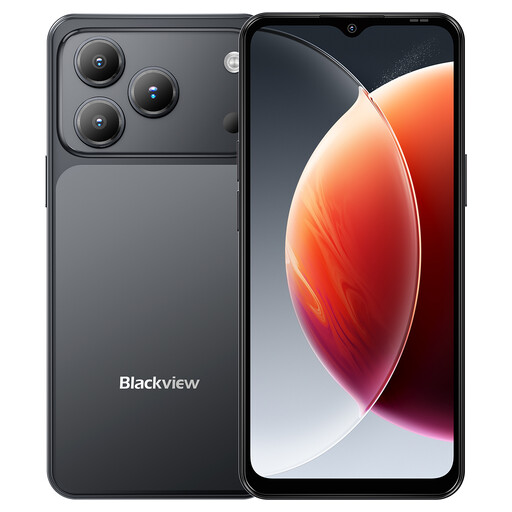
This smartphone is a route to consider when your relative can use a phone to make calls independently. Before choosing it for family video calls, check the intended app and account requirements, then try the calling controls with the person who will use them.
 No image available
Blackview Wave 7C Android 16 smartphone, 128GB, black
Consider this phone if the recipient wants a portable device for making their own video calls and can manage its controls after setup.
The listed configuration has a 6.56-inch display, 4G dual SIM, a 5000mAh battery and 128GB storage. Confirm that the family’s chosen calling service works on the phone, and test its accessibility setup with the recipient.
Joybuy
Questions families ask
Does a simple video-calling device need home Wi-Fi?
Not every route does. Komp says its device has built-in 4G and can work without Wi-Fi, although its communication features require an active subscription. Amazon says Echo Show setup needs Wi-Fi; for a tablet or phone, check the intended app’s connection requirements and the available mobile-data allowance.
Will a TV-linked calling system work with any television?
No: check the exact television before ordering. NHS Highland says CallGenie works with most modern Smart TVs and older sets supporting HDMI-CEC. Also consider where the camera will point when your relative is in their usual seat.
Can relatives call without the recipient pressing an answer button?
Some systems allow it, provided that arrangement is acceptable to the recipient. Komp says calls begin after a countdown; Amazon says Alexa Drop In can connect automatically, with both contacts required to grant permission for Contact Drop In. Try the incoming-call experience together before using either feature routinely.
Can a simple family calling device also handle a video appointment?
Do not assume it can. NHS Highland notes that many simple calling devices may not support Near Me health and care appointments, while a suitable tablet or smartphone with an internet connection is another route. Check the appointment service’s requirements for the exact device and app in advance.


