Start with the device and calling service your family already uses: a webcam addresses video on an existing computer, a headset suits one caller who wants private audio, and a speakerphone suits people sharing a call around a table. Choose a tablet when the caller needs a portable device with its own screen, camera and audio, but check the intended app, account and invitation method before buying. For hearing-related needs, a well-lit view of faces and accessible calling practices matter alongside any equipment choice.
Who is choosing equipment?
Families improving an existing device
If a computer or tablet already handles calls, identify whether the difficulty is the camera angle, lighting, sound or placement before replacing it. AbilityNet notes that most smartphones, tablets and laptops already have a camera and microphone, while some computers need separate equipment.
One-person callers in noisy homes
A headset is worth considering when one person wants private listening or needs a microphone closer to their voice. If several relatives need to hear and speak from the same table, check a speakerphone instead; room noise and the device connection still matter.
Callers with hearing-related communication needs
Choose a setup that keeps faces visible and supports the ways the caller follows conversation, including chat or captions where available. RNID advises good front lighting and one speaker at a time on group calls; AbilityNet advises individual specialist assessment for people with hearing loss.
What should you check first?
Test the usual call on the existing device, then choose equipment for the specific difficulty rather than assuming a new screen, camera or microphone will fix every part of the call.
| Priority | What to check | Your needs |
|---|
| Joining the call |
Confirm the service your relatives use, how invitations work, and whether the caller needs an app, account or camera and microphone permissions. Test the intended joining method. |
I want the person using the device to open the family’s usual invitation without a difficult setup. Zoom and Microsoft say some meeting settings can restrict joining without signing in. |
| Existing device |
Try its built-in camera and microphone in the usual room. Check whether a stand, webcam or audio accessory addresses the problem before considering a tablet. |
If the current phone, tablet or laptop already handles calls, I would rather change the part of the setup that gets in the way. |
| Faces and framing |
Place the camera near face height, light the speaker from the front and avoid a bright background. Check that a stand fits the device or a webcam mounts securely. |
Seeing a speaker’s face clearly matters to me, particularly if someone relies on lip-reading. RNID advises callers to face the camera and keep their mouth visible. |
| One caller or a group |
For one person, check headset fit, microphone position and device connection. For a group around a table, check speakerphone connection, placement and the manufacturer’s stated pickup features. |
Private listening suits my solo calls; when several of us join together, we need a way to hear and speak without passing a headset around. |
| Portable calling |
If choosing a tablet, confirm its front camera, speakers, microphone, charging arrangement and access to the intended calling service. Check whether the caller can manage the invitation. |
A separate device makes sense for our household if the caller needs to move between rooms and does not have a suitable computer to use for calls. |
What can go wrong?
-
Buying hardware before trying the family’s invitation
A working camera and microphone do not override meeting access settings. Zoom and Microsoft both describe circumstances in which an organiser’s settings affect whether someone can join without signing in.
Ask which service the family uses and run a short test with a real invitation on the intended device before choosing equipment.
-
Replacing a device when the setup is the problem
AbilityNet notes that most smartphones, tablets and laptops already contain a camera and microphone. Poor placement or lighting may remain a problem after buying another device.
Try a call from the usual spot. If the device otherwise works, decide whether repositioning it or adding a specific accessory addresses the difficulty.
-
Expecting louder audio to solve every accessibility need
Background noise, backlighting and people speaking over one another can make conversation difficult to follow, including for someone who lip-reads.
Follow RNID’s advice to keep faces well lit and visible and let one person speak at a time. Check chat or captions on the intended service, and seek individual advice where hearing-related needs are central.
-
Overlooking the charging setup
A charger, cable or plug that does not match the device’s stated requirements may leave the planned calling position inconvenient or unusable.
Check what charging equipment is included, what the device requires and whether the cable reaches its intended position. Government guidance distinguishes product-marking processes for Great Britain and Northern Ireland, so check product information for the delivery location rather than assuming one arrangement applies to both.
Relevant brand references
These examples illustrate features to check within each equipment route; they do not establish that a brand or model will work with your family’s devices and calling service.
Logitech
A reference for adding a webcam to an existing computer rather than replacing the calling device.
- Logitech lists Full HD 1080p video, light correction and auto-framing for the Brio 500.
- Check the computer connection, mounting position and intended calling service; the webcam does not address every audio problem.
Jabra
Its cited headset and speakerphone show two different arrangements: one private caller or several people around a table.
- Jabra describes voice-isolating microphone technology on the Evolve2 65 Flex. Its Speak2 55 specifications list four microphones, full duplex, acoustic echo cancellation and USB-C/USB-A connectivity.
- Choose by the number of callers and the exact device connection. Jabra specifies Bluetooth use for the Speak2 55 with smartphones and tablets.
Apple
An iPad is a self-contained option for a household that needs a portable calling device.
- Apple lists a landscape 12MP Centre Stage front camera, landscape stereo speakers and dual microphones for the 11-inch iPad (A16).
- Apple says Android and Windows users can join a FaceTime link in a current Chrome or Edge browser with a strong connection, but web participants cannot use SharePlay or screen sharing.
Samsung
The Galaxy Tab A11 is a tablet reference for calls where a wired-headphone connection may be useful.
- Samsung lists a 5MP front camera, dual speakers and a 3.5 mm audio jack for the Galaxy Tab A11.
- Confirm that the intended calling app, account arrangement and interface work for the person who will use it.
Joybuy product options
These options cover a tablet for calls on a separate device, webcams for an existing computer, and earbuds for one person’s audio. Match the connection and calling service to the person’s actual setup before choosing.
 No image available
TABWEE T20 10.1-inch tablet with keyboard, mouse and stylus
Consider a separate tablet when the caller needs a portable screen for family calls. The title lists a 10.1-inch display and 256 GB storage; confirm the delivered Android version, intended calling app and invitation method before buying.
View on Joybuy
 No image available
Philips SPL6308S/00 2K QHD clip-on webcam, EU version
A clip-on webcam is an option when a desktop or laptop’s camera is the difficulty. This model’s title lists 2K QHD video and a noise-reduction microphone; confirm its connection, operating-system support and fit with the intended calling service.
View on Joybuy
 No image available
Targus webcam with autofocus
This is another camera option for an existing computer. Confirm the video resolution before choosing it: the title says 2K, while the supplied detailed description says Full HD 1080p. Also check that the supplied USB connection and adapters suit the computer.
View on Joybuy
 No image available
j5create JVU250 HD webcam with auto/manual focus
The auto/manual focus switch may be relevant if the camera position changes between calls. Its stated video resolution is 720p; check whether that meets the caller’s needs, and confirm the computer’s USB-A connection and calling-service compatibility.
View on Joybuy
 No image available
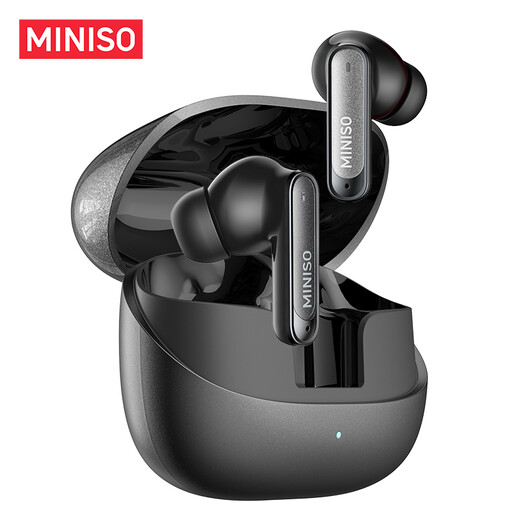
MINISO MS106 Bluetooth 6.0 earbuds with microphone
Earbuds suit one person who wants a personal audio setup rather than a shared speaker. The title lists Bluetooth 6.0 and a built-in microphone; check pairing, call controls, calling-app compatibility and in-ear fit on the intended device.
View on Joybuy
Common questions
Can someone join a Zoom or Teams family call without an account?
Yes in some circumstances, but the organiser’s settings can change what is required. Zoom says participants generally do not need an account, while host authentication settings can require sign-in; Microsoft likewise says Teams meetings can be joined without an account, but administrator settings can restrict unverified participants. Test the actual invitation before choosing a device for someone who needs a straightforward joining process.
Can an Android or Windows user join a FaceTime call?
Yes, Apple says they can join through a FaceTime link in a browser using a strong connection and the latest Chrome or Edge. Check camera and microphone permissions and allow for the host to admit the caller. Apple notes that SharePlay and screen sharing are unavailable to web participants.
Will a headset or speakerphone resolve a hearing-related call difficulty?
Not on its own. Choose audio equipment for a defined need, such as private listening or a microphone for a shared table, while also keeping faces visible and background noise down. RNID recommends good lighting and one speaker at a time in group calls; AbilityNet advises individual specialist assessment for people with hearing loss.
What should I check when buying a charger or other electrical accessory?
Check the device’s charging requirements, the supplied cable or plug and the product information for the delivery location. UK government guidance says relevant CE marking continues to be recognised alongside or in place of UKCA marking in Great Britain where applicable requirements are met, while processes differ in Northern Ireland. A marking alone does not establish that a charger fits a particular device or setup.


