What matters when choosing?
Start with the visitor function you need and the position available for a camera. Then check power compatibility and what is required to keep recordings: battery or wired power can be combined with either storage route, depending on the model.
| Concern |
What to check |
Who this matters to |
| Remote visitor contact |
Check Wi-Fi coverage, phone-app compatibility, live view and whether answering alerts works without a recording plan. |
If I am away from the entrance, I want to see who called and speak to them without depending on saved footage. Around 33% of consumers put remote visitor contact first. |
| Installation and power |
For wired use, compare the exact model's voltage, power and chime requirements with your installation; for battery use, check charging access. |
A difficult wiring run or an inconvenient charging position could decide which doorbell I can live with. For around 27% of consumers, installation fit is the primary concern. |
| Recordings and ongoing commitments |
Check which recording features need a plan, how long footage is retained and whether local storage needs separate hardware. |
I want to know what happens to recordings after a trial ends, or whether I need a hub or memory card. Recording terms come first for around 20% of consumers. |
| Camera positioning |
Assess the view from the intended mounting point and whether positioning or available privacy controls can limit capture beyond your property. |
My entrance faces other people's space, so I need to decide whether a suitable camera view is possible at all. Around 20% of consumers prioritise that privacy boundary. |
For a UK home, GOV.UK guidance says UK GDPR and the Data Protection Act 2018 apply if a domestic video-doorbell system captures people outside the boundary of the private property, including shared or public areas. The Information Commissioner's Office advises positioning cameras to capture only your own property where possible. If a suitable view is not achievable and an audible alert meets your needs, consider a non-camera doorbell instead.
Video doorbells on Joybuy
These models offer battery-powered, solar-powered or model-dependent wired routes for answering visitors. Compare the exact installation and recording arrangements before choosing, particularly if you need saved footage or want to use existing wiring.
 No image available
BOTSLAB R810 5MP Video Doorbell with 32GB SD Card
Consider this model if you want to speak to visitors remotely and are comparing local recording with optional cloud features.
The product name specifies 5MP video, Wi-Fi, two-way audio and a 32GB SD card. Check the functions available without a cloud plan and the electrical requirements before using a wired connection.
Joybuy
 No image available
tapo D230S1 Smart Battery Video Doorbell
A battery-powered option to consider if you want to answer visitors through an app without relying on existing doorbell wiring.
Check the storage arrangement, whether a memory card is included and compatibility with your phone before choosing a recording route.
Joybuy
 No image available
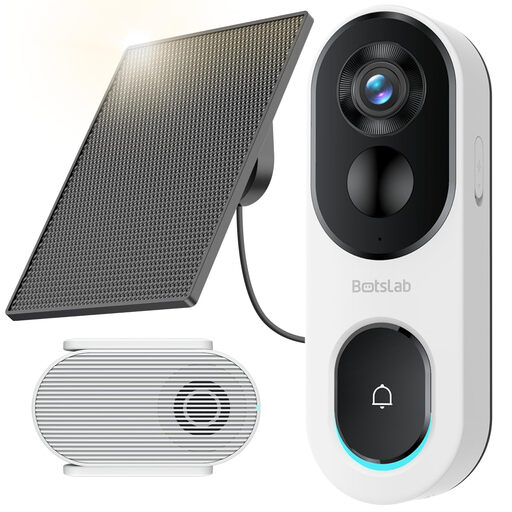
BOTSLAB R810SE 2K Solar-Powered Video Doorbell
Consider the solar-powered route if the panel can be positioned suitably and you want to speak to visitors through your phone.
The product name specifies 2K video, two-way audio and 2.4GHz Wi-Fi only. Check the base-station bundle and obtain a compatible memory card for local recording if needed.
Joybuy
 No image available
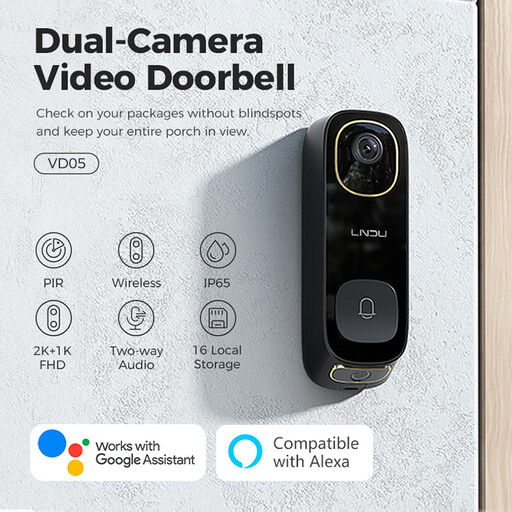
LNDU VD05 2K HD Video Doorbell with Monitor
Consider this model if remote visitor conversation and a choice of recording arrangements matter to you.
The product name specifies dual PIR motion detection and two-way audio. Confirm the app, recording terms and requirements for any wired installation; check the weather-protection rating before fitting it outdoors.
Joybuy
 No image available
eufy Security Video Doorbell C31, 2K FHD
A model to consider if you want phone-based visitor calls and are deciding between battery and hardwired power.
The product name specifies both power options. Confirm the transformer and chime requirements for hardwiring, and check the storage equipment needed if you want to keep recordings.
Joybuy
Frequently asked questions
When does UK data-protection law apply to a video doorbell?
UK GDPR and the Data Protection Act 2018 apply when a domestic video-doorbell system captures people outside the boundary of your private property. GOV.UK guidance includes neighbours' property, shared spaces and public areas in that assessment; where the laws apply, you must ensure your use complies with the relevant obligations.
What if my proposed camera view includes a shared path?
Assess the view the camera would actually record before fitting it. The Information Commissioner's Office advises capturing only your own property where possible; consider a different position or suitable privacy controls, and consult its domestic-CCTV guidance if capture beyond your boundary remains.
Do I need a subscription to answer a Ring doorbell?
No: Ring says you can view real-time video and answer alerts without a subscription. Saving, reviewing and sharing recordings requires a compatible plan, so check the current terms if you want recorded history.
How can I tell whether a wired doorbell will work with my existing supply?
Compare the exact model's electrical requirements with your transformer and chime before buying. Google specifies 8 to 24 V AC for a wired Nest doorbell, while eufy specifies 8 to 24 V and more than 10 VA for the E340 in wired mode; one model's figures do not establish compatibility for another.
What should I check about app and security updates?
Check the manufacturer's support information for the exact model and UK variant, including its required app or account and any published support period. Google says connected Nest cameras and doorbells update automatically when connected to Wi-Fi and the internet; confirm the arrangements for whichever model you choose.


