What matters when choosing?
Check the proposed camera position before comparing recording plans or power options: those features cannot compensate for an unsuitable view of a shared or neighbouring area.
| Concern |
What to check |
Who this matters to |
| Recording footprint |
Assess the view from the planned mounting point, including the parcel area. Check what the exact model can mask and whether its audio and detection settings can be adjusted. |
If my entrance overlooks a neighbour or shared access, I want to see my caller without capturing more of the surroundings than necessary. Around 31% of consumers would put that recording footprint first. |
| Remote response |
Confirm live view, two-way audio, notifications, phone-app support and the home connection the doorbell requires. |
When I am away and a visitor rings, I need to see and speak to them promptly, even if I do not keep a recording. For around 25% of consumers, remote response is the primary concern. |
| Recording history |
Check whether replay needs a subscription or local storage, then compare the applicable history period, storage hardware and access to recordings. |
If I miss a delivery, I want to review what happened without taking on a recording arrangement I do not want. Around 25% of consumers would prioritise control over recording history and ongoing fees. |
| Installation and upkeep |
Check permission before fixing or wiring a unit; compare battery charging with compatible, permitted wired power. |
Where my tenancy, lease or building limits alterations, I need an installation I can arrange and maintain. That would be the leading concern for around 19% of consumers. |
Joybuy doorbells to consider
These choices cover remote visitor response through battery-powered and local-recording-oriented doorbells. Compare their stated configurations, then check the view and privacy settings at your intended mounting position; inclusion here does not establish that a model can mask an unsuitable view.
 No image available
BOTSLAB R810 5MP video doorbell with 32GB SD card
Consider this model if you want to speak to visitors and assess a doorstep-and-parcel view from your proposed mounting point.
The product name specifies wireless operation, two-way audio and a 32GB SD card. Confirm how recordings are retained and accessed, and whether its privacy and audio controls suit the surrounding view.
View on Joybuy
 No image available
tapo D230S1 smart battery video doorbell
Consider a battery model if a wired installation is unsuitable, while checking that you can maintain and charge it where it will be fitted.
For the D230S1, confirm the exact local-storage arrangement, whether a memory card is included and what privacy controls apply to its live view and recordings.
View on Joybuy
 No image available
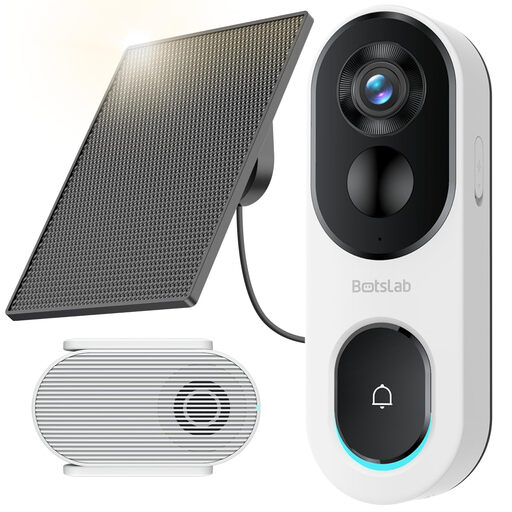
BOTSLAB R810SE 2K solar-powered video doorbell
Consider this configuration if a suitable, permitted position can accommodate the doorbell and its solar panel while keeping the camera aimed at your own entrance.
The product name specifies a head-to-toe view, two-way audio and 2.4GHz Wi-Fi only. Check the panel-position requirements and local-recording configuration; a microSD card is not included. Confirm privacy and audio controls before installation.
View on Joybuy
 No image available
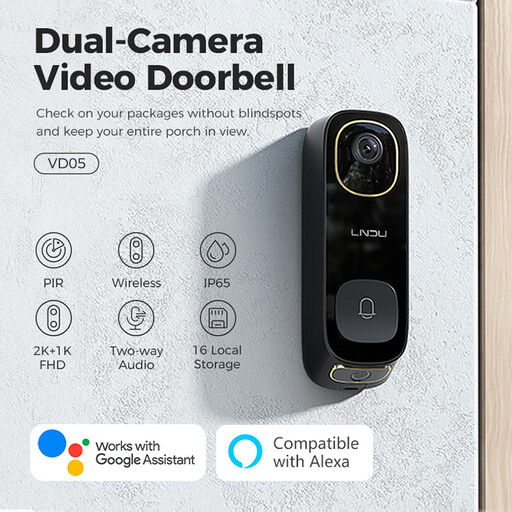
LNDU VD05 2K video doorbell with monitor
Consider the VD05 if speaking to visitors remotely and having the stated monitor configuration fit your entrance setup.
Its product name specifies dual PIR motion detection, two-way audio and IP65. Check the fitted camera view, privacy controls and the terms and configuration for accessing recordings before buying.
View on Joybuy
 No image available
eufy Security Video Doorbell C31 2K FHD
Consider the C31 if a live visitor video call is important and either its battery or a suitable, permitted hardwired installation fits your property.
The product name specifies battery or hardwired power. Its stated 24/7 recording depends on hardwiring; check storage and replay arrangements, wiring suitability and privacy controls for this exact model.
View on Joybuy
Frequently asked questions
Does data-protection law apply if my doorbell records a shared corridor or pavement?
Yes, if it captures images of people outside your private domestic property boundary. GOV.UK guidance says GDPR and the Data Protection Act 2018 then apply to domestic video systems, including video-equipped doorbells; assess what the installed camera actually captures rather than relying on the product’s advertised field of view.
Can a privacy block make any mounting position suitable?
No. A block may reduce what is recorded in a selected area, but you still need to assess the camera’s overall position and what it captures. Ring says its blocked areas become permanent parts of recordings, so check which views and recordings the exact control affects before fixing the doorbell.
Should I leave audio recording on near neighbours or passers-by?
Assess audio separately from the camera view rather than leaving it on by default. The Information Commissioner’s Office advises that surveillance systems should not normally record conversations between members of the public; check whether your exact doorbell lets you disable audio streaming or recording and what conditions apply to that setting.
Do I need a subscription to replay missed doorbell events?
That depends on the model and recording arrangement. Ring says recorded-video review requires a subscription, Google says Nest history depends on the device and Google Home Premium plan, and Reolink offers local-storage options without a monthly storage fee. Confirm the selected product’s included hardware, access method and history terms.
How should I protect my video-doorbell account?
Use a unique strong password, keep the device and app updated, and turn on two-step verification if it is offered. The National Cyber Security Centre recommends two-step verification as an additional barrier even if someone learns your password.


