Who needs to consider the boundary?

Households monitoring an entrance near other spaces

If the proposed view could include a neighbour’s garden, shared path, communal landing or public space, check the mounting angle, visual masking and audio controls before concentrating on resolution. The Information Commissioner’s Office advises positioning home cameras to capture only your own property where possible.

Consumers who prefer local recording

If you want recorded clips without making cloud storage the default, check the exact card, hub or recorder needed, whether it comes with the device and where footage is kept if the camera is removed.

Renters and leaseholders planning to mount a device

Check the tenancy or lease and ask about external fixings before drilling or filming near shared space. Published policies from Cambridge City Council and Tandridge District Council illustrate why permission requirements need checking with the relevant housing provider.

What matters when choosing?

Video doorbell

Choose when: Seeing and speaking to visitors at one entrance matters more than monitoring several sides of the property.

Trade-off: A doorstep view may still include a shared path or neighbouring property, depending on where it is mounted.

Home CCTV cameras

Choose when: Your task is to monitor a driveway, garden, side passage or more than one access point.

Trade-off: Additional views create more positions and angles to assess for capture beyond your private area.

ConcernWhat to checkWho this matters to
View and audio privacy Check the view from the intended mounting point and the exact model’s privacy-masking and audio controls. Narrow or reposition the view where possible. If my entrance faces a shared path, I need to see callers without recording more of that space than necessary. Around 33% of consumers put privacy-safe capture first.
Mounting and power Check the property’s permission rules, mounting surface and whether battery power, existing wiring or another supported connection fits the location. Before fixing a device to a rented or managed property, I need an installation I am allowed to make and can power there. For around 27% of consumers, that is the primary concern.
Recording storage Confirm the exact local or cloud route, required media or hub, what is included and how recordings can be accessed. I want to keep clips locally rather than rely on a continuing cloud service, but I need to know where the recordings will sit. Local-storage control comes first for around 20% of consumers.
Coverage and alerts Match the view to callers, parcels or the private areas you intend to monitor; check the exact model’s motion-zone and notification options. If I need to watch a side entrance as well as the doorstep, one doorbell view may not cover my task. Around 20% of consumers primarily need suitable coverage and alerts.

Mistakes to avoid before buying

  • Assuming a wider view is always preferable

    A wide or head-to-toe frame can also include neighbouring property, communal space or the street. UK government domestic-CCTV guidance says UK GDPR and the Data Protection Act 2018 apply when a system captures people outside the boundary of private domestic property.

    Assess the view from the proposed position and use the smallest useful private-area frame. Repositioning or a suitable mounting wedge may help; check the resulting live view rather than relying on masking alone.

  • Assuming every privacy control works on every model

    Controls depend on the device and service. Ring says changing its audio streaming and recording setting requires a compatible Ring subscription; TP-Link’s privacy-zone guidance also needs checking against the exact Tapo device.

    Check the model’s documentation for masking and audio controls, including any plan requirement, before treating either feature as part of your setup.

  • Equating local storage with a complete storage setup

    A local-recording option is useful only with compatible storage hardware. If recordings are kept in the camera, consider what happens to them if the device is removed.

    Check the required medium, supported capacity, package contents and storage location for the exact model.

    A compatible microSD card, hub or recorder may need to be obtained separately.

  • Buying before checking mounting permission

    Permission for an external fixing can depend on the tenancy, lease or building rules. Cambridge City Council and Tandridge District Council publish different requirements for tenants and leaseholders considering alterations or CCTV.

    Check the rules for your property and obtain the required written approval before mounting or drilling, particularly near shared areas.

Relevant brands to consider

Tapo

Consider selected Tapo doorbells if a local-storage route and documented configuration options matter to you.

  • TP-Link says the Tapo D230S1 can save recordings to a hub-installed microSD card of up to 512 GB or use Tapo Care cloud storage.
  • Check privacy-zone compatibility and audio controls for the exact device. TP-Link’s UK support-period policy does not by itself identify the dates applicable to every model.

Ring

Consider compatible Ring devices if documented privacy-zone and audio settings are central to your choice.

  • Ring describes blocked areas in recordings and an option to disable audio streaming and recording on compatible devices.
  • Ring says changing the audio setting requires a compatible subscription. Check the exact device’s storage and plan terms.

eufy Security

Selected eufy doorbells offer different entrance views and power arrangements.

  • eufy describes microSD recording of up to 128 GB for the C30 and battery or wired operation for the E340.
  • Do not transfer storage or control features between models: check the chosen device’s privacy, audio and UK security-update information separately.

Reolink

Consider specific Reolink doorbells or cameras when you need to compare local recording and configurable monitoring for a particular position.

  • Reolink describes local storage and custom motion zones for its Video Doorbell WiFi.
  • Check privacy masking, audio controls and the UK security-update statement for the exact model before settling on an installation.

Video doorbells on Joybuy

These doorbells address entrance viewing and visitor interaction. If you need to monitor a wider private area, assess camera positions separately rather than assuming a doorbell will cover it.

Tapo D230S1 battery video doorbell

Tapo D230S1 Smart Battery Video Doorbell

For an entrance where battery operation and a choice of recording routes matter.

TP-Link describes a 160° diagonal view and recordings saved to a hub-installed microSD card of up to 512 GB or to Tapo Care cloud storage. Check the installed view, required storage hardware and exact-model privacy and audio controls.

View on Joybuy

BOTSLAB R810 5MP video doorbell with 32GB SD card

BOTSLAB R810 5MP Video Doorbell with 32GB SD Card

For consumers comparing doorstep viewing and a local-recording option at one entrance.

The product name specifies 5MP, a 32GB SD card, package and human detection, and two-way audio. Check the actual mounted view and how the card and recordings are housed before choosing it for your property.

View on Joybuy

eufy Security Video Doorbell C31

eufy Security Video Doorbell C31 2K

For an entrance where a live video call and a choice between battery and hardwired power are relevant.

The product name states 2K, human and motion detection, and 24/7 recording. Check the wiring and recording conditions: continuous recording is described for hardwired use, not battery operation.

View on Joybuy
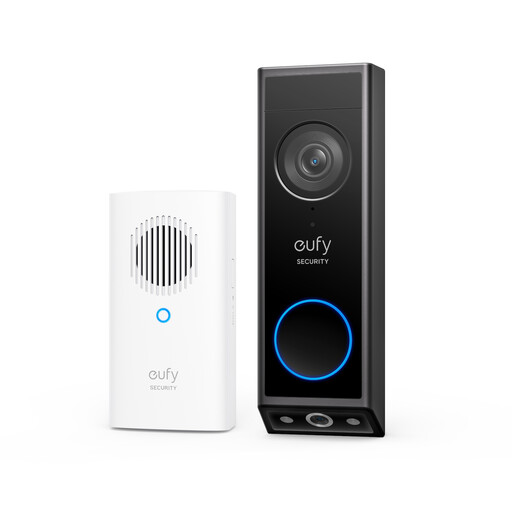
eufy E340 2K dual-camera video doorbell with chime

eufy E340 2K Dual-Camera Video Doorbell with Chime

For an entrance where seeing both visitors and the area below the doorbell is useful.

eufy describes dual cameras and battery or wired operation for the E340; its wired mode also uses the battery. Check power compatibility and what both camera views capture from your intended mounting point.

View on Joybuy

Common questions

Does UK data-protection law apply to a home doorbell camera?

It applies if the system captures people outside the boundary of your private domestic property, according to UK government domestic-CCTV guidance, which identifies UK GDPR and the Data Protection Act 2018. The Information Commissioner’s Office advises positioning cameras to capture only your own property where possible.

Will privacy zones resolve a view beyond my property?

Privacy zones alone cannot establish that a particular installation meets its obligations. Where the device supports them, they can block selected areas, but the Information Commissioner’s Office advises positioning the camera to capture only your own property where possible. Check the live view and recorded clips from the installed position.

Do I need permission to mount a camera on a rented or leasehold home?

Check your tenancy, lease and building rules before mounting it; requirements depend on the property and proposed work. Cambridge City Council and Tandridge District Council publish policies requiring permission or notification in circumstances involving their tenants and leaseholders. Obtain any required written approval before drilling or fixing equipment externally.

What should I check about security updates?

Check the minimum security-update period stated for the exact UK product. The National Cyber Security Centre says manufacturers must state that period for consumer smart devices covered by the UK regime, including smart doorbells and security cameras; a general brand policy should not be mistaken for a model’s applicable dates.

Does local recording remove the need for a subscription?

Local recording can provide an alternative to cloud storage on compatible devices, but check the features you want individually. A card, hub or recorder may be needed, while some app features have separate plan conditions. Also check whether footage remains accessible if storage is inside a camera that is removed.