Older residents who use a tablet
Someone who uses an iPad or another supported tablet but not a smartphone needs an app routine they can manage, along with a way to hear the doorbell and decide whether to answer.


Choose a video doorbell around the older relative’s actual tablet and the family’s access needs, rather than camera resolution alone. Test whether the resident can hear and answer a visitor, give carers separate accounts with suitable permissions, and decide whether missed visits need recording. Power, Wi-Fi coverage and the camera’s view beyond the property boundary can then determine which setup is workable.
Someone who uses an iPad or another supported tablet but not a smartphone needs an app routine they can manage, along with a way to hear the doorbell and decide whether to answer.
When relatives help monitor visitors, individual invitations let the household choose who can see alerts or events without passing around the resident’s main account password. The permissions available depend on the system.
If the question is whether a visitor or delivery arrived earlier, live answering alone will not meet that need. Compare how each system records, stores and shares footage before choosing it.
Start with how the resident will answer and how carers will help. Then decide whether the household needs recordings and check that the chosen power and network setup will work at the door.
| Concern | What to check | Who this matters to |
|---|---|---|
| Answering on a familiar device | Confirm the app supports the resident’s tablet and software version. Try its alert, live view and two-way talk, and check whether an audible indoor chime is needed. | If I rely on my tablet rather than a smartphone, I need to notice the ring and answer without help. Around 33% of consumers put independent answering first. |
| Separate family access | Check invited-user roles, including access to live view and stored video, and whether the owner can remove an invitation. | When relatives help with visitors, I want each person to have access appropriate to their role rather than my main password; around 25% of consumers prioritise controlled family sharing. |
| Recording missed visits | Choose between live view, event clips and continuous recording. Confirm the required power mode, storage method, retention and who can review footage. | If nobody answers a ring, I want to check later who came to the door. Reviewing missed events is the primary need for around 25% of consumers. |
| Power and entrance connection | Check Wi-Fi at the mounting point and the model’s supported bands. Assess existing wiring, Ethernet options or who will recharge a battery. | If the signal at my entrance is weak or wiring is impractical, the installation has to fit the house before other features matter; around 17% of consumers put that fit first. |
App support does not establish that the resident can manage sign-in, notifications and two-way talk. A doorbell that carers can operate may still be difficult for the person at home.
Before fixing the doorbell permanently, try the app on the resident’s actual tablet and make a test call from the entrance. Check the audible alert, screen prompts and conversation.
Sharing permissions differ substantially. TP-Link Tapo limits what invited camera users can change, while Google Home and Nest Help warns that home members may control other Nest products and alter settings.
Invite carers individually, check each role’s access to recordings and settings, and make sure the owner can remove access when arrangements change.
Power mode can change recording capability: eufy specifies continuous recording and five-second pre-roll for the C31 when hardwired. A battery-runtime claim also depends on its stated usage conditions.
Decide whether live answering, event clips or continuous footage is necessary before choosing a battery or wired installation.
With battery operation, someone in the family also needs to monitor charging and arrange access to the doorbell when it needs attention.
GOV.UK says GDPR and the Data Protection Act 2018 apply when domestic video surveillance captures people outside the private property boundary, including shared or public areas.
Position and angle the camera to minimise that capture. If its view still includes areas beyond the boundary, check the current Information Commissioner’s Office domestic-CCTV guidance before recording.
An app-based option for a household using a phone or tablet alongside invited family users.
An app-based route for families comparing invited access with model-dependent local storage.
Video doorbell models with different wired-network, wired-Wi-Fi and battery arrangements.
A range in which the choice between battery and wired power can affect available recording features.
A home-sharing route to examine when the family already uses Google Home or Nest with an iPad.
These video doorbells offer different battery, storage and power configurations to consider for family-supported visitor monitoring. Before choosing one, confirm that the resident’s tablet and the intended family accounts can carry out the tasks they need.
 No image available
Consider this battery model if installing a wired doorbell is impractical. Confirm its app works on the resident’s tablet and check the storage arrangement and invited-user permissions before relying on family review.
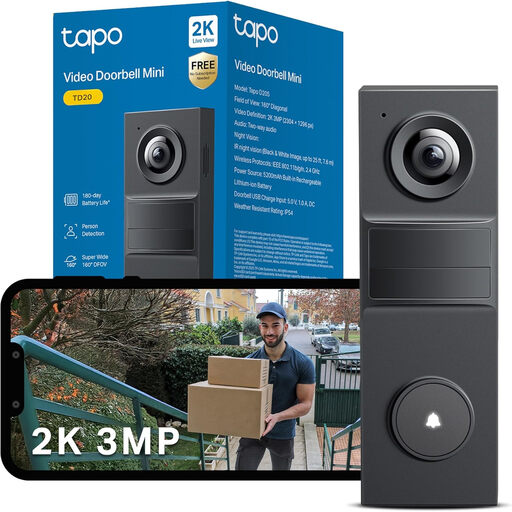 No image available
Consider this model if a Tapo-based family setup is under consideration. Its name specifies 3MP video and night vision; check tablet compatibility, entrance Wi-Fi, storage requirements and the access available to invited users.
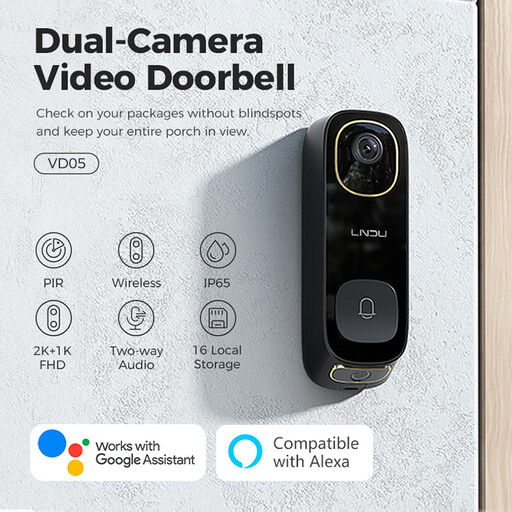 No image available
The stated monitor makes this a model to examine if the household wants an at-home viewing arrangement. Its name also specifies dual PIR motion detection and IP65; confirm how the monitor, tablet app, family access and recordings work together.
 No image available
If reviewing missed visits matters, this model’s stated 32GB SD card is a reason to examine its recording workflow. The name also specifies 5MP video and two-way audio; check footage access, retention, tablet support and separate family accounts.
 No image available
Consider the C31 when the household is weighing battery installation against hardwired recording. eufy specifies 24/7 recording and five-second pre-roll in hardwired mode; confirm compatible wiring, storage, tablet support and family permissions before choosing that setup.
Yes, if the chosen system supports their tablet and they can manage its alerts and answering routine. Ring UK says its app can be used with a phone or tablet; try the resident’s actual device to check sign-in, live view, two-way talk and any recorded-video access.
Use separate invited accounts where the system offers them. TP-Link Tapo and Ring both describe shared-user arrangements, but permissions differ, so check who can see recordings, change settings or remove other users.
Consider local storage if the family wants to review missed doorstep events without depending on a cloud-recording plan. Check the exact model’s card or hub requirements, footage access and retention; Ring says reviewing recorded video on its doorbells requires a subscription.
They apply when the system captures people outside the boundary of the private domestic property. GOV.UK’s domestic-CCTV guidance includes video-equipped doorbells and says GDPR and the Data Protection Act 2018 apply in that situation, including capture of shared or public areas.
No. Someone still needs to manage charging and check the connection at the door. Assess any advertised runtime against its stated recording conditions: Reolink bases its cited battery-runtime claim on five minutes of recording per day.