What should you check before choosing?
Start with how you need to respond to visitors, then check fitting and power; treat recording arrangements and camera coverage as separate decisions.
Battery video doorbell
Consider it: When there is no suitable doorbell wiring or you want to avoid electrical fitting work.
Bear in mind: It needs a charging plan, and battery power does not remove mounting-permission requirements.
Wired video doorbell
Consider it: When compatible doorbell wiring or a viable Ethernet route is available and you want continuous power.
Bear in mind: Electrical, chime and network requirements vary by model, and fitting may need approval.
Non-camera doorbell
Consider it: When you only need to notice a visitor while you are at home.
Bear in mind: An ordinary wireless chime cannot show you a visitor or let you speak through a phone when you are away.
| Priority |
What to check |
Your needs |
| Remote conversation |
Confirm that the exact model provides phone alerts, live view and two-way talk. Check its connection requirements and whether its camera view includes the visitor and doorstep. |
I want to see who has arrived and speak to them when I cannot reach the door. |
| Power and fitting |
For battery models, check charging and mounting. For wired models, match the stated voltage, transformer or Ethernet requirements to the property; a hybrid model may still need its battery installed. |
A simpler fitting method matters if altering the entrance is difficult. If charging would interrupt use, I would check whether a compatible powered installation is possible. |
| Recorded visits |
Check whether recorded-event review needs a plan, an SD card, a chime or a hub. Compare the model’s recording method and available history, not just its live-view features. |
I need to look back at a visit I missed, so I would check what is required to save and retrieve that recording. |
| Camera coverage |
Aim the view at your own entrance where possible and check whether it captures a pavement, neighbouring property or communal space. Consult Information Commissioner’s Office and GOV.UK domestic-CCTV guidance before installation. |
My doorway faces a shared or public area, so the camera’s position could affect whether this setup is suitable. |
| Visitor alert only |
If a phone conversation is unnecessary, compare a non-camera chime’s audible or visual alerts with the need for remote identification. |
Someone is usually home; I only need to notice that a visitor has pressed the bell. |
Which brand lines illustrate the options?
These examples show how recording and power arrangements differ by model; a brand name alone does not establish the features of every doorbell it sells.
Ring
Ring’s Battery Doorbell Plus is a battery option for app alerts, live viewing and two-way talk.
- Ring specifies 1536p video, a 150° horizontal and vertical field of view, a removable rechargeable battery and a minimum 2.5 Mbps upload speed for optimal performance on this model.
- Ring says reviewing recorded doorbell video requires a subscription; without one, live viewing and responding to alerts remain available.
eufy
The referenced S220 and E340 models illustrate different approaches to local recording and battery-or-wired installation.
- eufy says the S220 stores recordings on an SD card in its indoor Wi-Fi chime.
- The S220’s SD card is purchased separately. For the E340, eufy specifies that wired operation still requires the battery to remain installed and an 8–24 V, greater-than-10 VA supply.
Reolink
Reolink’s referenced battery and PoE doorbells offer distinct local-storage and installation routes.
- Reolink states that its battery doorbell supports local microSD storage up to 256 GB or Home Hub storage without a subscription requirement for local storage.
- Its PoE doorbell uses one Ethernet cable for power and network connectivity, so that route depends on a suitable cable installation.
Google Nest
The referenced battery Nest Doorbell is an app-connected option with event-video history.
- Google lists three hours of free event-video history for the battery model and up to 60 days with Nest Aware.
- Google says the battery Nest Doorbell cannot continuously record 24/7 video history, even when wired. Check history features against the specific device and plan.
Joybuy video doorbell options
These video doorbells cover battery-powered fitting and local-storage choices for answering visitors remotely. Compare each model’s phone features, recording setup and installation conditions against your entrance.
 No image available
tapo D230S1 Smart Battery Video Doorbell
The described Tapo app communication and visitor alerts address answering the door from elsewhere. Its battery installation avoids reliance on existing bell wiring; check charging expectations and whether you need to obtain storage media for recorded visits.
View on Joybuy
 No image available
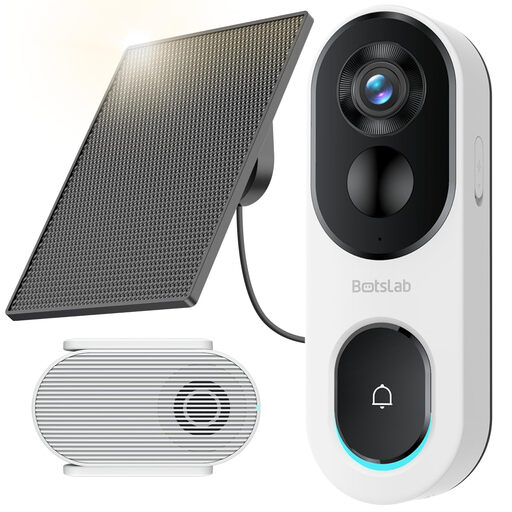
BOTSLAB R810SE 2K Solar Powered Doorbell Camera
This model’s described phone calls and two-way talk suit remote visitor conversations. The listing specifies 2.4GHz Wi-Fi only and says its Micro SD card is not included; check network compatibility, storage setup and whether the panel can be positioned for the available light.
View on Joybuy
 No image available
eufy Security Video Doorbell C31 2K FHD
The described phone video calls and real-time chat address answering visitors while away. This battery-or-hardwire model also calls for checking the exact wiring requirements and how recordings are stored and reviewed before relying on its advertised 24/7 recording feature.
View on Joybuy
 No image available
BOTSLAB R810 5MP Video Doorbell Camera with 32GB SD Card
The included 32GB SD card and described two-way audio make this a local-recording option to examine. If answering from outside the home is essential, confirm that the phone app provides the live view and two-way conversation you expect.
View on Joybuy
 No image available
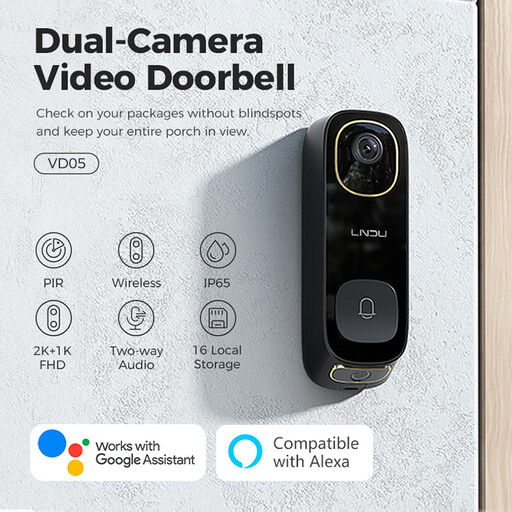
LNDU VD05 2K HD Dual PIR Video Doorbell with Monitor
The described two-way audio and battery-or-wired options may fit a front entrance where power arrangements could change. Confirm the phone workflow for answering remotely, the equipment needed for local recordings and compatibility with the stated 8–24V AC wired option.
View on Joybuy
Questions before you buy
When does a home video doorbell raise data-protection obligations?
GOV.UK says the UK GDPR and Data Protection Act 2018 apply if domestic CCTV captures images of people outside the boundary of your private domestic property. This can include a public area or shared space; position the camera to cover your own entrance where possible and consult current Information Commissioner’s Office guidance.
Do renters need permission to fit a battery video doorbell?
Check the tenancy and any landlord or building-management conditions before fitting one; battery power does not automatically remove permission requirements. North Tyneside Council and Perth & Kinross Council require advance permission for relevant installations by their council tenants, but their policies do not establish a rule for every tenancy.
Can I review Ring doorbell recordings without a subscription?
Ring says a subscription is required to review recorded doorbell video. Without one, you can view live video and respond to alerts as they happen; check the current terms for the model and plan you are considering.
What equipment might local recording need?
It depends on the model’s storage design: recordings may use a card, chime or hub. For example, eufy says its S220 saves recordings to an SD card in the indoor Wi-Fi chime, and the SD card must be obtained separately.
Would an ordinary wireless doorbell meet the same need?
It can alert someone who is at home, but it will not identify a visitor on your phone or provide app-based two-way conversation when you are away. Choose a non-camera chime if an at-home visitor alert is all you need.


