What should you check?
Settle who will own the doorbell account and answer visitors before choosing a recording method or mounting position. Ring's permission levels, Tapo's account sharing and the eufy E340's installation options address different parts of that decision.
Ring: role-managed access
Choose when: One owner needs to invite residents to selected devices and assign different permission levels.
Consider: Ring says reviewing recorded video requires a subscription; agree which invited users may see event history.
Tapo: shared accounts and local storage
Choose when: Residents need separate accounts and the household wants a local-recording option on a compatible model.
Consider: TP-Link says shared camera users cannot change camera settings or access Tapo Care cloud storage; a TD21 microSD card is sold separately.
eufy E340: doorstep coverage
Choose when: A view of both the visitor and the floor immediately below the door matters more than a specified housemate-permission structure.
Consider: eufy says wired use still requires the battery and an 8–24V, greater-than-10VA power source; confirm household access controls and installation permission.
| Concern | What to check | Who this matters to |
|---|
| Individual access |
Check separate invitations, answering permissions and how an owner removes access when someone moves out. |
If several housemates answer the door, I need each person to have their own removable access without giving everyone the owner password; around 33% of consumers put access and accountability first. |
| Camera placement |
Check the actual field of view before mounting and whether positioning or privacy controls reduce unnecessary capture. |
When the entrance opens onto a communal route or faces neighbours, I want to limit what the camera sees; roughly 27% of consumers make privacy their primary concern. |
| Installation and charging |
Check mounting permission, battery access and, for wired use, the exact model's electrical requirements. |
If I rent, I need a setup I can obtain permission to fit and keep charged despite front-door traffic. Installation is the main concern for around 20% of consumers. |
| Recording history |
Check whether missed events need a subscription or compatible local storage, and which residents can review them. |
Live answering may be enough for me, but if I need to revisit missed calls, I want to know how footage is saved; about 20% of consumers put recording arrangements first. |
Joybuy product choices
These doorbells offer models to consider for remote answering, battery-powered fitting or local recording. Before choosing one for a shared house, check its exact account-sharing controls and what its mounting position would capture.
 No image available
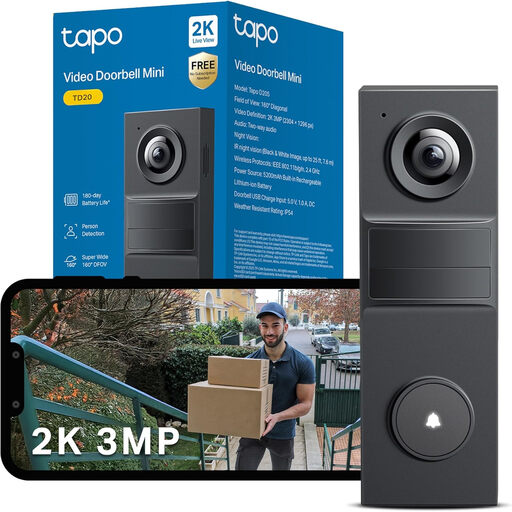
Tapo TD20 3MP video doorbell with night vision
Consider this model if separate Tapo account access and remote answering are priorities; confirm how its sharing settings work for each resident. Check the TD20's power arrangement before planning installation, and confirm what is needed for local recording.
View on Joybuy
 No image available
Tapo D230S1 battery video doorbell
Battery operation may suit a doorway where using existing wiring is undesirable; plan how residents will charge it. Check the exact sharing controls and whether the storage setup requires a separately obtained microSD card.
View on Joybuy
 No image available
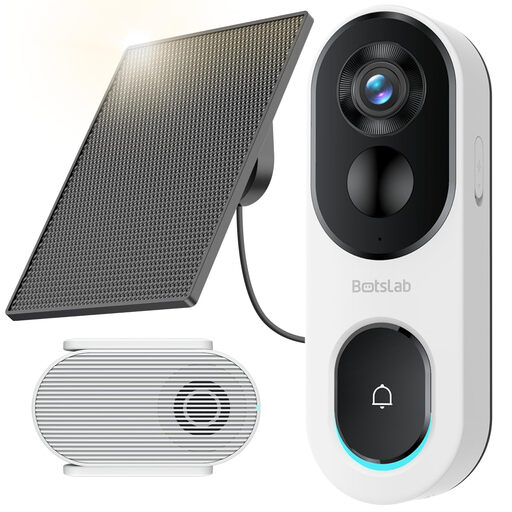
BOTSLAB R810SE 2K solar-powered video doorbell
Consider the solar-powered design where regular charging is inconvenient, provided the panel can be placed suitably and mounting is permitted. Confirm how residents are invited, what each can access and how access is removed; also check the compatible local-storage setup.
View on Joybuy
 No image available
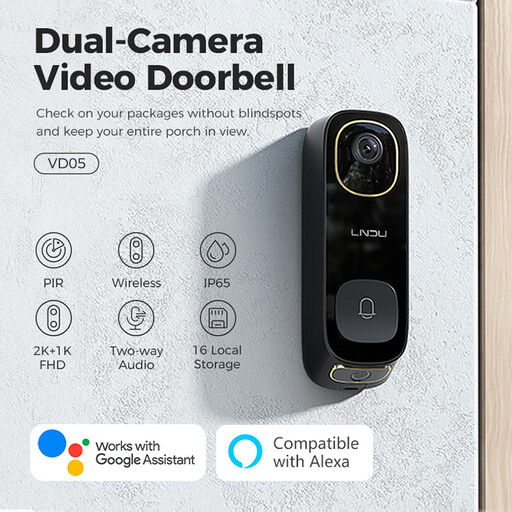
LNDU VD05 2K dual-PIR video doorbell with monitor
This model is worth checking if remote conversations and its supplied monitor format suit the household. Confirm individual invitations and access removal before relying on it for several residents; obtain written permission before any wiring or other property alteration.
View on Joybuy
 No image available
BOTSLAB R810 5MP video doorbell with 32GB SD card
The stated SD-card bundle may suit a household that wants local recording; agree who should be able to review footage. Check invitations and permission controls for each housemate, and inspect the camera view before mounting it near communal space.
View on Joybuy
Frequently asked questions
Can every housemate answer from their own phone?
Yes, if the chosen doorbell's sharing controls give each resident the answering access they need. Ring describes invitation-based permissions, while TP-Link says Tapo doorbells can be shared with up to five accounts; check the exact model and plan how to remove access when someone moves out.
Will remote answering also save missed visits?
Not necessarily: live answering and recorded history are separate capabilities. Ring says reviewing recorded video requires a subscription; the Tapo TD21 offers local recording with a separately purchased microSD card. Check the storage arrangement for the model you choose.
Can a UK video doorbell face a shared path or street?
Check what the camera actually captures before fitting it. The Information Commissioner's Office says data-protection law applies when home CCTV captures someone else's property, a public area or communal space; position the camera to limit unnecessary capture where possible.
Should a renter ask before fitting a video doorbell?
Obtain written permission before drilling, wiring or otherwise changing the property. The London Borough of Redbridge advises private tenants to get written landlord permission for home improvements; check your tenancy agreement and proposed mounting method too.
How often will a battery doorbell need charging?
Use the exact model's stated conditions to plan charging rather than assuming its maximum battery figure will apply. Google notes that activity, temperature and settings affect Nest doorbell battery life, so consider how busy the shared entrance is.


