Households that need to replay deliveries
A live notification will not show you an earlier visit. Look for local recording, then check the required card or hub, its supported capacity and whether it comes in the bundle.


To review past delivery footage without recurring recording charges, choose a doorbell that explicitly supports local recording and check what storage hardware the bundle includes. Battery power suits an entrance without suitable wiring but requires charging; on eufy’s C31, 24/7 recording and five-second pre-roll require hardwiring. If the camera captures someone else’s property or a public or communal area, the Information Commissioner’s Office says UK data-protection law applies.
A live notification will not show you an earlier visit. Look for local recording, then check the required card or hub, its supported capacity and whether it comes in the bundle.
A battery-powered doorbell offers a way to install at the entrance without relying on existing bell wiring. Allow for charging and check the Wi-Fi signal where the camera will be mounted.
Check whether the proposed camera angle includes both a visitor and the place parcels are left. The final view should avoid unnecessary coverage of neighbours, shared space and the street.
Decide what you need to replay after an alert, then check whether the doorbell’s power, view and connection will work at your entrance.
| Priority | What to check | Your needs |
|---|---|---|
| Recorded history | Check whether alerts, live viewing and replay are separate features. For local recording, confirm the storage location, required card or hub and what the bundle includes; for cloud recording, check the plan needed for replay. | I need to see what happened earlier, not just answer an alert while the courier is at the door. |
| Doorstep view | Check the actual view from the intended mounting height, including where parcels are normally left. Confirm package detection on the exact model and variant if that feature matters to you. | A face-height view alone may miss the part of my doorstep where a parcel is placed. |
| Power and installation | Check existing wiring and the model’s compatible power options. Battery use means planning for charging; features tied to hardwiring must be checked for the power mode you will use. | If wiring is unsuitable, I want a workable battery position. If I want continuous recording, I need a model that expressly offers it with my planned power setup. |
| Wi-Fi and alerts | Check the model’s supported Wi-Fi bands and the signal at the mounting point. Test whether the proposed position lets you receive and respond to alerts reliably. | I want to know about a delivery while I am away from the entrance, so the connection there matters as much as the connection indoors. |
| Camera placement | Assess the installed field of view, not only a product illustration. The Information Commissioner’s Office says UK data-protection law applies if a home camera captures someone else’s property or a public or communal area. | At a shared entrance or beside a pavement, I need a useful doorstep view without unnecessarily filming beyond my property. |
An alert helps you respond at the time, but it may not let you revisit a missed delivery. Ring says live viewing and answering notifications work without a subscription, while reviewing recorded video requires one.
Check alerts, live viewing and later replay separately. Find out where recordings are stored and whether replay needs a plan or additional hardware.
Power mode and recording capability are model-specific. Eufy says hardwiring enables 24/7 recording and five-second pre-roll on its C31; Google says 24/7 history remains unavailable on the Nest Doorbell (battery) even when it is wired to power.
Check the feature information for the exact model and the power mode you intend to use.
A package-related feature does not establish that every variant has the same detection options or that the mounted camera will show your doorstep. A wider view can also include neighbouring or public space.
Confirm the selected variant’s features, then check the proposed mounting angle against both the parcel location and the property boundary.
Drilling or fixed wiring can raise questions in a rented home. Shelter England advises tenants to get their landlord’s agreement in writing before making improvements and to check their tenancy agreement.
Check the agreement before altering the entrance. If connecting to electrical wiring, follow the product’s safety instructions and use a qualified electrician when the work calls for one.
These brand examples illustrate different storage and power arrangements; features still need checking on the particular model and bundle.
A local-storage option to examine if replay without a monthly recording fee is your priority.
The C31 is worth considering if you want battery installation now and may use compatible doorbell wiring later.
A cloud-recording route for households willing to subscribe for access to past video.
An option for households considering Google Home’s device- and plan-dependent video history.
These doorbells offer battery-powered or solar-powered approaches to watching a home entrance. Compare each listing’s recording setup, doorstep view and mounting requirements against your plans for reviewing deliveries without a subscription.
 No image available
The stated 32GB SD card and no-monthly-fee recording make this a model to consider if you want to revisit deliveries locally. Its title also lists package detection and two-way audio; check Wi-Fi coverage at the proposed mounting point before relying on remote alerts.
 No image available
This battery model is an option where existing doorbell wiring is unsuitable. If reviewing earlier deliveries is essential, check the exact bundle’s local-recording setup and included storage media; also confirm Wi-Fi coverage at the entrance.
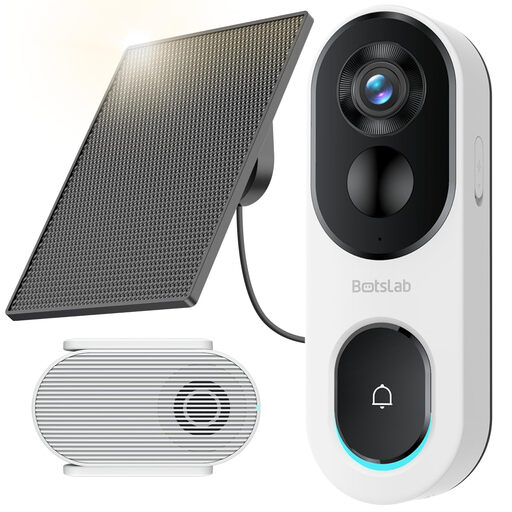 No image available
Its stated head-to-toe view and package detection address doorstep monitoring, while the solar-powered design makes mounting position especially important. The title specifies 2.4GHz Wi-Fi only. Check the solar position, signal and storage-card requirements for your installation.
Yes, if the particular model supports local recording and you have the required storage hardware. Reolink says its Battery Video Doorbell can record to a microSD card up to 256GB or a Home Hub without a monthly fee. Check whether the card or hub comes with the bundle you intend to buy.
Ring says you can view live video and answer notifications without subscribing, but reviewing recorded doorbell video requires a subscription. If replaying a missed parcel delivery without recurring charges is essential, live viewing alone will not meet that need.
Battery power suits an entrance without suitable wiring, provided you can manage charging and get a usable Wi-Fi signal. Wired power avoids routine charging and may enable model-specific features: eufy says its C31 offers 24/7 recording and five-second pre-roll when hardwired. Check compatible power and installation requirements before choosing.
The Information Commissioner’s Office says it applies if the camera captures someone else’s property, a public area or a communal space. Check the actual view after positioning the doorbell, keep it focused on your entrance where possible and consult the ICO’s current home-CCTV guidance if it extends beyond your private boundary.
Check your tenancy agreement before drilling or adding fixed wiring. For rented homes in England, Shelter England advises getting the landlord’s agreement in writing before making improvements; requirements can differ elsewhere in the UK. A removable installation may raise different questions from an alteration, so confirm what your agreement permits.