Streamers showing the whole board
If the camera takes in cards, tokens and a full playing area, your priority is light that reaches the edges without putting distracting hand shadows across play.


Start with a dimmable bi-colour LED panel that can sit high and off-axis, then check the camera image for shadows and reflections across the board. A clamp-mounted light can keep a small playing surface clear if it reaches the right position; a point-source light with a softbox is another option for a larger table, but needs more mounting space and setup.
If the camera takes in cards, tokens and a full playing area, your priority is light that reaches the edges without putting distracting hand shadows across play.
When the board shares space with a camera and microphone, a suitable clamp position can preserve playing space while keeping brightness controls within reach.
If viewers need to distinguish painted pieces or card colours, consider the light’s stated colour rendering and adjustable colour temperature alongside its placement.
For a board-game stream, settle where the light can go before comparing its output. Then decide whether colour, a clear playing surface or portable power is your next priority.
| Concern | What to check | Who this matters to |
|---|---|---|
| Even board coverage | Check the lit area at your intended distance and whether an elevated, off-axis position avoids reflections. | I want viewers to see the edges of the board without my hands casting shadows over play; around 36% of consumers put coverage first. |
| Component colours | Check the stated colour rendering index (CRI) and colour-temperature range; assess the result through your camera. | When I show card art or painted miniatures, I need their colours to remain distinguishable on screen. Colour is the primary concern for around 29% of consumers. |
| Mounting and control | Measure table-edge clearance and mounting height, then check how brightness can be adjusted. | At a compact desk, I need room to play and a way to adjust the light without disturbing the camera; around 21% of consumers prioritise that setup. |
| Portable power | Check the power source, stated run time at a relevant brightness and charging requirements. | If I move sessions between rooms or venues, I need lighting I can power for the session. For around 14% of consumers, portability comes first. |
A bright centre does not tell you whether the edges of a wide board will be lit. A point-source light’s beam also changes with its reflector or other modifier.
Measure the table and plan the light’s distance and mounting position. If choosing a point-source light for broad, soft coverage, check which compatible modifier you will use.
A stand, softbox, reflector or second light may add equipment to the setup.
Lumens describe total output, lux describes illumination at a surface under stated conditions, and CRI concerns colour rendering. One figure cannot establish all three.
Compare illumination figures at equivalent distances and conditions, then check colour rendering and adjustment separately.
A clamp saves surface space only if it can grip an accessible edge and place the light high enough for the board.
Measure the edge thickness, clearance underneath and usable mounting height before ordering.
A different mounting arm or stand may be needed if the table edge is unsuitable.
A light’s charging or mains requirements affect where it can be placed and how it can be used during a long session.
Check what power supply is included, the stated plug or charging requirements and the product information applicable to your delivery location.
Elgato’s streaming-light range includes clamp-mounted panels for desk-based setups.
NEEWER offers video panels, including portable bi-colour models relevant to tabletop setups.
The amaran range includes point-source lights for setups that use separate light modifiers.
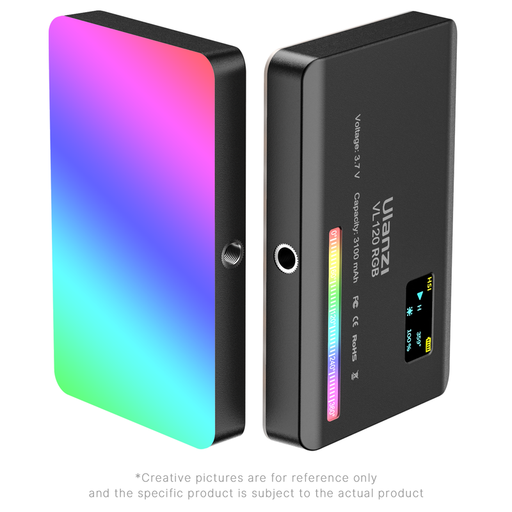
This compact, battery-powered video light is relevant if you move your tabletop setup or need adjustable light for close views of game components. Check its board coverage and mounting position against your own table before choosing it as the main light.
 No image available
The compact, integrated-battery design may suit a setup that moves between rooms or uses close views of cards and miniatures.
The listed specifications include a 3100 mAh battery, CRI ≥ 95 and a 2500–9000 K colour-temperature range.
Before using it as your main board light, check its illumination at your intended distance, beam coverage, dimming, mount and battery run time. Confirm the specified 5 V, 1–2 A USB-C charging arrangement and the power information relevant to your delivery location.
Start with one broad, dimmable light positioned high and away from direct reflections, then inspect the camera view. Add a lower-powered fill light or reflector if hands leave one side of the board dark.
Neither figure alone tells you whether a light will cover your board. Lumens describe total output; lux describes illumination on a surface, so compare lux readings only at equivalent distances and measurement conditions.
A stated CRI above 90 is a useful starting point when component colours matter, but it does not guarantee the colours viewers see. Check colour-temperature adjustment and set the camera’s white balance for the lighting you use.
Check the model’s stated run time at the brightness you expect to use rather than assuming its maximum figure applies throughout play. Confirm its charging requirements and whether it can be used while charging if a session may run longer.
Confirm the included plug or power supply and the product information applicable where it will be delivered. GOV.UK provides electrical-equipment guidance for Great Britain; Northern Ireland has different arrangements, so check the requirements for that delivery location separately.