Who this setup is for

Collectors managing reflections

If you film shiny, toned or slabbed coins, your main concern is keeping bright reflections from obscuring surface detail. Artemis Collection describes diffusion and small changes in coin angle as ways to manage bright spots.

Presenters focused on colour and detail

If you want coins to look consistent across a longer tour, adjustable colour temperature and a repeatable camera white-balance setting matter alongside the light's published colour-rendering specifications.

Creators working at a small desk

If your camera support and coin trays already occupy the work surface, check whether a desk-clamped panel or a compact light on a separate mount can be positioned without crowding the filming area.

What matters when choosing a light

Desk-mounted LED panel

Choose it when: You film at a fixed desk and want an integrated light and clamp rather than a separate modifier rig.

Trade-off: Check that the clamp fits your desk and that the panel can sit outside the coin's most reflective angle; it does not offer the same choice of separate modifiers as a compatible COB fixture.

Bi-colour COB light with a modifier

Choose it when: You need to reposition and shape the source around reflective coins, or move the setup between filming locations.

Trade-off: Allow room for a stable mount and compatible diffusion; portable power and mount adapters depend on the fixture and kit.

Concern What to check Who this matters to
Reflections and glare Look for adjustable output and a way to diffuse or reposition the light. Allow clearance to move it off the camera axis. If bright spots hide inscriptions or toning, I need to adjust the light and coin rather than simply increase output; around 42% of consumers put reflection control first.
Colour and surface detail Check the exact model's colour-temperature range and published colour-rendering figures, then use a repeatable manual white-balance setting. When filming coins across several sessions, I want their colour to remain consistent; around 33% of consumers make colour and detail their primary concern.
Space and mounting Measure the usable desk edge and space around the camera and trays. For a movable setup, check the mount and power arrangement. With limited room beside the collection, I need a light I can position without crowding the shot; around 25% of consumers prioritise space and setup.

Buying mistakes to avoid

  • Choosing output alone for reflective coins

    A bare frontal source can produce hotspots that hide coin detail. Artemis Collection's coin-photography guidance discusses diffusion, reflectors and small angle changes for managing bright spots.

    Try the proposed position with a particularly reflective or slabbed coin, and check that you can dim, diffuse or move the light.

  • Assuming a COB fixture includes the whole setup

    The amaran 100x S box contents list a reflector and power accessories, while Godox describes separate accessories and an optional Bowens adapter for the ML60II Bi. Neither description establishes what a particular retailer bundle contains.

    Check the bundle contents and match the stand, modifier and any adapter to the chosen fixture.

    A stand, diffusion accessory or mount adapter may need to be obtained separately.

  • Ordering a clamp-mounted panel without measuring

    Elgato specifies a clamp capacity of up to 60 mm for Key Light MK.2; a desk lip or cable tray can also affect where a clamp can sit.

    Measure the usable edge and check that the mounted panel can be angled away from strong reflections.

    An unsuitable desk edge may call for a different mounting arrangement.

  • Expecting colour specifications to determine the final footage

    Manufacturer colour-rendering and colour-temperature figures describe the fixture, not the combined effect of camera white balance, exposure, room light and reflections.

    Set manual white balance and record a short clip of representative coins before filming the full tour.

Relevant brands to consider

amaran

The amaran 100x S is a 100 W bi-colour Bowens-mount point source for a setup built around compatible modifiers.

  • amaran specifies 2,700–6,500 K adjustment, 0–100% dimming, CRI 95+ and TLCI 97+ for the 100x S.
  • Its listed box contents include a reflector and power accessories; check the chosen bundle for a stand and softbox.

Godox

The ML60II Bi is a compact bi-colour COB light with Godox-mount accessories and an optional Bowens adapter.

  • Godox specifies a 2,800–6,500 K range, 0–100% brightness adjustment, CRI 96+ and TLCI 97+ for this model.
  • Check which adapter, modifier, mount and power accessories the intended setup requires; the available power options do not establish the contents of a particular kit.

Elgato

Key Light MK.2 takes a desk-mounted panel approach to a fixed filming station.

  • Elgato specifies adjustable output up to 2,800 lumens, a 2,900–7,000 K range and a clamp for desk edges up to 60 mm.
  • If you need to choose and reposition separate softboxes or other modifiers, assess that requirement against the panel's integrated design.

Joybuy products for compact filming

This compact, battery-equipped video light is relevant if your coin-filming position needs to move. Check how you would mount and diffuse it before relying on it to manage reflections.
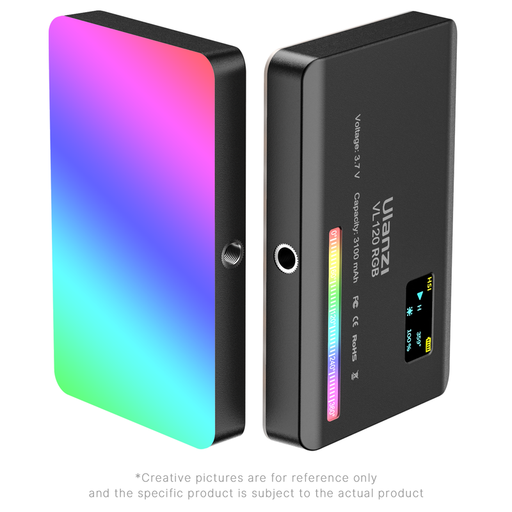
ULANZI VL120 RGB video light

ULANZI VL120 RGB Video Light, 3,100 mAh battery

For a coin-filming position that needs to move, this compact light has an integrated 3,100 mAh battery.

The product title lists a 2,500–9,000 K colour-temperature range, CRI ≥95, RGB colour control and 20 lighting effects.

For reflective coins, check the available dimming and diffusion options and the included mounting hardware. Check battery runtime against your planned recording length.

View on Joybuy

Questions about filming coins

Where should I put the light when filming reflective coins?

Start with a diffused light away from the camera axis rather than a bare source shining straight at the coin. Artemis Collection notes that a coin tilt of roughly 3–10 degrees can help reduce bright spots in a high-angle lighting setup; make small adjustments while checking the recorded image, especially with slabbed coins.

Do I need a bi-colour light for a coin collection tour?

Bi-colour adjustment is useful when you need to match other lighting or repeat a colour-temperature setting across sessions, but it does not replace manual camera white balance or reflection control. For example, amaran specifies 2,700–6,500 K for the 100x S, Godox 2,800–6,500 K for the ML60II Bi, and Elgato 2,900–7,000 K for Key Light MK.2.

What might I need alongside a COB light?

Plan for a stable mount and a diffusion or control accessory that fits the exact fixture. The amaran 100x S lists a reflector and power items in its box contents, while Godox describes an optional Bowens adapter for the ML60II Bi; check your chosen bundle for the stand, modifier and adapter you intend to use.

Can a USB-C power bank run a panel at its stated full output?

Only if the exact panel supports that power source and the bank meets its stated requirement. Elgato specifies a PD-compatible adapter or battery bank rated at 30 W or higher for the full 2,100-lumen output of Key Light Air MK.2, and says that power supply is not included.

What should I check in the listing before ordering?

Confirm the included power supply and plug, mounting hardware, compatible modifiers and exact bundle contents against your filming setup. Check the seller's applicable warranty and returns information for that listing rather than assuming the same terms apply to every fixture or bundle.