Home workers in shared or noisy spaces
Clear speech, personal listening, microphone placement, mute control and privacy can matter more here than upgrading the camera alone.


Choose audio equipment first when speech is difficult to hear or you need private listening: a headset suits individual calls in shared spaces, while a speakerphone suits rooms where open audio is acceptable. Add a webcam when camera placement, lighting or privacy control is the issue, and use a laptop riser for longer sessions only with a separate keyboard and mouse.
Clear speech, personal listening, microphone placement, mute control and privacy can matter more here than upgrading the camera alone.
Portable equipment and dependable USB or Bluetooth compatibility are important when moving between home and another workplace. Longer laptop sessions may also need a raised screen with a separate keyboard and mouse.
If being clearly seen is part of regular calls, assess camera position, lighting, platform compatibility and whether the exact camera has a physical privacy shutter.
Start with the problem affecting your calls, then check that the device can connect to your computer and meeting app before choosing extra features.
| Priority | What to check | Your needs |
|---|---|---|
| Speech clarity and room noise | Check whether you need a headset microphone or a separate USB microphone. For wireless devices, confirm Bluetooth pairing, battery needs and microphone selection in the operating system. | I need callers to hear me clearly without relying on open room audio. A headset is usually the more suitable route when other people are nearby or I need private listening. |
| Video, framing and privacy | Check stated resolution, lighting features, camera placement, operating-system support and the presence of a physical privacy shutter on the exact webcam. | I need to be clearly visible on calls, or I want a direct way to close the camera when it is not in use. |
| Connection and permissions | Match USB-A or USB-C to your computer port. Confirm Bluetooth support where relevant, then check microphone and camera permissions and choose the intended devices in the meeting app. | I need equipment that works with my actual laptop, desktop or mobile device rather than only being marketed for calls. Microsoft Support also recommends checking connected devices and making a test call in Teams. |
| Longer laptop sessions | Check whether a riser can raise the screen to a comfortable position and whether you can use a separate keyboard and mouse with it. | I spend sustained periods at a laptop and need the screen position to work as part of the whole desk setup. Health and Safety Executive guidance recommends a separate keyboard and mouse when a laptop screen is elevated. |
A connected device may still not work in a call if microphone or camera access is disabled, Bluetooth is not paired, or the meeting app is using a different input or output.
Before buying, identify your operating system, available USB ports and main meeting app. After setup, allow the required permissions, select the device in the app and make a test call.
Open speaker audio can be unsuitable for confidential conversations or shared homes, where other people can hear the meeting or be picked up by the microphone.
Choose a headset when private listening is important. Use a speakerphone only where room audio is appropriate, and confirm the exact model's USB or Bluetooth connection method.
Resolution, field of view, autofocus, light adjustment and a privacy shutter are separate features. More resolution alone does not fix camera placement or application permissions.
Identify the issue first: routine 1080p video, difficult lighting, wider framing, privacy control or a particular compatibility requirement. Then confirm the relevant features on the exact model.
A raised screen can improve viewing position, but typing for long periods on an elevated laptop can compromise the workstation arrangement.
If using a laptop riser for prolonged work, use a separate keyboard and mouse and position the screen and desk equipment together.
Business and hybrid-work headsets, including portable Bluetooth and USB-adapter models intended for voice calls across locations.
UK-available webcams ranging from routine 1080p call cameras to higher-resolution business webcams.
USB and Bluetooth speakerphones for computer and mobile-call use, including desk and small-room audio routes.
Joybuy product options for home-working call audio, including wired and wireless headsets plus speakerphones for rooms where open audio is suitable.
 No image available
A desk-based call route for individual computer calls where inline mute control is useful.
The listing states a USB-A connection, inline mute, adjustable noise-cancelling microphone and a 2.4 m cable. The supplied listing has inconsistent brand and model information, so confirm the exact manufacturer and model before buying, as well as USB-A access on your computer.
 No image available
Consider this speakerphone for private-room or small-group calls where open meeting audio is acceptable.
The listing states USB-C connectivity, Teams and Zoom certification, physical mute and volume indicators, and a stated 2.5 m pickup range. It is not suitable where private listening or confidential calls are necessary; check your computer's USB-C port before buying.
 No image available
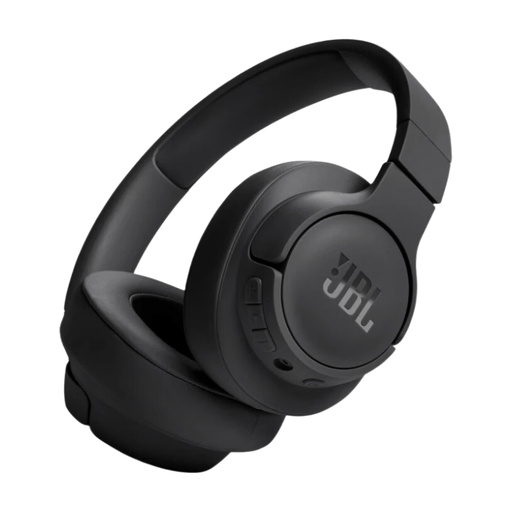
A wearable personal-audio option for hybrid laptop-and-phone use when a dedicated boom microphone is not required.
The listing states Bluetooth 5.3, multipoint connectivity, USB-C charging, a detachable audio cable and integrated microphones with call controls. Check Bluetooth microphone support for your work computer and meeting platform, and allow for pairing, charging and input selection.
 No image available
A room-based speakerphone option for occasional group calls where others may hear the meeting audio.
The listing states an eight-microphone 360° array, full-duplex calling, dual USB-C connections and Bluetooth 5.3. Its open audio and wide pickup may be unsuitable for a busy shared home; confirm direct USB-C compatibility with your computer before buying.
 No image available
A wired headset route for computer calls when you prefer personal listening instead of open speaker audio.
The listing states a USB wired connection, PC and Mac compatibility, a detachable noise-cancelling microphone and over-ear cushions. It is primarily presented as a gaming headset, so confirm its microphone selection and conferencing-app compatibility for your work setup.
Not necessarily. Choose one when your existing camera, framing, lighting or privacy control is inadequate for calls where you need to be seen. Check the exact model for platform compatibility, operating-system compatibility, USB connection and a physical privacy shutter.
Choose a headset when you need private listening or work near other people. Choose a speakerphone only when room audio is acceptable and its USB or Bluetooth connection suits your device; Microsoft Teams also requires the intended speaker and microphone to be selected.
Check that microphone or camera access is enabled, that the device is connected or Bluetooth-paired, and that it is selected as the system default and in the call application. Microsoft Support advises making a test call in Teams after choosing the connected speaker and microphone.
For prolonged laptop use, the Health and Safety Executive advises using a separate keyboard and mouse when the screen is elevated on a riser or similar support. Choose the stand as part of the workstation arrangement, not only to raise the built-in camera.
UK Display Screen Equipment regulations can apply to permanent home workers and hybrid workers who use display screen equipment daily for continuous periods of an hour or more. The Health and Safety Executive says employers should assess whether the regulations apply and carry out an individual DSE assessment where needed; the Information Commissioner’s Office also says home-working arrangements must remain compliant with data-protection law.