Start with the call environment rather than a generic video-call kit: a close-mic headset is usually the route to assess first for individual callers in noisy or shared spaces, while a speakerphone suits quiet personal desks or small huddles. Choose a webcam when the existing camera or desk lighting is the limitation, and check the computer connection, operating system, call platform and required button controls before buying.
Who this equipment suits
Hybrid workers making frequent individual calls
Workers moving between home and office may need a personal device that is easy to connect in both places and supports the call controls they use. Ofcom’s UK SME research in March and April 2025 confirms that online communication services are widely used by SME decision-makers.
Staff in noisy shared offices or busy homes
For individual callers dealing with nearby conversations, household activity or limited privacy, assess a close-mic headset before relying on speaker playback. Jabra describes its office headset range as intended for noisy office environments, while the exact model and platform support still need checking.
Small teams sharing a desk or huddle space
Teams joining one remote call from the same room should match microphone pickup coverage and connection options to their seating layout. Poly by HP differentiates speakerphone models by workspace type, connection method and stated pickup range.
Buying priorities
Check the working environment first, then confirm that the chosen device can connect to the computer and deliver the functions the team actually uses in its conferencing app.
| Priority |
What to check |
Your needs |
| Computer and app compatibility |
Match USB-A, USB-C, Bluetooth or any dongle to the available computer connection. Confirm operating-system support and whether the installed Teams or Zoom desktop app supports the required mute, answer and hang-up controls for the exact device. |
I need staff to select the device in their existing call software and use physical controls when those controls are part of the workflow. |
| Voice capture and room noise |
For one caller, consider a close-positioned microphone and private listening. For a speakerphone, compare the stated pickup range with the real seating distance and confirm that shared playback will not disturb nearby people. |
I want my voice to remain the focus without broadcasting meeting audio across a shared desk, home room or open office. |
| Camera and desk position |
Check camera placement, mounting, available USB ports, computer resources and the video mode needed for the team’s platform. Review lighting direction as well as resolution and frame-rate options. |
I need a usable image at a desk affected by dim light, backlighting or direct sunlight, rather than paying for modes the setup cannot use. |
| Home and hybrid workstation setup |
For long-term or hybrid display-screen work, consider the home and office setup separately. Position task lighting to maintain satisfactory screen contrast and avoid glare; it is not a substitute for a needed camera or microphone. |
I need equipment that fits the workstation where calls actually happen, including both home and office when work is regularly split between them. |
Common buying pitfalls
-
Assuming USB or Bluetooth guarantees full call controls
A device may work as general audio while its answer, hang-up or mute buttons do not synchronise with the conferencing app. Microsoft and Zoom document platform- and model-specific conditions for these functions.
Check the exact model, connector, operating system, installed desktop app and official Teams or Zoom support information before ordering.
An unsuitable connection or control setup can require an approved adapter, dongle or replacement device.
-
Buying a speakerphone for a noisy open office because it is labelled for meetings
Speakerphone suitability depends on room noise, the number of local participants and whether the stated pickup range covers their seats. Shared playback can also disturb nearby colleagues or reduce privacy.
Use a speakerphone for quiet personal or huddle settings, and assess a close-mic headset first for an individual caller in a shared office.
-
Paying for webcam resolution without checking the desk and computer setup
A higher-resolution mode does not correct poor camera position, unsuitable lighting or a computer that cannot use the selected mode. Logitech lists mode-specific requirements and connection details for its Brio range.
Check the lighting direction, mounting position, available USB port, computer resources and the video mode required for the team’s platform before choosing 4K or high-frame-rate equipment.
Some desk layouts may need an adapter, tripod or other mounting solution.
-
Treating task lighting as a universal video-call upgrade
Lighting affects screen comfort and contrast, but poorly positioned lighting can create glare and does not automatically solve camera-image issues.
For long-term home or hybrid display-screen work, use the individual workstation assessment to identify lighting or other equipment needs, then position any light to maintain satisfactory screen contrast.
Relevant brand references
Jabra
A business-headset specialist relevant to individual callers in office, hybrid and mobile work settings.
- Jabra positions its Evolve range as professional office headsets, with manufacturer claims around voice pickup, comfort and noise cancellation.
- Check the exact connector, platform certification and desktop-app call-control support rather than assuming these functions apply to every model.
Logitech
A business-webcam option for workers who need an external camera with controllable placement and stated conferencing-platform compatibility.
- Logitech’s UK Brio 4K specifications list selectable resolution modes, RightLight 3 adjustment, USB-A or USB-C connection, a privacy shutter and stated compatibility with Teams, Zoom and Google Meet.
- A 4K option is not automatically necessary or usable on every computer; check ports, computer resources and the video mode required.
Poly by HP
A USB and Bluetooth speakerphone range relevant to quiet personal desks, flexible workers and small huddle spaces.
- HP’s Poly Sync comparison differentiates models by workspace type, connection options, microphone count and stated pickup range.
- Match stated pickup coverage to the seating layout; a speakerphone is not automatically the right route for a noisy shared office.
Joybuy product options
These Joybuy options cover speakerphones, individual headsets and task lighting for video-call setups at home, in offices and in small huddle spaces.
 No image available
DELL Pro Wired Speakerphone SP325
A speakerphone option for quiet small huddles or home-office calls where several local participants need to be heard.
The listing states USB-C connection, four omnidirectional microphones, a 2.5 m pickup range, onboard mute and volume controls, and Teams and Zoom certification.
Check that each computer has a suitable USB-C port or approved adapter, and keep seating within the stated pickup range.
Joybuy
 No image available
EMEET Lunaplus 8-Mic Bluetooth Conference Speaker
This conference speakerphone is aimed at a small local group joining one remote call from a quiet room.
The listing states eight microphones, 360° voice pickup, USB-C and Bluetooth connections, dual-device mode, 10-hour talk time and compatibility with Zoom, Teams and Skype.
Confirm the real huddle seating layout before buying, as the listing does not state a microphone pickup distance.
Joybuy
 No image available
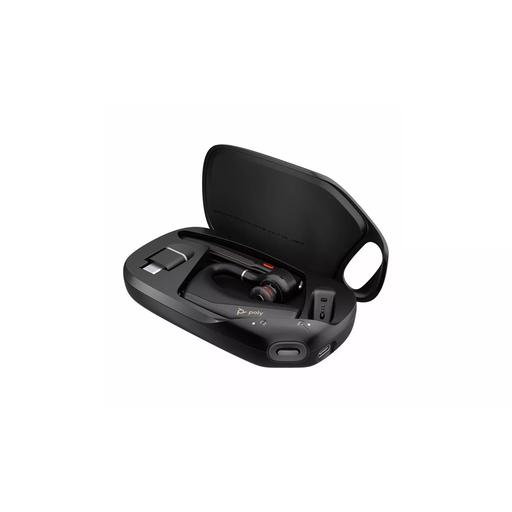
HP Poly Voyager Legend 50-M UC Bluetooth Headset
An individual-call headset option for workers moving between office, home and travel settings.
The listing describes Bluetooth pairing, a boom positioned near the mouth, on-ear mute, call and volume controls, plus stated NoiseBlock and WindSmart background-noise technologies.
Verify the supplied computer connection method, supported desktop operating system and exact Teams or Zoom call-control behaviour before ordering.
Joybuy
 No image available
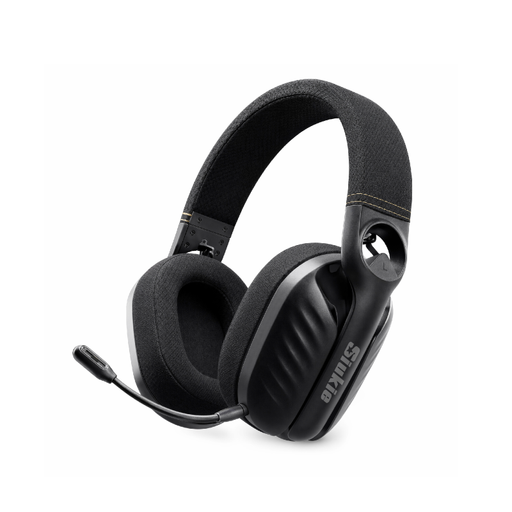
Siukie I600 Wireless 3MODE Headset
A headset option for home-office callers who use compatible devices with different connection methods.
The listing states 2.4 GHz wireless, Bluetooth and 3.5 mm wired connections, plus a flexible noise-cancelling microphone and over-ear design.
Check which 2.4 GHz receiver is included, whether it works with the intended work computer and whether Teams or Zoom controls are supported in the installed app.
Joybuy
 No image available
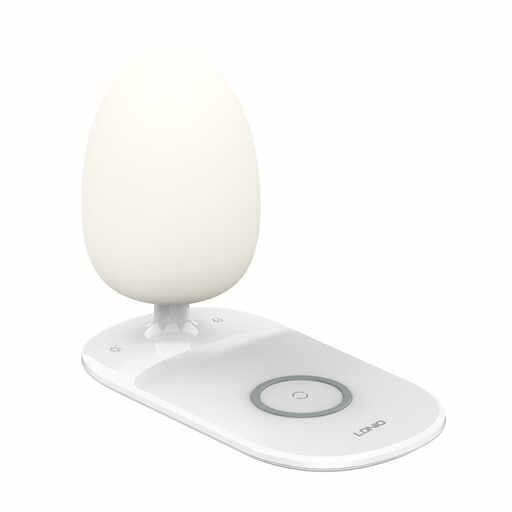
LDNIO Wireless USB-C Charging Desk Lamp 1M White
A task-light option for a home or office desk where a workstation assessment identifies a lighting or contrast issue.
The listing states an adjustable gooseneck, adjustable head, touch brightness control, memory function, a 1 m USB-C cord and an integrated wireless charging base.
Position lighting to avoid screen glare, and check charging compatibility for the intended phone or earbuds.
Joybuy
Frequently asked questions
Do we need a Teams- or Zoom-certified device?
Certification is not a universal legal requirement, but it is an important check where staff need dependable physical call controls. Microsoft documents call-management functions for certified Teams devices, while Zoom lists supported USB-HID devices and notes that functionality depends on the device, application and platform conditions.
Will any USB headset button answer, mute or end a Teams or Zoom call?
No. Microsoft’s documented USB peripheral call-control support applies to installed Teams on Windows and Mac, and Zoom’s USB-HID functionality is model-dependent. Verify the exact headset model and the installed desktop app before buying specifically for button controls.
When is a speakerphone more suitable than a headset?
A speakerphone is a suitable route when one person or several nearby people need shared microphone and speaker coverage in a quiet personal or huddle workspace. Match the stated pickup range to the seating layout; for an individual in an open office or busy home, assess a close-mic headset first.
Does UK law require task lighting for every home worker?
No blanket rule requires every home worker to have a task light. The UK Display Screen Equipment Regulations require room or task lighting that is provided to ensure satisfactory lighting and appropriate contrast, taking account of the work and the user’s vision requirements; where the rules apply to long-term or hybrid home work, HSE guidance calls for an individual assessment.


