What to check before buying
Settle the deck’s position and your speaker connections first, then check every record format you intend to play. Ease of operation matters too, but it cannot compensate for an incompatible speed or connection.
| Concern |
Buying check |
Who this matters to |
| Vibration and placement |
Find a level, rigid support; check whether speakers excite the same furniture. Confirm wall construction and deck compatibility before considering a wall mount. |
If my speakers and deck must sit close together, I want playback that stays steady when nearby furniture vibrates. Around 36% of consumers put vibration control first. |
| Speaker connection |
Identify powered or passive speakers, the available inputs and whether the deck has a switchable phono preamp. |
When my powered speakers have no phono input, I need a connection that works with the equipment I already have. Around 29% of consumers put connection simplicity first. |
| Record speed and stylus |
Read the disc labels; for 78s, confirm 78 RPM operation and a suitable, compatible stylus or cartridge. |
If my soundtrack collection includes 78s, playing them at the correct speed with a suitable stylus takes priority over convenient controls. Roughly 21% of consumers put 78 compatibility first. |
| Setup and upkeep |
Compare automatic and manual operation, initial tonearm adjustments and replacement-part availability for the exact model. |
For a first deck, I would rather minimise initial adjustments and know which parts will need attention later. Around 14% of consumers put easy setup and upkeep first. |
Joybuy turntables for this setup
These Sony models are options for soundtrack listeners considering automatic playback and Bluetooth connectivity. For either deck, check your speaker connection, support position and record speeds before deciding.
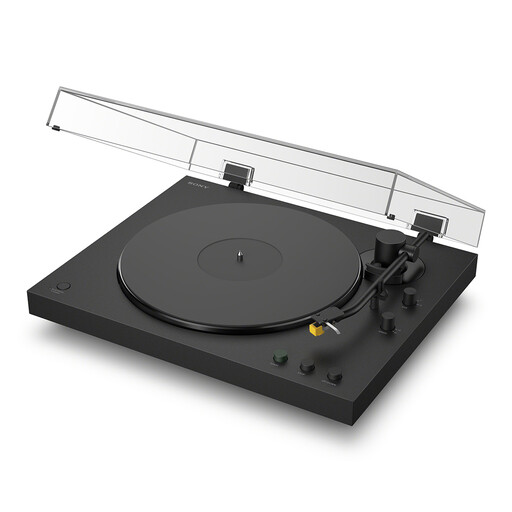 Image unavailable
Sony PS-LX5BT Bluetooth Turntable with Auto Playback, Cartridge & Stylus
Consider this model for standard soundtrack LPs and singles if automatic playback and a Bluetooth connection option suit your setup. Confirm that your speakers accept the connection you plan to use, place the deck on a stable, level support and check speed and stylus suitability before playing any 78s.
View on Joybuy
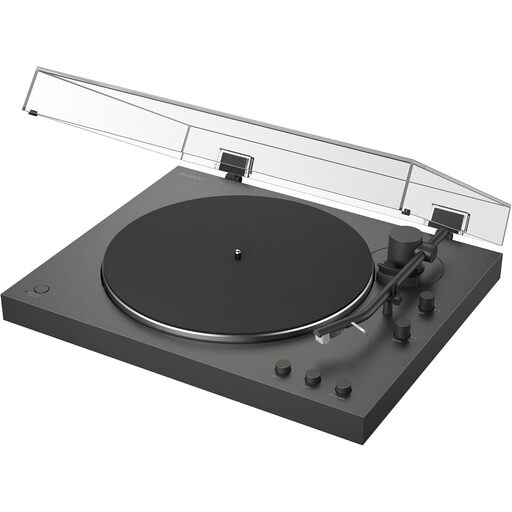 Image unavailable
Sony PS-LX3BT Bluetooth Turntable with Auto Playback
Consider this model for standard soundtrack LPs and singles when simple automatic operation is a priority. Check whether your speakers can use Bluetooth or need a suitable wired connection; keep the deck level and confirm both speed and stylus suitability if your collection includes 78s.
View on Joybuy
Frequently asked questions
Do speakers near a wall require a special turntable?
No special turntable is automatically required: give the deck a level, stable support and check whether speaker or furniture vibration reaches it. Rega notes that changing the speakers’ distance from the rear wall can alter bass response. If a wall mount is appropriate, verify deck compatibility and wall construction; Pro-Ject recommends a solid wall such as brick for its Wallmount it 1.
Can a turntable connect directly to powered speakers?
Yes, when its output matches the speakers’ input—for example, a turntable’s built-in phono preamp set to line output can serve suitable powered speakers. Audio-Technica specifies a switchable preamp on the AT-LP70XBT; check the input and phono/line setting for the equipment you choose.
How do I tell whether my soundtrack records need 78 RPM playback?
Check the speed marked on the records you intend to play. If the collection includes 78s alongside LPs or singles, look for all the required speeds and a suitable stylus or cartridge. Audio-Technica lists 33⅓, 45 and 78 RPM for the AT-LP5X; Rega’s Planar 78 is for 78s only.
Which replacement parts should I check before buying?
Check that the appropriate replacement stylus—and, for a belt-drive turntable, belt—is available for the exact model. Pro-Ject’s maintenance guidance recommends belt replacement every year or at least every two years for its products; follow the instructions applicable to your deck.


