Who these monitors suit

Single-screen cockpit-view seekers

If you want a broad driving view without the bezels of a multi-monitor layout, start by comparing 32:9 with large 21:9 screens. Check the available desk or rig space and your simulator's aspect-ratio support before choosing either format.

Long-session OLED-care planners

If lap timing, maps or telemetry stay in fixed positions through repeated stints, include panel-care settings and warranty terms in your OLED decision. ASUS ROG warns that prolonged static, high-contrast content can cause image persistence or burn-in.

High-refresh PC sim racers

If smooth motion is your priority, compare the monitor's resolution and refresh mode with your GPU outputs, cable and game settings. A monitor's stated refresh rate does not establish the frame rate your PC will deliver in a simulator.

What matters when choosing

49-inch 32:9

Choose it when: a panoramic view on one panel is your main aim. Samsung UK describes its Odyssey G91F format as equivalent to two side-by-side 16:9 screens.

Allow for: the physical width, your simulator's aspect-ratio support and the demands of driving the chosen resolution.

45-inch 21:9 5K2K OLED

Choose it when: you want a large curved display with more vertical pixels than Dual QHD; LG UK specifies 5120 × 2160 for the 45GX950A-B.

Allow for: the graphics demands of that resolution and OLED care during repeated stints with fixed HUD elements.

34-inch 21:9 OLED

Choose it when: you want an ultrawide view and high-refresh capability without making room for a 45- or 49-inch panel. ASUS ROG specifies 240Hz for the PG34WCDM.

Allow for: less screen area than the larger formats and the same need to manage prolonged static OLED content.

Concern What to check Who this matters to
Panoramic cockpit coverage Check 21:9 or 32:9 game support and the panel's width with its stand or mount. If I want a broad driving view without joining several panels, I need the format to work in my simulator and fit my cockpit. Roughly 31% of consumers would put that single-screen coverage first.
Static-HUD OLED care For OLED, check the exact model's protection settings, maintenance requirements and panel warranty. With timing and telemetry left on screen through repeated stints, I want to know how I will manage fixed images. Around 23% of consumers would make static-HUD care their primary concern.
Positioning and glare Measure viewing distance and stand depth; check adjustment or mounting options and room-light reflections. When I sit at the rig for a long session, the display needs a comfortable position that does not leave me fighting reflections. Approximately 23% of consumers would put workstation fit first.
Motion and PC connection Match the intended resolution and refresh mode to GPU outputs, the monitor input, cable and variable-refresh support. If I care most about smooth motion, I need a display mode my existing PC and connection can actually use. Roughly 23% of consumers would prioritise that compatibility.

Buying pitfalls

  • Choosing by the refresh-rate headline alone

    A stated 144Hz, 165Hz or 240Hz mode does not tell you what frame rate your PC will sustain at your chosen resolution. Samsung UK notes that refresh and response-time results can vary with the input source and settings.

    Before ordering, check your GPU output, monitor input, cable, simulator settings and variable-refresh compatibility together.

  • Assuming OLED protection makes a fixed HUD risk-free

    ASUS ROG warns that prolonged static, high-contrast content can cause OLED image persistence or burn-in. Panel-protection functions do not remove the reason to consider repeated HUD exposure.

    Check the exact model's care instructions and warranty, keep its available protection functions enabled and use HUD-management options if your simulator offers them.

  • Ordering a large panel before measuring the rig

    A 45- or 49-inch curved display needs enough width and depth for a workable viewing position. The UK Health and Safety Executive identifies comfortable viewing distance and glare control as practical display-screen considerations.

    Measure the usable space with the supplied stand or planned mount in mind, and consider reflections from windows and room lighting.

    If the supplied stand does not suit the layout, an alternative arm or rig mount may be needed.

  • Relying on a familiar series name instead of the full model number

    Specifications can conflict even where listings use the same model number: Samsung UK states 144Hz for the Odyssey G91F LS49FG910EUXXU, while a Joybuy listing for that number states 240Hz.

    Check the full model number and confirm the resolution, refresh mode, panel type and warranty with the seller before paying.

Brands and product lines to consider

Samsung

The Odyssey G91F LS49FG910EUXXU illustrates the 49-inch curved 32:9 single-screen route.

  • Samsung UK specifies Dual QHD, a 1000R curve, 144Hz and Picture-by-Picture/Picture-in-Picture functions for this model.
  • Confirm the panel's fit, your simulator's 32:9 support and the performance of your PC at the intended settings.

LG UltraGear

The 45GX950A-B illustrates the large 21:9 5K2K OLED route.

  • LG UK specifies a 45-inch, 5120 × 2160, 800R OLED panel with 165Hz at 5K2K and an optional 330Hz lower-resolution mode.
  • Check PC performance at your chosen mode and plan for OLED care if your racing HUD remains static during long stints.

ASUS ROG

The ROG Swift OLED PG34WCDM illustrates the smaller 34-inch 21:9 high-refresh OLED route.

  • ASUS ROG specifies 3440 × 1440, an 800R curve, 240Hz, Adaptive-Sync, height adjustment and VESA mounting for this model.
  • ASUS ROG cautions against prolonged static, high-contrast OLED content and lists a two-year warranty including panel burn-in for this model; check the applicable terms before purchase.

Joybuy monitor choices

These monitors offer 49-inch panoramic formats or a smaller 34-inch ultrawide for comparing against your cockpit space and PC. Check each model's panel type and native resolution rather than treating the shared screen size as a shared specification.

Acer X Predator X49X 49-inch QD-OLED gaming monitor

Acer X Predator X49X 49-inch QD-OLED monitor

Consider this model if a panoramic single-panel layout is your priority and you have room for its 49-inch screen.

The listed configuration has a 32:9 Double Quad HD panel, 1800R curve, 240Hz refresh rate and HDMI, DisplayPort and USB-C connections.

Check your simulator and PC at the intended display mode, along with the exact model's OLED-care functions and panel warranty.

Joybuy

CRUA 49-inch curved 32:9 DQHD VA gaming monitor

CRUA 49-inch curved 32:9 DQHD VA monitor

This is another 49-inch single-screen option if you want a broad cockpit layout without choosing OLED.

The listed configuration is 5120 × 1440 with a 1500R curve, 165Hz refresh rate, HDMI 2.1 and DisplayPort 1.4 connections, and a 75 × 75 VESA mount pattern.

Measure your available space and confirm the supplied stand's adjustments before ordering.

Joybuy

Lenovo R34w-30 34-inch UWQHD gaming monitor

Lenovo R34w-30 34-inch UWQHD gaming monitor

Consider this 34-inch ultrawide if you want a smaller panel than the 49-inch options while retaining a wide-screen format.

Check its connections and available display modes against your PC and simulator, and measure the space needed for the stand.

Joybuy
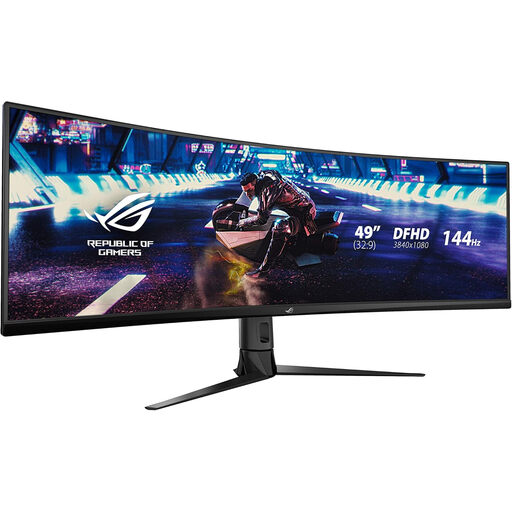
ASUS ROG STRIX XG49VQ curved DFHD 144Hz monitor

ASUS ROG STRIX XG49VQ curved DFHD 144Hz monitor

This model is worth comparing if a wide curved screen matters more to you than choosing a higher-resolution DQHD format.

Check whether its DFHD resolution meets your detail and workspace needs, then confirm desk fit, stand or mounting options and the display mode your PC can use.

Joybuy

Frequently asked questions

Should I choose a 49-inch 32:9 screen or a 45-inch 5K2K ultrawide for endurance racing?

Choose the 49-inch 32:9 format if a panoramic single-screen cockpit layout is your priority; consider the 45-inch 21:9 5K2K format if you value its additional vertical pixels. Samsung UK and LG UK specify these formats for the Odyssey G91F and 45GX950A-B respectively. Before deciding, check physical fit, simulator aspect-ratio support and PC performance at the resolution you intend to use.

Does a persistent racing HUD need special attention on an OLED monitor?

Yes: prolonged static, high-contrast content is an OLED-care consideration, according to ASUS ROG. Check your exact monitor's protection functions and warranty terms, and use HUD-management options where your simulator provides them.

Will a 240Hz monitor make my simulator run at 240 frames per second?

No. The monitor's refresh capability does not establish the frame rate your PC can produce in a particular simulator. Check the selected resolution and refresh mode alongside your GPU output, cable, game settings and monitor input; Samsung UK notes that results can vary with the source and settings.

How can I make long racing sessions more comfortable?

Position the monitor at a comfortable viewing distance, control glare and take regular breaks. The UK Health and Safety Executive favours short, frequent breaks for display-screen work, giving 5–10 minutes every hour as an example rather than 20 minutes every two hours; that example is not a prescribed timetable for recreational gaming.