What to check when buying
List your frequent railway-building commands first, then assess button reach, dark-room lighting and handling during longer sessions. A programmable button is useful for a particular command only if the simulator accepts the binding you intend to assign.
| Concern |
What to check |
Who this matters to |
| Construction shortcuts |
Check how many buttons you can reach comfortably and whether the simulator accepts your intended assignments. |
If I frequently change tools and views, I want those commands within reach without learning buttons I will never use. Around 42% of consumers put command access first. |
| Lighting in a dark room |
Check the exact model’s lighting settings, including whether its illumination can be reduced or switched off. |
When I play beside a bright display, I do not want mouse lighting drawing my eye away from the railway. Roughly 25% of consumers make low-distraction lighting their primary concern. |
| Long-session handling |
Consider shape, weight, scroll-wheel behaviour and a sensitivity setting you can control during placement. |
For extended building sessions, I need navigation and track placement to feel manageable in my hand. About 33% of consumers prioritise handling over the other concerns here. |
Joybuy gaming mice for this setup
These wireless gaming mice offer programmable buttons for railway-building shortcuts, with different weights and button counts. Before choosing one for a dark room, check its lighting behaviour and test your intended commands in the simulator.
 No image available
Rapoo VT7 MAX Wireless Gaming Mouse, White
Consider this model if ten programmable buttons would cover your regular construction and view commands, subject to the simulator accepting your bindings.
The product name specifies a 53 g weight, optical switches and wireless operation. Its stated battery life is up to 750 hours at 1000 Hz; low-power mode requires a driver update.
For dark-room use, check whether the exact mouse has illumination and, if so, whether you can dim or disable it.
View on Joybuy
 No image available
Rapoo VT2 Wireless Gaming Mouse, Purple
Consider this model if ten programmable buttons meet your shortcut needs and you prefer its specified mechanical-switch variant; test the intended bindings in your simulator.
The product name specifies wireless operation and a 53 g weight. Its stated battery life is up to 750 hours at 1000 Hz, with a driver update needed for low-power mode.
Check the switch feel and sound against your preferences, and confirm whether any mouse lighting can be dimmed or disabled.
View on Joybuy
 No image available
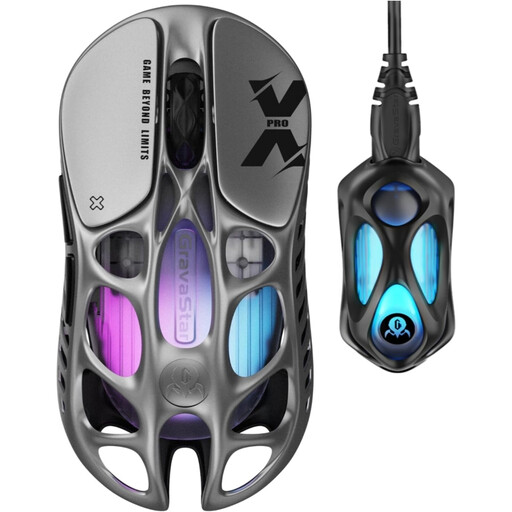
GravaStar Mercury X Pro Wireless Gaming Mouse, Chinese Retail Version, Silver
Consider this model if five programmable buttons cover your frequent railway-building actions and you prefer the specified 49 g weight; confirm that the simulator accepts your assignments.
The product name specifies wireless operation, an 8K dongle and RGB lighting. Check whether the lighting can be dimmed or disabled before choosing it for a dark room.
This is identified as a Chinese Retail Version. Check the supplied product and compliance information for the exact item you would receive.
View on Joybuy
Common questions
How many programmable buttons do I need for virtual railway building?
Start with the construction, editing and camera commands you use repeatedly, then look for a layout that puts those commands within comfortable reach. A denser MMO-style grid is worth considering when you have enough recurring actions to use it and your simulator accepts the intended bindings.
Will RGB lighting be distracting in a dark room?
Bright or animated RGB can be distracting, so check the lighting controls on the exact mouse. Razer says its Chroma controls include effects and LED-brightness adjustment, while Logitech G describes LIGHTSYNC customisation through G HUB; neither description establishes the settings available on every other model.
How should I set up mouse shortcuts for my railway simulator?
Assign a small set of frequent commands in the mouse’s configuration software, then test each one in your simulator. Add more only when you can reach the buttons reliably without looking down or pressing neighbouring controls by mistake.
Is maximum DPI important for precise track placement?
Maximum DPI alone does not establish how easily you can place track. Set a pointer sensitivity you can control and assess mouse shape, button access and configuration alongside it; DPI changes sensitivity rather than adding commands.
What should I check about a mouse’s UK-market version?
Check the full model and variant, seller details and compliance information supplied for the exact item. GOV.UK’s August 2026 guidance says Great Britain continues to recognise CE marking alongside or instead of UKCA marking where the relevant requirements apply; a generic listing photo does not establish which requirements an individual mouse meets.


