For a continuous cockpit view, start with a 34-inch ultrawide if desk space and graphics performance are constraints; consider a 49-inch super-ultrawide if horizontal space matters more and your setup can accommodate it. Choose several separate monitors only after checking how your game handles the intended layout, as well as your graphics outputs, mounts and desk space. A monitor’s advertised refresh rate alone does not establish the frame rate your game will achieve.
Who is this setup for?
Cockpit-view immersion seekers
If a central bezel would interrupt the forward view you want while docking, compare curved 34-inch, 45-inch and 49-inch single-screen formats. Check how your game presents the view and interface at the chosen aspect ratio.
Smooth-flight performance prioritists
If changing frame rates distract you during manoeuvres, look beyond the maximum refresh-rate figure. Check variable refresh rate (VRR) compatibility with your graphics card and connection, alongside the performance you can achieve at the monitor’s resolution.
Dedicated sim-pit builders
If you want a central gameplay display with separate screens for maps or other tools, plan the graphics outputs, cables, mounts and desk layout together. Confirm the game’s current multi-display behaviour before relying on an image spanning the screens.
What matters when choosing?
Choose the layout around the view and information you need during docking, then check whether your PC, game and desk can support it.
34-inch ultrawide
Consider it when: You want one continuous, wide view without moving to a 49-inch display. The ASUS ROG PG34WCDM and Alienware AW3426DW specified for the UK both use 3440 × 1440 panels.
Trade-off: It has less horizontal pixel space than a 5120 × 1440 display; check whether its view and interface layout suit your game.
49-inch super-ultrawide
Consider it when: An uninterrupted, very wide forward view is your priority. Samsung specifies its Odyssey OLED G95SD at 5120 × 1440.
Trade-off: Its greater pixel count than a 3440 × 1440 panel and its physical width make graphics performance and desk fit especially important to check.
45-inch 5K2K ultrawide
Consider it when: You want a single broad screen with more vertical pixel space. LG specifies the UltraGear 45GX950A at 5120 × 2160 and 165Hz in its WUHD mode.
Trade-off: Driving that resolution places a substantial demand on the graphics card. Check game performance and the panel’s physical dimensions before choosing it.
Several separate monitors
Consider it when: You specifically want physical screens for a central game view and separate maps, communications or other tools.
Trade-off: Confirm the game’s current display behaviour before buying an array for a spanning cockpit view. Also check graphics outputs, cables, mounts and clearance for every screen.
| Concern |
What to check |
Who this matters to |
| Continuous cockpit space |
Compare native resolution and aspect ratio, then check desk dimensions and how your game places its view and interface. |
If a bezel interrupts the forward view I want, screen continuity and room for instruments come first. Roughly 42% of consumers put this cockpit-space need first. |
| Fluid motion |
Check VRR support for your graphics card and input, plus the refresh mode available at your chosen resolution. |
When frame rate changes during manoeuvres, I care most about how consistently motion appears. For roughly 33% of consumers, fluid motion is the primary concern. |
| Several-screen practicality |
Check current game behaviour, simultaneous graphics outputs, suitable cables, mounts and desk clearance. |
If I am building a separate-screen cockpit, the layout has to work with my PC and available space before I commit to it. Making that physical setup workable comes first for roughly 25% of consumers. |
Buying pitfalls
-
Choosing resolution without checking graphics performance
LG specifies 5120 × 2160 for its 45GX950A. Roberts Space Industries notes that Star Citizen frame rates and stability can vary with location, server population, background applications and network conditions, so a display specification cannot predict your docking performance.
Look for performance evidence relevant to your graphics card and target resolution, and check the monitor mode you intend to use.
Reaching the performance you want may require lower in-game settings or a different graphics card.
-
Assuming several connected screens will show one usable cockpit
Connecting multiple monitors does not establish how a game will place its interface, field of view or rendered image across them. Roberts Space Industries’ system requirements describe performance variability, not a supported multi-monitor spanning configuration.
Check the game’s current display options or test your intended arrangement before buying the full array. Confirm output and mounting requirements separately.
-
Treating any HDR label as a certification
An unspecific HDR description does not identify the performance tier VESA tests under its DisplayHDR programme.
Check the exact model’s DisplayHDR or DisplayHDR True Black certification rather than relying on an HDR label alone.
-
Assuming OLED care features remove burn-in risk
ASUS describes the PG34WCDM’s heatsink as reducing burn-in risk, not eliminating it. Persistent static cockpit or desktop elements make the panel-care instructions relevant to long sessions.
Read the exact model’s OLED-care guidance and warranty terms before choosing it for a layout with static interface elements.
Relevant brands to consider
LG UltraGear
The UK 45GX950A is a single-screen option for a broad view with additional vertical pixel space.
- LG specifies a 45-inch, 5120 × 2160 curved OLED with a 165Hz WUHD mode, plus DisplayPort 2.1 and USB-C with 90W power delivery.
- Check graphics performance at 5120 × 2160 and whether its dimensions suit your desk; those specifications do not establish game-specific results.
Samsung Odyssey
The UK Odyssey OLED G95SD represents the 49-inch, 32:9 single-screen route.
- Samsung specifies 5120 × 1440 and 240Hz for this model, offering a continuous, wide display area.
- Measure the space available and check whether your graphics card and game can make use of the intended resolution and refresh mode.
ASUS ROG
The PG34WCDM is a 34-inch curved OLED option for a more compact single-screen layout.
- ASUS specifies 3440 × 1440, 240Hz, Smart KVM and 90W USB-C power delivery for this model.
- ASUS says its heatsink reduces burn-in risk; check the panel-care instructions and warranty if static interface elements will be shown frequently.
Alienware
Dell’s UK AW3426DW is another 34-inch ultrawide to compare when 3440 × 1440 suits your planned layout.
- Dell specifies a QD-OLED panel at 3440 × 1440 and 280Hz for this model.
- Its specified resolution provides less horizontal pixel space than a 5120 × 1440 panel; check the game view and interface arrangement you need.
Joybuy monitors for single-screen layouts
These 34-inch and 49-inch monitors are options for a continuous cockpit view on one screen rather than an array of separate displays. Compare the listed resolution or format with your graphics card, desk space and intended game layout; the 49-inch models do not all have the same vertical resolution.
 No image available
Acer X Predator X49X 49-inch QD-OLED monitor
Consider this single-screen route if a very wide, uninterrupted cockpit view is your priority. The product name specifies a 32:9 QD-OLED display, 240Hz and AMD FreeSync Premium; check the mode available with your graphics card and connection.
Confirm the curvature specification before ordering, and check desk fit and OLED warranty terms for a setup with static interface elements.
View on Joybuy
 No image available
LG UltraGear 34GX900A-B 34-inch OLED monitor
Consider this 34-inch ultrawide if you want a continuous cockpit view without moving to a 49-inch panel. Its product name specifies WQHD and 240Hz; confirm the resolution and refresh mode available through your chosen connection.
Check how your game places its interface on the screen, and read the OLED-care instructions and warranty if static elements will remain visible for long sessions.
View on Joybuy
 No image available
Lenovo R34w-30 34-inch UWQHD monitor
This is a 34-inch UWQHD option if you want one wide display instead of separate cockpit screens. Check the exact resolution and refresh mode supported by your graphics card and intended connection.
Measure the space available on your desk and confirm the game’s interface layout before ordering.
View on Joybuy
 No image available
CRUA 49-inch curved DQHD 165Hz monitor
Consider this model if a continuous 32:9 cockpit display suits your desk and PC. Its product name specifies 5120 × 1440, a VA panel, 165Hz and AMD FreeSync; verify the full-resolution mode with your graphics card, cable and chosen input.
Check the panel’s footprint and the capacity of any mount you intend to use.
View on Joybuy
 No image available
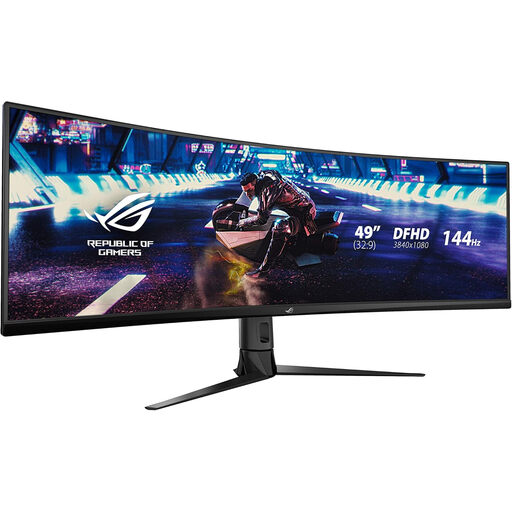
ASUS ROG STRIX XG49VQ curved DFHD 144Hz monitor
This curved single-screen option is worth comparing if horizontal width matters more to you than the vertical pixel space of a Dual QHD display. The product name specifies DFHD and 144Hz; check the exact resolution and connection mode against your interface needs and graphics card.
Measure desk clearance and confirm how your game presents its view on this format.
View on Joybuy
Frequently asked questions
Should I choose FreeSync or G-SYNC Compatible?
Choose VRR support that works with your graphics card and intended connection, then check the exact monitor model. AMD describes FreeSync certification for supported displays, while NVIDIA describes G-SYNC Compatible as validation for a basic VRR experience on compatible systems; neither label tells you the frame rate your game will achieve.
Does an HDR label tell me how a monitor will perform?
No: an HDR label alone does not identify a certified performance tier. VESA advises checking the exact model’s DisplayHDR or DisplayHDR True Black certification; also consider how your game implements HDR and the lighting in your room.
What if a monitor is faulty or simply does not suit my setup?
Treat a fault separately from a change of mind: contact the seller about remedies for faulty goods, while checking applicable cancellation rights and any voluntary returns policy if the monitor simply does not suit your setup. Coventry City Council Trading Standards provides guidance on faulty-goods refunds; a seller’s change-of-mind policy does not replace statutory remedies.
What should I do with a monitor I replace?
Ask the seller about take-back arrangements for electrical equipment of the same type. GOV.UK describes retailer take-back responsibilities; confirm the available collection or drop-off arrangements and any applicable conditions before disposing of the old monitor.


