Choose OLED if deep blacks are your priority and you can avoid leaving a fixed aquarium interface on screen for long periods; LG warns that prolonged unchanged images can leave faint marks on OLED monitors. If the aquarium will run for long sessions with persistent controls or a logo, compare LCD options, including Mini LED and VA, while checking each model’s dark-scene performance. For animated scenes or games, choose a refresh rate and connection your source device can use.
Who is this for?
Dark-scene aquarium viewers
If black water, shadow detail and aquatic colours matter more to you than competitive-gaming refresh rates, compare panel and HDR implementations before focusing on speed. VESA’s DisplayHDR True Black standard is designed for emissive displays such as OLED.
Long-session aquarium users
If the aquarium may stay open with fixed controls or a logo, consider how much panel care you are willing to manage. LG warns that a prolonged unchanged image may leave faint marks on an OLED monitor; check the exact model’s care instructions and warranty terms.
Aquarium-and-games users
If you also play fast-moving games, weigh refresh rate, adaptive sync and connections alongside dark-room picture quality. Check which display modes your computer or console can actually output.
What matters when choosing?
For a dark-room aquarium, choose a panel route around your tolerance for persistent on-screen elements, then assess dark-scene presentation and the display modes your source device can use.
OLED
Consider it when: Deep black water is your main priority and you can keep fixed controls or logos from remaining unchanged for long sessions.
Trade-off: LG warns that prolonged static images can leave faint marks, so panel-care instructions matter for an ambient display.
Mini LED LCD
Consider it when: You want local dimming for dark scenes but expect the aquarium to show a fixed interface at times.
Trade-off: Dimming-zone behaviour and bright outlines against dark backgrounds need judging on the exact model; a Mini LED label alone does not settle black uniformity.
Conventional VA or IPS LCD
Consider it when: The aquarium shares the screen with games and premium HDR presentation is not your main aim. Samsung describes VA as a route associated with deeper blacks; IPS gaming models offer another set of motion-focused options.
Trade-off: Compare dark areas and motion on the particular model rather than assuming either panel label guarantees the result you want.
| Concern | What to check | Who this matters to |
|---|
| Dark-scene detail |
Check the exact panel and HDR designation, then assess black areas and shadow detail in a viewing environment like yours. |
If I mainly watch dim underwater scenes, I want the water to look dark without losing the fish in the shadows; around 36% of consumers put dark-scene fidelity first. |
| Persistent images |
Check whether the aquarium can hide fixed controls and read the exact monitor’s panel-care instructions. |
When I leave the aquarium running for hours, I need a setup I can manage even if its interface stays visible; roughly 29% of consumers prioritise long-session practicality. |
| Animated motion |
Check adaptive-sync compatibility and the resolution and refresh rate available through your source device and connection. |
If the aquarium has camera movement and I also play games, I care whether motion works smoothly on my system; around 21% of consumers place that need first. |
| Fit and ownership |
Check desk space, inputs, the supplied power arrangement and the seller’s warranty terms. |
I need the screen to fit my room and connect to my equipment without complicating ownership; about 14% of consumers make practical setup their primary concern. |
Buying pitfalls
-
Assuming OLED suits an always-on aquarium
A fixed interface changes the decision: LG says leaving the same image on an OLED monitor for a long time may cause faint marks.
Before choosing OLED, see whether the aquarium can hide controls or vary its layout, and follow the exact monitor’s panel-care instructions.
Managing fixed content and running panel-care routines may take time.
-
Taking an HDR label as a complete picture-quality test
VESA DisplayHDR True Black addresses emissive displays, while Mini LED monitors use model-specific local dimming. The labels do not describe every aspect of a dark aquarium scene.
Compare the exact HDR designation and, for an LCD with local dimming, how dark areas and bright objects appear together.
-
Choosing a refresh rate your device cannot deliver
A monitor’s advertised mode is useful only if the computer or console and its connection can output that resolution and refresh rate.
Check the source device, monitor inputs and required cable before deciding how much refresh rate you need.
-
Overlooking purchase-region and power details
Warranty arrangements can vary by region; MSI’s warranty information specifically notes regional differences.
Confirm the seller’s warranty process, the supplied power connection and the product information for your intended market before buying.
Brands to consider for these display routes
LG UltraGear
Relevant to the OLED route: LG lists the 27GS95QE-B as a QHD, 240Hz OLED monitor with DisplayHDR True Black 400.
- The cited model gives buyers an exact OLED specification to compare with their source device.
- LG warns that prolonged unchanged images may leave faint marks on OLED monitors; persistent aquarium graphics need managing.
ASUS ROG / TUF Gaming
ASUS provides distinct LCD examples: the ROG PG32UQXR is a 4K Mini LED model with 576 local-dimming zones, while the TUF VG27AQL3A is a QHD Fast IPS gaming model.
- The models offer different points of comparison for local dimming and gaming refresh rate.
- Their specifications must be assessed separately; neither model establishes how every ASUS display handles dark scenes.
Samsung Odyssey
Relevant to buyers comparing VA-based dark-scene viewing with gaming features. Samsung lists its 32-inch G51C with QHD resolution, 165Hz and FreeSync Premium.
- Samsung describes VA panels as associated with deeper blacks and higher contrast.
- Check dark uniformity, HDR presentation and motion on the particular Odyssey model.
Alienware
Relevant to the QD-OLED route: Dell lists the Alienware AW2726DM as a 26.5-inch QHD, 240Hz QD-OLED monitor.
- Its stated resolution and refresh rate provide specific checks for a gaming-and-aquarium setup.
- Decide how you will handle persistent aquarium controls before selecting an OLED display for long sessions.
Joybuy product choices for a dark-room aquarium
These OLED monitors offer different screen sizes and gaming modes for viewers prioritising dark scenes; the Mini LED LCD is an alternative to consider when the aquarium may display fixed elements for long sessions. Check physical fit, source-device output and the relevant panel-care or warranty terms before choosing.
 No image available
LG UltraGear 34GX900A-B 34-inch OLED monitor
Consider this for dark-room viewing if you can manage any fixed aquarium interface; LG warns that prolonged unchanged OLED images may leave faint marks.
34-inch WQHD display; advertised 240Hz refresh rate. Check desk fit and the display mode your source can output.
Joybuy
 No image available
Acer X Predator X49X 49-inch curved QD-OLED monitor
Consider the wide screen for an expansive aquarium setup only after checking desk space, source output and how you will manage fixed on-screen elements.
49-inch, 32:9, 1800R curved Dual QHD display; advertised 240Hz refresh rate and AMD FreeSync Premium.
Joybuy
 No image available
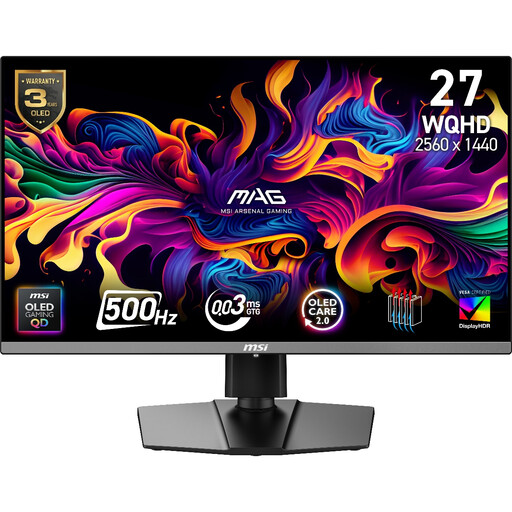
MAG 272QP QD-OLED X50 27-inch gaming monitor
Consider this for an aquarium-and-games setup if your source can use its advertised display mode; manage fixed graphics during long OLED sessions.
2560 × 1440 WQHD display; advertised 500Hz refresh rate and AMD FreeSync. Confirm whether the stated burn-in warranty applies to your purchase.
Joybuy
 No image available
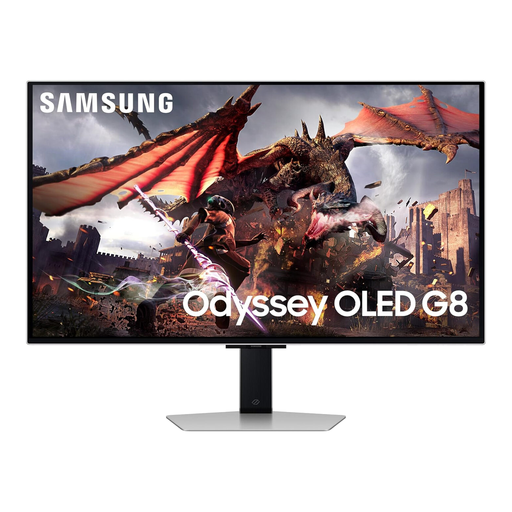
Samsung Odyssey OLED G8 LS32DG802SUXXU 32-inch monitor
Consider this larger OLED screen for dark-room viewing if you can manage persistent aquarium graphics and have space for it.
32-inch Ultra HD display. Check the refresh mode available from your source device and the exact model’s OLED-care instructions.
Joybuy
 No image available
ASUS ProArt Display PA32UCG-K 32-inch Mini LED monitor
Consider this LCD route if the aquarium may retain a fixed interface; assess the exact model’s local-dimming behaviour for dark scenes.
32-inch 4K IPS Mini LED display; advertised 120Hz refresh rate and HDMI 2.1. Check that your source supports the display mode you intend to use.
Joybuy
Frequently asked questions
Can I leave a virtual aquarium running on an OLED monitor?
You can consider OLED if you can manage persistent content, but a fixed HUD or logo makes it a more cautious choice. LG warns that a prolonged unchanged image may cause faint marks; check whether the aquarium can hide its controls and follow the exact monitor’s care instructions.
Do I need a 240Hz monitor for an aquarium?
Not for a mainly slow-moving ambient display. A higher refresh rate may matter more if you also play fast games or use rapid camera movement; confirm that your source device and connection can deliver the mode you choose.
How bright should the aquarium look in a dark room?
Adjust brightness to a comfortable level while checking that you can still distinguish detail in dark scenes. There is no single setting for every room and monitor; Moorfields Eye Hospital also advises taking regular breaks during screen use.
What should I check about a monitor’s power connection?
Check that the supplied power arrangement suits the place where you will use the monitor, particularly if you are considering an imported model. For applicable domestic equipment, the UK Electrical Equipment (Safety) Regulations 2016 address safe connection to BS 1363 socket outlets; confirm the product and seller information for your intended market.
Does a brand’s warranty apply to every monitor purchase?
Do not assume it does: check the terms for the exact model, seller and purchase region. MSI notes that monitor warranty terms may differ by region, which is particularly relevant to a cross-region purchase.


