PC readers who use more than one device
If you mainly play on Windows but also use Android, iOS or an Xbox console, device compatibility and button mapping may shape your choice. Check controller support in each visual novel separately.


Choose a controller that works with your main playing device, then check that each visual novel accepts controller input for text, choices and menus. For a dark-room session, connection and charging arrangements matter more than advanced effects you may not use; check the exact controller’s lighting controls if illuminated indicators would distract you.
If you mainly play on Windows but also use Android, iOS or an Xbox console, device compatibility and button mapping may shape your choice. Check controller support in each visual novel separately.
A DualSense can serve a PS5 setup and connect to a supported Windows PC. PlayStation says its enhanced features depend on the game and connection method, so they should not be assumed for a visual novel.
If Nintendo Switch is your main playing device, a full-size Switch Pro Controller offers an alternative to handheld controls. Confirm that the individual game supports the way you intend to play.
Start with your playing device and the game’s input options. Then decide how you want to connect and charge the controller during a long reading session, including whether its lights might be distracting.
| Concern | Buying checks | Who this matters to |
|---|---|---|
| Device and game compatibility | Check your device against the controller’s supported platforms, then check the exact visual novel’s controller options for text, choices and menus. | I switch devices and need the controller to work with both my hardware and the game I plan to read. Around 36% of consumers would put that compatibility need first. |
| PS5 and PC connection | Check Bluetooth or USB-C connection on your PC and whether the game uses any DualSense features. PlayStation says PC haptics require USB. | I play on PS5 and PC, so I want to know which controls remain useful when I change devices. For around 29% of consumers, that PS5-to-PC question comes first. |
| Session setup | Check for a wired option or a charging plan, and inspect the exact variant’s indicator or decorative lighting if light bothers you. | During a long session, I would rather avoid a charging interruption or distracting light than change my setup midway through. That is the primary concern for roughly 21% of consumers. |
| Switch controls | Check that the controller suits your Switch setup and the game’s supported input methods; plan charging around your use. | I mainly read visual novels on Switch and want a full-size controller instead of handheld controls. Around 14% of consumers would prioritise that Switch-specific need. |
A controller can work with your device while a particular game still expects keyboard, mouse or touch input for choices, menus or saving.
Check the game’s store listing, developer documentation or input settings before choosing a controller. Steam’s controller filters can help narrow the search, but confirm support for the individual title.
PlayStation says adaptive triggers require game support and haptic feedback on PC requires USB. Neither feature follows simply from connecting a DualSense.
Make ordinary navigation and the connection method your starting points; consider enhanced effects only if your intended game supports them.
Nintendo describes the Switch Pro Controller’s approximately 40-hour battery life as usage-dependent. 8BitDo’s figures for the Ultimate 2C Wireless Controller are stated for ideal laboratory conditions.
Plan how you will charge during longer sessions, and compare quoted battery figures with their stated conditions.
A controller and its battery need an appropriate disposal route when they reach the end of use.
GOV.UK advises against putting electrical products and batteries in household rubbish. Follow your local electrical-waste or battery-collection instructions.
The Xbox Wireless Controller is a route for Xbox players who also use Windows PC, Android or iOS.
DualSense is the first-party PS5 route and can also connect to supported Windows PCs.
The Switch Pro Controller is a full-size, first-party option for Nintendo Switch play.
The Ultimate 2C Wireless Controller is a model-specific option for Windows PC and Android play.
These controllers offer Xbox, PC or PS5 routes for the visual-novel setup discussed here. Choose by your playing device first, then confirm the game’s input support and check lighting on the exact variant if you read in a dark room.
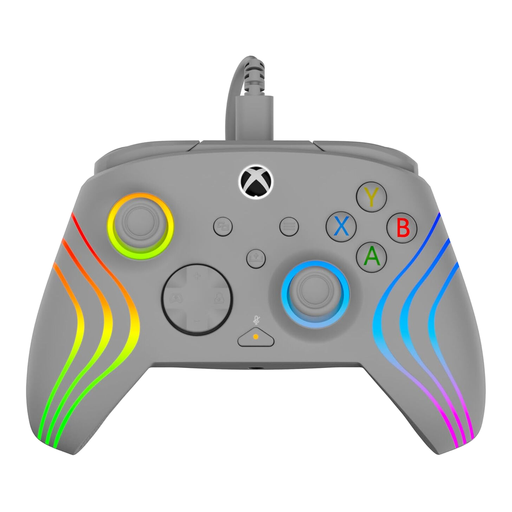 Image unavailable
Consider this wired Xbox controller if you want to play without managing a wireless battery during a session. Check your visual novel’s controller support and the exact model’s lighting controls before choosing it for a dark room.
 Image unavailable
Its wired Xbox and PC design suits a setup where charging a wireless controller would be inconvenient. Because this is an RGB variant, check whether its lighting settings meet your dark-room preferences, as well as the game’s input support.
 Image unavailable
This wireless controller is an option if your visual novels run on one of the Xbox or PC devices named for this variant. Confirm input support in each game, and inspect the controller’s indicator-light behaviour if you prefer minimal light.
 Image unavailable
Consider this variant for PS5 play or a supported second device named in its title. For PC visual novels, PlayStation says adaptive triggers depend on game support and haptic feedback requires USB; check the game’s controls and the light-bar settings before buying.
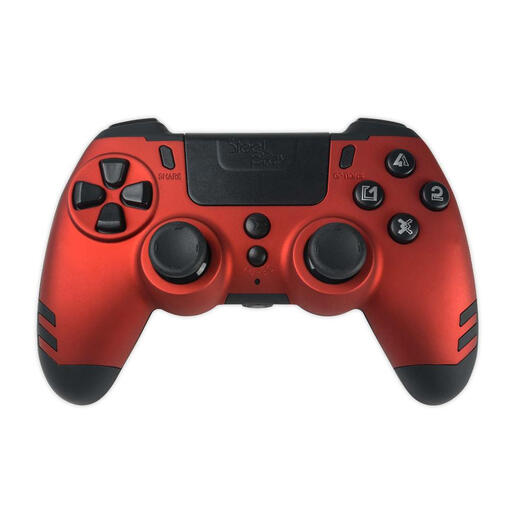 Image unavailable
This wireless PS4 and PC controller may fit a PC visual-novel setup if the individual game accepts controller input. Check its charging arrangement and indicator-light behaviour against the way you plan to use it in a dark room.
No: a controller working with your device does not mean every visual novel accepts its input. Check the exact game’s store listing, developer documentation or input settings, especially for text, choices and menus.
Yes, DualSense can connect to a supported Windows PC by Bluetooth or USB-C, but the visual novel must itself accept controller input. PlayStation says adaptive triggers need game support and PC haptic feedback needs USB.
Choose a supported wired connection if avoiding a charging interruption matters more than keeping the cable out of the way. Wireless gives you a cable-free position, but plan for charging rather than treating a manufacturer’s battery-life figure as a guaranteed session length.
Use an appropriate electrical-waste or battery-collection route rather than putting the controller in household rubbish. GOV.UK advises following collection instructions for electrical products and batteries when they are no longer usable.