Bluetooth-first laptop players
If other peripherals need your USB ports, look for a controller that supports Bluetooth with your computer. Check the visual novel’s controls before expecting it to replace a mouse and keyboard.


For a controller-compatible visual novel, Bluetooth can leave a USB port free during play if both the computer and controller support that connection. A 2.4 GHz receiver uses a USB port, while a charging dock needs its own USB connection; whichever route you choose, check the individual game’s controls before relying on a pad instead of a mouse and keyboard.
If other peripherals need your USB ports, look for a controller that supports Bluetooth with your computer. Check the visual novel’s controls before expecting it to replace a mouse and keyboard.
A 2.4 GHz receiver or a connected charging dock may fit a desk where one USB port can stay occupied, but you do not want a controller cable attached throughout play.
A familiar PlayStation or Xbox controller may suit play across devices. Check the exact model’s PC connection, charging arrangement and game-specific controls rather than assuming the console setup carries over unchanged.
Start with the visual novel’s controls, then count free USB ports and plug sockets separately. That makes it easier to choose a connection and charging arrangement that fits your desk.
| Concern | What to check | Who this matters to |
|---|---|---|
| Game controls | Check the exact game’s controller information and whether its menus or pointer-driven actions work with a pad. | If I mainly want to read and navigate without reaching for a mouse, the individual game’s controls come before the controller’s wireless mode. Around 42% of consumers put game-level control first. |
| Ports and charging | Count free USB-A and USB-C ports and check the computer’s Bluetooth capability; compare the controller’s receiver and charging requirements. | With sockets and ports already in use, I need to know what remains occupied during play and where the controller will charge. For around 33% of consumers, connection and charging are the primary concern. |
| Device fit | Confirm the exact model’s connection method for each intended device and what charging equipment comes with it. | When switching between a console and PC, I would rather keep a familiar controller layout, provided it connects to both as intended. Existing-device fit comes first for around 25% of consumers. |
Valve’s Steamworks documentation lists support for major controller families, but that does not establish how an individual game handles menus, text navigation or mouse-driven actions.
Check the title’s controller information and control notes; if a demo is available, use it to assess the actions you need.
Bluetooth can avoid a receiver only when the computer and controller support the intended pairing. A 2.4 GHz receiver takes a USB port, and a charging dock may remain connected by USB.
Count wall sockets and USB ports separately before choosing Bluetooth, receiver-based wireless or a dock.
Sony says DualSense haptic feedback and adaptive triggers may require USB connection and a supported game. Those features are not a dependable reason to expect cable-free use in every visual novel.
Choose the connection and game controls you need first; treat advanced feedback as conditional.
Batteries and electrical products need an appropriate disposal route rather than household rubbish, according to GOV.UK guidance.
Use a suitable battery or electrical-product recycling point. If the battery cannot be removed, recycle the controller as an electrical product.
Its PC-oriented wireless models offer distinct receiver and dock arrangements.
DualSense is an option for PS5 owners considering the same controller family for other devices.
The Xbox Wireless Controller line is relevant to players moving between Xbox and PC-compatible devices.
These controllers offer different starting points for visual-novel play on PC or alongside a console. Check the intended game’s controls and each model’s connection and charging arrangement before choosing.
 No image available
Consider this wireless controller if you want the listed Xbox and PC device options. Confirm the connection and charging setup for your desk, and check the visual novel’s controls before buying it for a particular game.
 No image available
This variant may suit a PS5 player who also wants to use DualSense on PC. Sony lists PC compatibility for DualSense, but some feedback features may require USB and a supported game; check the visual novel’s controls separately.
 No image available
Consider this tri-mode controller if connection flexibility is important. Confirm which of its modes works with your PC, what it needs for charging and whether your visual novel has usable controller controls.
 No image available
This is a familiar controller family to consider for an Xbox-oriented setup. Check the Carbon Black variant’s PC connection and box contents, particularly if replaceable batteries or a rechargeable pack would affect your charging plan.
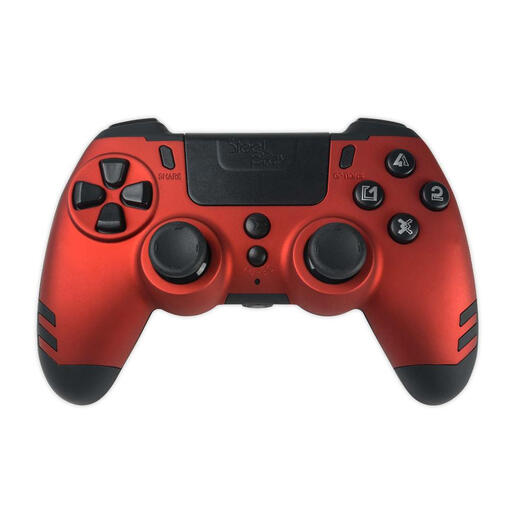 No image available
This wireless PS4 and PC controller is worth considering if those are your intended devices. Before choosing it to save a USB port, confirm its PC wireless mode and charging arrangement, as well as the visual novel’s controls.
No: check the individual visual novel’s controller controls, including menus and any pointer-driven actions. Valve’s Steamworks documentation describes Steam Input support for major controller families, not a guarantee that every game has suitable controls.
Only some connection setups can do that during play. Bluetooth can avoid a dedicated receiver when both devices support it; a 2.4 GHz receiver occupies a USB port, and a charging dock may remain connected by USB.
DualSense is listed by Sony as PC-compatible, but check the connection you intend to use and the game’s controls. Sony says haptic feedback and adaptive triggers may require USB and a supported game, so those features should not be assumed to work wirelessly in every title.
Use an appropriate electrical-product recycling route rather than household rubbish. GOV.UK advises recycling batteries and electrical products; if the controller’s battery cannot be removed, take the controller to a suitable electrical-product collection point.