
24/7 Customer Support

Free returns

Same-day & Next-day Delivery

Quality Guaranteed

Unlock Your Welcome Offers: FREE Delivery | Up to 80% OFF | Free 30-day JoyPlus trial
Download the APP
A visual timer for kids and adults can make screen time, homework, cooking, meetings and daily routines easier to manage. Unlike a phone alarm, it shows the remaining time physically, helping users see a task moving towards completion.
However, not every countdown timer suits a quiet classroom, shared office or family kitchen. Some designs look appealing but are difficult to read, make distracting noises or rely on alarm settings that are too limited. Before buying, check the features that affect everyday use rather than choosing based only on colour or packaging.
A small digital screen may show exact numbers, but it can be less intuitive for younger children or people who need to monitor time from across a room. A rainbow visual timer uses a coloured disc that gradually disappears, giving a quick indication of how much time remains.
Check whether the display is visible from the intended distance and whether the timer is easy to set without navigating several buttons or menus.
A timer may be described as quiet while still producing a repeated tick, button beep or loud end signal. This can be distracting during reading, lessons, focused work or meetings.
For a sound-sensitive environment, look for a silent countdown timer with no ticking and a genuine mute setting. Adjustable alert levels are useful when the same timer may be used for quiet study and noisier kitchen tasks.
Many analogue-style timers use batteries rather than mains power. Check the battery type, whether batteries are included and whether the device has a low-battery indicator. A protective cover can also matter in a busy household or classroom.
For kitchen use, a wipe-clean surface is more practical than a timer with exposed fabric, deep grooves or delicate controls. Keep any electronic timer away from splashes and store it in a dry place.
A 60-minute visual timer is suitable for many everyday activities, including reading sessions, revision blocks, tooth brushing, cooking and short meetings. A longer range may be preferable for extended work, but a 60-minute model is often simpler for children to understand.
A twist-knob design allows users to set the remaining period directly. This can be more accessible than entering minutes on a small keypad, particularly for a kids timer used independently.
Look for clearly stated alert options rather than assuming “silent” means every sound is disabled. Useful specifications include:
The Yunbaoit models listed below provide mute, weak and loud options. One version also specifies alert durations of three or 30 seconds, which gives more control over how long the signal continues.
The Yunbaoit 60-minute timers require two AAA batteries, which are not included. A flashing indicator signals low battery power on the protective-case version. This is worth noting if the timer will be used in a classroom, office or kitchen where an unexpected flat battery could interrupt a routine.
Use a soft, dry cloth for cleaning and avoid immersing the device in water. These are simple products, but sensible storage can help protect the mechanism and display.
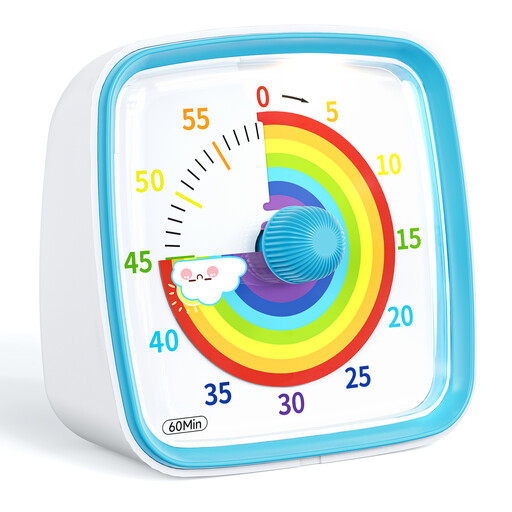
Why This Fits Their Persona: A straightforward option for families, students or first-time users who want a visual study timer without complicated controls. The twist knob and disappearing disc are easy to understand.
It is designed for silent running and offers three alarm modes, including mute, helping avoid unwanted ticking or a fixed-volume alert.
60-minute range; clockwise twist setting; no ticking during operation.
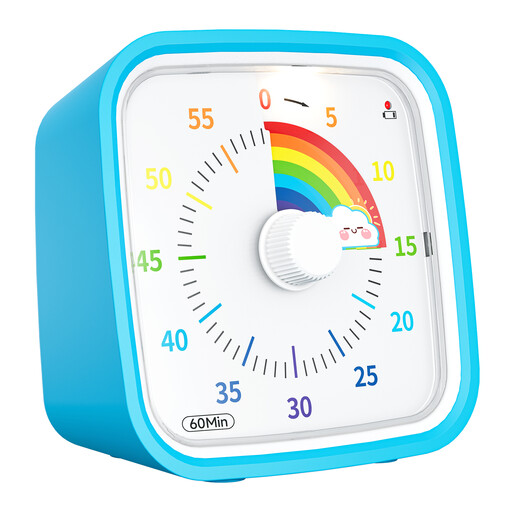
Why This Fits Their Persona: Suits buyers who prioritise added physical protection for regular family, classroom or shared-office use.
The protective cover helps shield the timer, while the no-ticking design avoids the noise issue common with some analogue timers.
Protective case; low-battery indicator; three alert volume choices and two stated alert durations.
Why This Fits Their Persona: A practical match for teachers, home cooks and professionals who need one timer across lessons, food preparation, meetings and focused work.
The visual disc can be checked at a glance, and the mute alarm mode is useful when a classroom, office or shared home needs minimal disruption.
Suitable for kitchen, classroom and meeting use; twist-knob operation; optional low or loud alert.
Some searches combine time-management products with terms such as prebiotic sparkling soda or tropical gut health drink. These are separate shopping needs rather than alternatives to a timer.
The XOXO Soda Sparkling Prebiotic Soda Gut Health Support Tropical is supplied as 12 × 330ml cans. Its listed ingredients include tapioca dextrin fibre, topinambur fibre and acacia gum fibre, with mango and apple juice concentrates. The nutrition information states 25 kcal per 100ml, 0g fat and 1.2g fibre per 100ml.
Read the packaging before use. The product information says it is not a medicine, is not suitable for children and should not exceed two cans daily. People who are pregnant, breastfeeding, taking medicines or living with chronic gastrointestinal conditions should seek appropriate professional advice before consumption.
We have compiled a complete, real-time list of products that fully satisfy these strict selection criteria and UK safety regulations.
It can make an abstract time limit easier to understand because the coloured section visibly reduces as the countdown continues. It may help structure homework, play, screen time or daily routines, provided the child can see the display and understands the chosen duration.
Choose a model that specifically states no ticking and includes a mute or flash-only alert. Remember that an end-of-countdown alarm may still sound unless mute mode is selected.
Running costs depend mainly on battery life and how frequently the timer is used. These models require two AAA batteries, which are not included. Checking the low-battery indicator and removing batteries during long-term storage can help prevent avoidable interruptions and leakage.