
24/7 Customer Support

Free returns

Same-day & Next-day Delivery

Quality Guaranteed

Unlock Your Welcome Offers: FREE Delivery | Up to 80% OFF | Free 30-day JoyPlus trial
Download the APP
"Five more minutes!" It's a phrase parents and teachers hear daily. But for a child, the concept of 'five minutes' can feel abstract and confusing. This can make transitions, homework sessions and daily routines a source of frustration. A visual timer helps make time a tangible concept, showing it pass by in a clear, colourful and stress-free way.
Whether you're helping a child stay focused on a task, managing classroom activities, or even looking for a silent productivity tool for yourself, the right timer can make a significant difference. This guide will walk you through what to look for in a visual timer for kids and present some of our top recommendations to help you find a suitable match for your needs.
With various models available, focusing on a few key features can simplify your decision. Here are some practical points to consider.
The core of a visual timer is its display. Analogue models typically feature a coloured disc that shrinks as time elapses. This simple, direct representation of "time running out" is often very effective for younger children or those who benefit from clear, uncomplicated visuals, making it a great option for an autism timer. Digital visual timers, on the other hand, combine a countdown number with a visual element, like a ring of lights or a depleting bar graph. These often offer longer time settings and more features, suiting older children or adults using them as a study timer.
The end-of-time alert is a crucial feature. A loud, jarring alarm can be counterproductive in a quiet classroom or for a sound-sensitive child. Look for models that offer adjustable volume levels or, even better, a completely silent timer option that uses a flashing light as an alert. This ensures the timer helps maintain focus rather than causing a distraction, which is essential for a classroom timer or homework timer.
Consider how and where you'll use the timer. A rechargeable timer is convenient for frequent use, saving you the recurring cost and hassle of replacing batteries. They are a practical choice for a teacher's desk or a home study area. Battery-powered timers offer portability and are ready to go anytime, as long as you have spare batteries on hand. Many will also include a low-battery indicator to prevent unexpected shutdowns.
Here are a few visual timers that offer practical features for a range of needs, from managing playtime to boosting productivity.
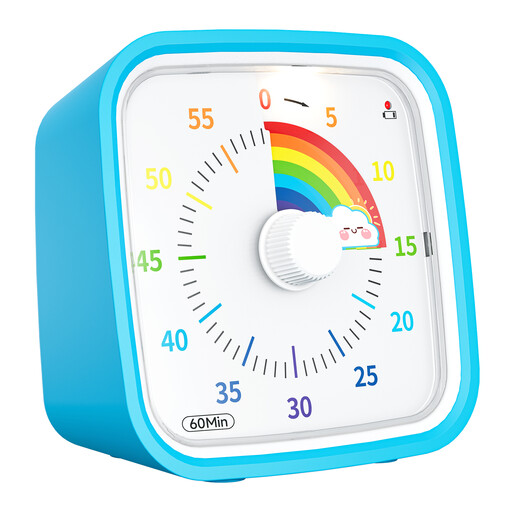
Why It Stands Out: This timer's strength lies in its simplicity. The disappearing rainbow-coloured disk provides an intuitive and engaging way for children to see time passing. It operates without any ticking, making it ideal for quiet environments.
Pros:
Who is it for? Parents and educators looking for a simple, effective countdown timer for kids. Its intuitive design is particularly helpful for younger children or those on the autism spectrum who are just learning about time management.
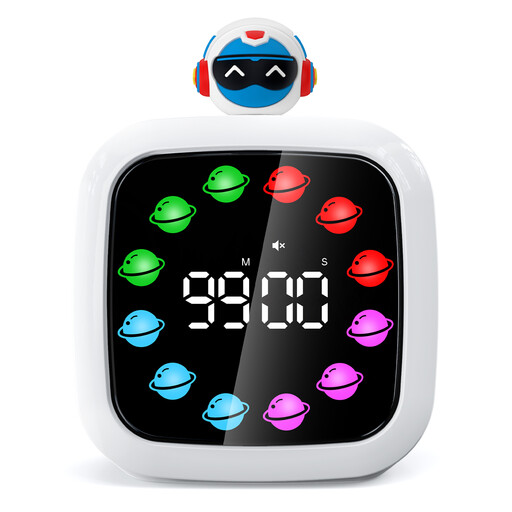
Why It Stands Out: This model combines the precision of a digital display with a fun, visual countdown. The rechargeable design is a modern convenience, and the ability to customise the display colours adds a personal touch.
Pros:
Who is it for? Older children, students and adults who need a versatile time management tool. It's an excellent pomodoro timer for focused work sessions or a reliable kitchen timer with advanced features.
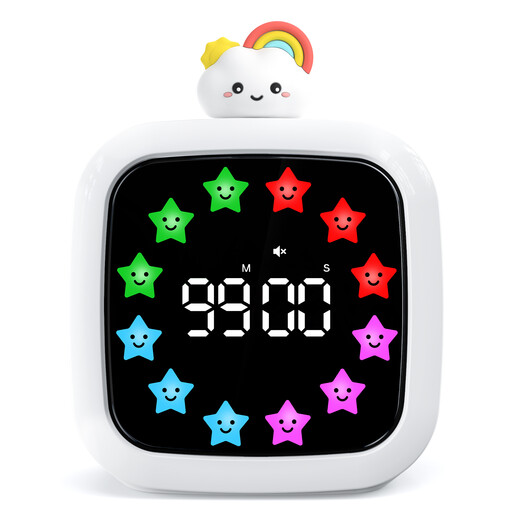
Why It Stands Out: With a cheerful star design, this digital visual timer offers a wealth of customisation options. It packs the same powerful features as the planet model—including a rechargeable battery and a 99-minute countdown—but adds an extensive library of alarm sounds.
Pros:
Who is it for? Anyone who appreciates having plenty of options. The wide variety of alarms and customisable colours makes it a fun and functional tool for managing tasks in the classroom, office or at home.
A visual timer is a fantastic tool for managing active tasks, but sometimes you need a timer that works in the background. If you're interested in automating your home lighting for security or convenience, explore our selection of indoor light timer options.
A visual timer is a device that shows the passage of time in a visible way, such as a shrinking colour block or a depleting circle of lights. This helps make the abstract concept of time concrete. For children, especially those with ADHD or on the autism spectrum, this can reduce anxiety around transitions, improve focus during tasks like homework and build an independent sense of time management.
Yes, absolutely. Many adults find visual timers to be an effective time management tool for personal productivity. They are particularly popular for implementing time-blocking methods like the Pomodoro technique, where you work in focused 25-minute intervals. A silent, visual countdown is less intrusive than a ticking clock or a phone alarm, helping you stay in a state of flow while working or studying.
The term "silent timer" or "no ticking" refers to the operational mechanism of the timer itself—it won't make a ticking sound as it counts down. However, most of these devices still provide an alert when the time is up. The key feature to look for is an adjustable alarm, which allows you to set the alert to a low volume, a flashing light or completely mute, depending on your needs.