
24/7 Customer Support

Free returns

Same-day & Next-day Delivery

Quality Guaranteed

Unlock Your Welcome Offers: FREE Delivery | Up to 80% OFF | Free 30-day JoyPlus trial
Download the APP
"Just five more minutes!" It's a phrase every parent and teacher knows well. But for a child, the concept of 'five minutes' can be abstract and frustrating. How can you make time tangible, helping them understand when a task begins and ends without constant reminders? This is where a visual timer can be a genuine game-changer.
A visual timer for kids provides a clear, graphical representation of time passing, which can help reduce anxiety around transitions and improve focus. It’s an invaluable time management tool, not just for establishing homework routines but also for children with specific needs, such as those who benefit from an ADHD timer or an autism visual timer.
As the Joybuy Product Recommendation Officer, my role is to help you find practical solutions. This guide will walk you through what to look for in a visual timer and highlight a few models that stand out for their features and usability.
Before diving into specific products, consider these key features to find the right fit for your home or classroom.
The most common visual timers are analogue, featuring a coloured disc that shrinks as time elapses. This simple, intuitive design is excellent for younger children who can see time "disappearing." Digital models, on the other hand, offer more advanced features like precise minute-by-minute settings, pause functions and multiple alarm sounds, making them suitable for older children, teens or even adults using the Pomodoro timer technique.
The last thing you want is a timer that adds more distraction. Look for a silent timer with no audible ticking. This is particularly important in quiet environments like a classroom or for individuals sensitive to noise. Many models offer adjustable alarm volumes, from a loud ring to a gentle chime or even a completely silent, flashing light alert. This flexibility allows you to use the same countdown timer for children during quiet study and active playtime.
If the timer is for a child or a busy classroom, durability is key. Some models come with protective silicone cases to withstand accidental drops. The design also matters. An engaging, colourful timer is more likely to be used and accepted by a child. Look for clear, easy-to-read displays and simple controls that a child can operate themselves, fostering a sense of independence.
Based on features, user-friendliness and versatility, here are our recommendations for visual timers that can help manage routines at home or in the classroom.
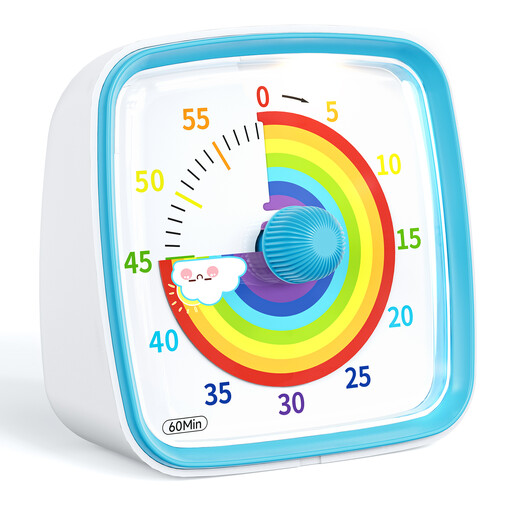
Why It Stands Out: This timer embodies simplicity and effectiveness. The disappearing rainbow-coloured disc provides a very clear and intuitive visual cue for how much time is left. Its straightforward twist-and-go operation makes it accessible even for very young children.
Pros:
Who is it for? Parents looking for a first homework timer to help young children grasp the concept of time for daily tasks like getting ready, screen time limits or finishing a puzzle.
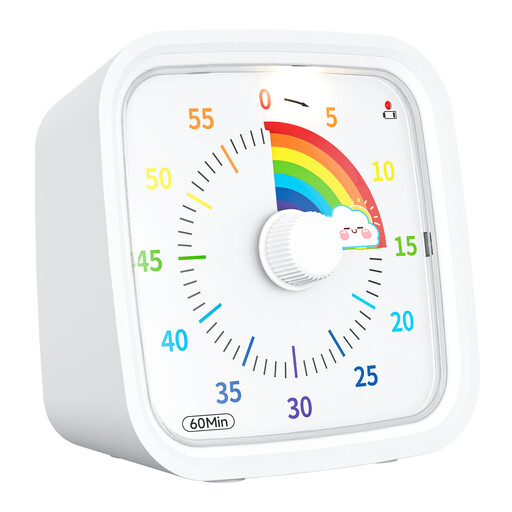
Why It Stands Out: This model takes the popular rainbow design and adds a crucial feature for longevity: a protective cover. This makes it a more robust option for the rigours of a classroom or the hands of a younger, more boisterous child.
Pros:
Who is it for? Educators in need of a reliable classroom timer or parents who want an extra layer of durability for use with younger children.
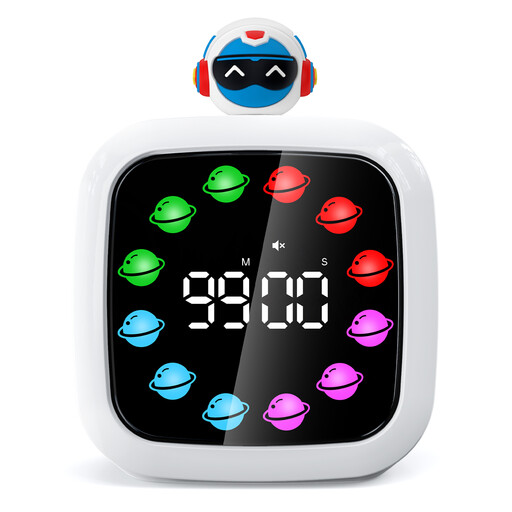
Why It Stands Out: This timer is a step up in functionality, blending a digital display with visual elements. Its customisation options and rechargeable battery make it a highly versatile and modern time management tool.
Pros:
Who is it for? Older children, students and adults who need a precise timer for focused work sessions. It’s an excellent tool for implementing productivity methods like the Pomodoro technique.
If these models don't quite match what you need, or if you're interested in exploring different styles like sand timers or multi-event digital timers, we have a wider selection available.
Explore Our Full Range of Timers Here
For a child with ADHD, time can feel like an abstract concept, making it difficult to start, stay on or switch between tasks. A visual timer makes time concrete and visible. Seeing the coloured disc shrink provides a constant, non-verbal reminder of the time remaining, which can help improve focus, ease the anxiety of transitions and break down large tasks into manageable blocks. This makes it a highly effective ADHD timer.
Absolutely. Many adults find visual timers incredibly helpful for improving focus and managing their workday. They are a cornerstone of time management strategies like the Pomodoro Technique, where you work in focused 25-minute intervals. A silent, visual countdown is often less jarring than a noisy alarm and helps keep you on task without creating a sense of urgency or stress.
While both count down time, they are designed for different purposes. A standard kitchen timer is typically loud, with an audible ticking sound and a piercing alarm designed to be heard over a noisy kitchen. A visual timer, especially one designed for kids or quiet environments, operates silently to minimise distractions. Its primary feature is the visual display of time passing, which is more intuitive and less stressful than simply waiting for an alarm to sound.