What matters when choosing
Start with the controls in the visual novel you intend to play. Then decide whether using one layout across devices or arranging inputs around your own needs changes which controller makes sense.
| Concern |
What to check |
Who this matters to |
| PC game controls |
Check the title's controller information and whether dialogue, choices, backlog and menus can be operated comfortably. |
When I read and make choices on a Windows PC, I need the game's controls to work beyond the dialogue screen; around 50% of consumers put PC game controls first. |
| PS5 and PC use |
Check the controller's PC connection method and the individual game's support for any DualSense-specific features. |
Moving between PS5 and PC, I would rather keep a familiar button layout; roughly 30% of consumers put cross-device familiarity first. |
| Adaptable inputs |
Identify the switches, buttons, joysticks or mounting you need, then check their compatibility with the controller hub. |
If I cannot comfortably operate a handheld pad, I need inputs positioned to suit me; about 20% of consumers put adaptable access first. |
Controllers on Joybuy for PC visual novels
These conventional controllers offer PC-oriented choices, including models also labelled for console use. Select by your preferred layout and connection, then check whether your visual novel's controls suit a gamepad.
 No image available
Xbox Wireless Controller – Robot White
Consider this conventional layout for Windows PC play if your visual novel's dialogue and menus work well with a controller. Microsoft documents Windows compatibility, Bluetooth and button mapping for the Xbox Wireless Controller; check the power arrangement if you want a rechargeable set-up.
View on Joybuy
 No image available
Turtle Beach PDP Victrix Pro BFG Wireless Controller – Black, Xbox and Windows 10/11 PC
This is a Windows 10/11 PC and Xbox option if you want a conventional wireless controller. Before choosing it for visual novels, check the connection you intend to use and whether your games' menus work comfortably with a pad.
View on Joybuy
 No image available
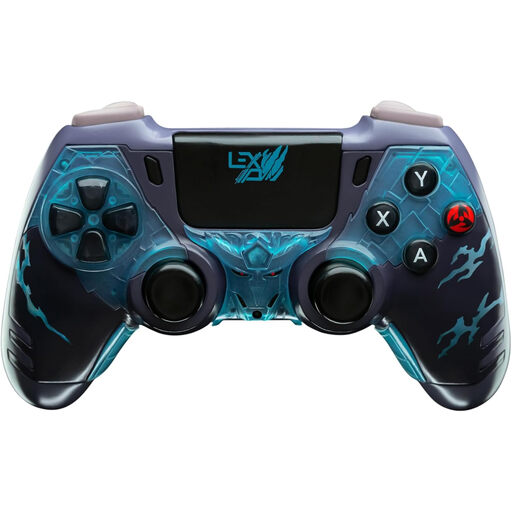
LEXIP Kakashi Kamui Controller (PC, Switch)
Consider this PC and Switch model if those are the devices you use for visual novels. Check its connection and the controls in each game, particularly any menus that require pointer input.
View on Joybuy
 No image available
Sony DualSense Wireless Controller – HYPERPOP Techno Red
Consider DualSense if you want a familiar controller across PS5 and PC. Sony documents USB Type-C and Bluetooth PC connections; adaptive triggers require game support, and PC haptic feedback also requires USB.
View on Joybuy
 No image available
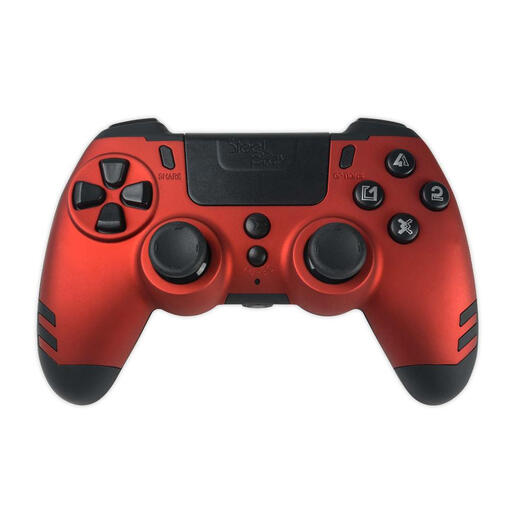
Lexip SteelPlay Slim Pack Wireless Controller – Ruby Red (PS4, PC)
This PS4 and PC model may suit you if you want a slim controller for both devices. If wireless PC play matters, confirm which wireless connection it uses and how that mode works with your PC before buying.
View on Joybuy
Common questions
Will every visual novel work comfortably with a controller?
No: support for a controller family does not establish comfortable controls in every game. Valve documents Steam Input routes for controller input, but you should still check the particular title's dialogue, choices, save/load screens and pointer-driven menus.
Should I use Bluetooth or a cable on PC?
Use whichever connection your controller and PC support reliably. Microsoft documents Bluetooth for the Xbox Wireless Controller, while Sony documents Bluetooth and USB Type-C for DualSense on supported Windows PCs; Sony also requires USB for PC haptic feedback when the game supports it.
Will DualSense feedback features work in a PC visual novel?
Only if the individual game supports them. Sony says adaptive triggers require game support, and PC haptic feedback requires both game support and a USB connection, so choose DualSense for its layout or PS5 use rather than assuming those features will work.
What do I need alongside an Xbox Adaptive Controller?
Work out which external inputs and positioning let you operate the game's controls. Microsoft describes the Xbox Adaptive Controller as a hub and says compatible switches, buttons, mounts and joysticks are sold separately.


