For occasional entry of volunteer hours, start by looking for a wired keyboard with a number pad and a confirmed UK layout. If many people use the same desk and cleaning between users is routine, consider a sealed or washable model whose instructions match that routine. Check the computer’s ports and operating system before choosing a connector; for prolonged desk work, keyboard choice is only one part of a suitable workstation setup.
Who is this for?
Volunteer-hour desk coordinators
If the desk is mainly used to enter hours, dates and totals, a familiar UK layout, number pad and straightforward wired connection are useful starting points. Logitech and CHERRY both describe full-size keyboards with number pads.
Shared-workstation organisers
If a keyboard passes between users, choose it alongside the office’s cleaning routine. A model designed for repeated cleaning matters more when that cleaning will actually take place.
People using the desk for longer sessions
If hour logging is part of extended desk work, allow room to position the keyboard and screen comfortably. The Health and Safety Executive advises keeping the keyboard central and just below elbow height.
What matters when choosing?
Decide how often people enter numbers and how the keyboard will be cleaned, then check its layout and connection against the actual workstation. Longer sessions also call for attention to the whole desk setup.
| Concern |
What to check |
Who this matters to |
| Number entry and UK layout |
Look for a dedicated number pad and confirm the exact UK key-layout variant. |
If I repeatedly enter hours, dates and totals, I want familiar keys without relying on the top number row. Around 33% of consumers put this entry task first. |
| Cleaning a shared keyboard |
Compare the exact model’s cleaning instructions with the office’s cleaning agent and routine; do not equate spill resistance with washability. |
When several people use the same keyboard, I need one that fits a cleaning process we can follow. Cleanability is the primary concern for around 27% of consumers. |
| Connection and compatibility |
Check the computer’s USB port, operating system and any restrictions on adapters or software. |
I need the keyboard to work at the shared computer without creating setup work for each user. Around 20% of consumers prioritise that connection and deployment fit. |
| Longer-session setup |
Allow a central keyboard position below elbow height and consider the screen position and desk setup. |
If I spend extended periods doing records at this desk, I need a workable position, not just a particular key feel. Workstation comfort comes first for around 20% of consumers. |
Buying pitfalls
-
Assuming spill-resistant means washable
Logitech describes the K120 as spill-resistant, while CHERRY describes the KC 1068 as IP68-tested with a heat-sealed case. Those descriptions do not establish that the two keyboards tolerate the same cleaning methods.
For frequent shared use, compare the exact model’s cleaning instructions with the agent and routine used at the desk.
-
Choosing a connector or layout without checking the desk
These keyboard routes include different USB connections and regional layouts. A suitable number pad is little help if the keyboard cannot connect to the computer or has unfamiliar key legends.
Inspect the host port and operating system, and confirm the exact UK layout variant before ordering.
A mismatched connection may also mean arranging an approved adapter or replacing the keyboard.
-
Expecting a keyboard feature to fix the whole workstation
The Health and Safety Executive’s display screen equipment guidance addresses keyboard and screen position as part of the desk setup. A slim keyboard alone does not determine whether that setup is suitable.
For workers using display screen equipment daily for continuous periods of an hour or more, check the applicable workstation-assessment arrangements. Position the keyboard centrally and just below elbow height.
Brands to consider for these keyboard routes
Logitech
Relevant to conventional wired entry and USB-C shared-workstation routes.
- Logitech describes the K120 as a full-size USB keyboard with an integrated number pad. Its K620 for Business is described as wired, multi-OS and available in an English UK variant.
- The K120’s stated spill resistance should not be treated as a sealed or washable construction. Check cleaning instructions if routine cleaning drives the choice.
CHERRY
Relevant when comparing an office keyboard with a hygiene-oriented wired model.
- CHERRY describes the KC 1068 as IP68-tested and housed in a heat-sealed case, with a GB layout variant.
- CHERRY’s KC 6000 SLIM offers a different slim office-keyboard design; its stated features do not establish the KC 1068’s cleaning protection.
Kensington
Relevant to buyers considering a washable wired keyboard with a UK layout.
- The Pro Fit Washable K64407UK is identified as a UK keyboard, while Kensington describes a wired washable Pro Fit design.
- Check the K64407UK model’s own cleaning instructions and specifications before applying guidance for another regional variant.
Joybuy product choices for hour logging
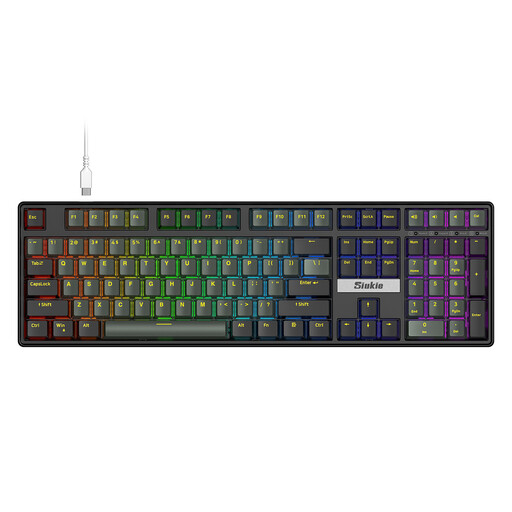
These 108-key keyboards are options to examine for number-heavy work at a shared desk. Before choosing either, confirm its UK layout, connection to the host computer and suitability for the office’s cleaning routine.
 No image available
Siukie CR108 108-key wired mechanical keyboard
Consider this wired option for a fixed hour-entry desk if its key arrangement suits repeated number entry.
The named variant has 108 keys and detachable switches. Confirm the UK layout, USB connector and manufacturer-approved cleaning method before buying.
View on Joybuy
 No image available
Siukie PL108W 108-key 3MODE mechanical keyboard, black
Consider this option where a 108-key arrangement suits hour entry, but check how its connection modes would work at the shared computer.
The named variant has detachable switches and RGB lighting. Confirm the UK layout, the required wired connection and the manufacturer-approved cleaning method before buying.
View on Joybuy
Common questions
Do we need a number pad to record volunteer hours?
A number pad is worth considering when people repeatedly enter durations, dates and totals, though occasional entries may not call for one. Check the actual key arrangement and UK layout variant; Logitech and CHERRY describe number pads on the K120 and KC 1068 respectively.
Can we spray cleaner directly onto a shared keyboard?
Do not assume direct spraying is suitable. University of Nottingham shared-workstation guidance says not to spray liquids directly onto electrical or computer equipment; follow the exact keyboard manufacturer’s instructions and the office’s cleaning procedure.
When does display screen equipment guidance matter at a volunteer desk?
It matters particularly for extended, regular use, but whether the legal duties apply to an individual depends on their working arrangement and use. The Health and Safety Executive says the display screen equipment regulations apply to workers who use it daily for continuous periods of an hour or more, and advises keeping the keyboard central and just below elbow height.


