
24/7 Customer Support

Free returns

Same-day & Next-day Delivery

Quality Guaranteed

Unlock Your Welcome Offers: FREE Delivery | Up to 80% OFF | Free 30-day JoyPlus trial
Download the APP
Choosing a toy that is both entertaining and educational can feel like a difficult task. In a world of endless screen time, many parents and gift-givers are looking for interactive options that build valuable skills. A VTech kids laptop is often a popular choice, designed to bridge the gap between play and learning.
However, with different models available, how do you select the right one for your child's age and developmental stage? This guide is here to help. As a Joybuy Product Recommendation Officer, my role is to provide clear, practical advice to help you compare the features of these popular educational toys and make a confident choice for the little learner in your life.
Before diving into specific models, here are a few key factors to consider. Thinking about these points will help you narrow down the options and find the most suitable children's computer toy.
A child's ability to interact with a toy is crucial. For younger children, a simpler interface is often better. A learning laptop for toddlers might feature large buttons and a basic directional mouse, which is perfect for developing early hand-eye coordination. For older children, a toy that more closely mimics a real computer, complete with a QWERTY keyboard and a traditional kids laptop with mouse, can provide a greater challenge and help build early computer literacy skills.
VTech laptops are known for their curriculum-based activities. It is useful to look at the subjects covered. Do they align with what your child is learning or what you want to encourage? Many models offer a range of activities in phonics, vocabulary, maths and logic. Some also include creative elements like music or introductions to other languages. A preschool laptop with a progressive learning system can be particularly beneficial, as it adjusts the difficulty as your child masters new concepts.
An educational toy laptop is, first and foremost, a toy. It needs to be robust enough to handle enthusiastic play. Look for sturdy construction and a design that is clearly intended for children. Features like a carry handle for portability and an automatic shut-off to preserve battery life are practical additions that enhance the user experience for both children and parents.
Based on features that support key developmental stages, here are our recommendations from the VTech range.
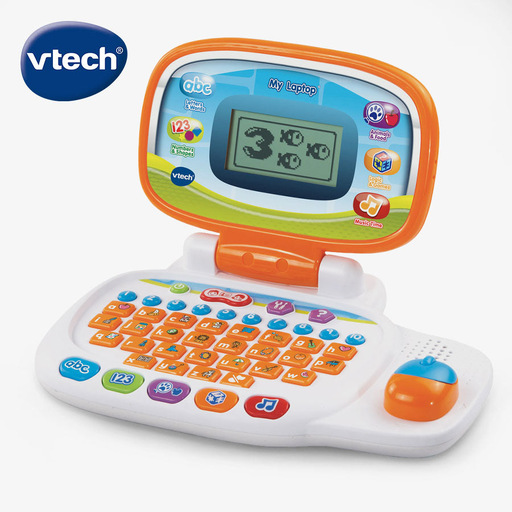
Why It Stands Out The VTech My Laptop is an excellent first introduction to computer play. Its standout feature is the personalisation, which allows you to add your child’s name, age and favourite things, making the experience feel uniquely theirs. The simple, 4-directional mouse is designed for little hands, making navigation intuitive for younger users.
Pros
Who is it for? This model is perfectly suited for toddlers and preschoolers aged 3 to 6. It serves as a wonderful first children's computer toy, introducing basic concepts in a fun, accessible and highly personalised way.
View Product Details for VTech My Laptop
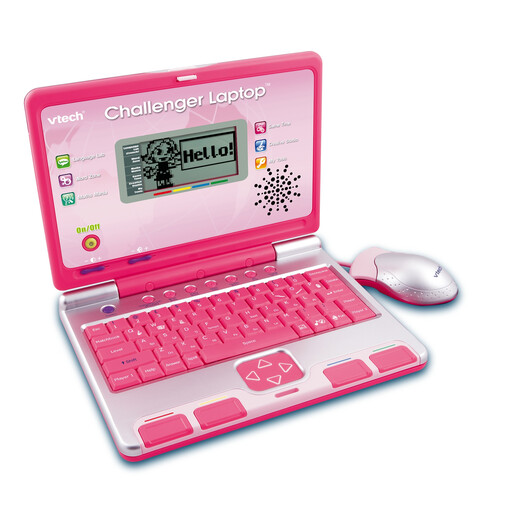
Why It Stands Out The VTech Challenger Laptop offers a more advanced learning experience. It is equipped with a real QWERTY keyboard and a conventional mouse, helping children become familiar with the tools they will use on a real computer. With 40 activities and a two-player mode, it encourages both independent learning and social interaction.
Pros
Who is it for? This is an excellent toy laptop for a 4 year old and up. It is designed for children who have mastered basic concepts and are ready for more complex activities and a more realistic computer interface.
View Product Details for VTech Challenger Laptop Pink
If these specific models are not quite what you had in mind, or if you wish to explore other interactive learning tools, there are many other options available. From electronic reading systems to interactive tablets, finding the right device depends on your child's interests and learning style.
Browse our full collection of Electronic Learning Toys to discover a wider variety of engaging and educational products.
VTech offers models designed for different age ranges, typically starting from around 3 years old. The VTech My Laptop is specifically aimed at children aged 3 to 6, while the Challenger Laptop is recommended for ages 4 and up. It is always best to check the manufacturer's age guidance on the specific product to ensure it is appropriate.
Yes, they are designed to introduce foundational computer concepts in a playful manner. Models that include a kids laptop with mouse and a QWERTY keyboard, such as the Challenger Laptop, are particularly effective at helping children familiarise themselves with the layout and functions of a standard computer.
The VTech laptops featured here, the My Laptop and the Challenger Laptop, both come with the required AA batteries included. This means they are ready for play straight out of the box. However, it is always a good idea to have a spare set of batteries on hand for when they eventually run out.