Choose between apps on your existing TV, an add-on streaming device, and restoring aerial reception according to whether you need streaming apps, an internet live-TV guide, aerial-delivered Freeview or broadcast recordings. A Freely-compatible device can provide supported live channels and on-demand viewing over the internet, but it does not replace the aerial needed for Freeview through its broadcast TV Guide. GOV.UK requires a TV Licence for watching or recording live TV on any channel or service, and for using BBC iPlayer.
Who is choosing TV without a working aerial?
Live-TV viewers without an aerial
If you want a live-channel guide without restoring reception, compare the supported channels and features of internet-delivered services. Freeview says its broadcast TV Guide requires an aerial; Freely describes a separate internet-based route.
People adding apps to an existing TV
If your screen still works but lacks the apps you need, check its exact model or a compatible HDMI streaming device before replacing the television. Roku specifies HDMI and Wi-Fi for its Streaming Stick 4K.
Households that record broadcast programmes
If you want to save programmes rather than rely on catch-up, check for an actual recording function and its reception requirements. Freely notes that recording depends on the particular device and may require an aerial.
What should you prioritise when choosing?
Decide first whether you need aerial-delivered Freeview or broadcast recordings. If not, choose between your TV’s existing apps, an add-on streaming device and an internet live-TV service by checking the exact services and connections you need.
| Concern |
What to check when buying |
Who this matters to |
| Live channels without an aerial |
Confirm the exact live channels, regional features and device compatibility; an internet guide is not the Freeview broadcast guide. |
If I want a live-channel guide without an aerial, I would check the channels I actually watch. Around 29% of consumers put an integrated internet live-TV guide first. |
| Required apps |
Check current support for each essential service on the exact TV or device model. |
I would list the broadcaster and streaming apps I use before choosing an add-on. Around 23% of consumers put access to particular apps first. |
| Recording programmes |
Verify that the device has a recording function and whether it requires an aerial. |
If I need to save a broadcast programme, I would not assume catch-up is the same as recording. Around 18% of consumers put broadcast recording first. |
| Connection quality |
Test the connection near the TV during typical household use. Freely states a 10 Mbps minimum for its live internet channels or on-demand shows; Netflix recommends 15 Mbps or higher for a 4K stream. |
I would check that viewing remains steady while others use the household connection. Around 18% of consumers put connection reliability first. |
| Keeping the existing TV |
Check its HDMI input, available power and picture capabilities before choosing an add-on or replacement screen. |
If my TV still works, I would look for a compatible way to add the services I need before replacing it. Around 12% of consumers put keeping their existing equipment first. |
Pitfalls to avoid when choosing a streaming route
-
Assuming an internet live-TV guide is Freeview
Freeview’s broadcast TV Guide needs a working aerial, while supported internet channels are delivered online. Choosing an internet service alone will not restore aerial reception.
Identify the channels you need and whether you specifically want broadcast Freeview before choosing a device.
If broadcast Freeview is essential, you may need to arrange a usable aerial connection.
-
Treating catch-up as a recording function
A programme being available on demand does not mean a device can save a broadcast recording for later.
If recordings matter, confirm the device’s recording function and aerial requirements with its manufacturer.
A separate compatible recorder and a usable aerial may be needed.
-
Choosing a 4K device without checking the rest of the setup
A 4K-capable player alone does not establish that the TV, service and connection can deliver the intended picture quality. Netflix recommends at least 15 Mbps for a 4K stream; that recommendation is for Netflix viewing, not a guarantee for simultaneous household use.
Check the TV’s picture capabilities and test connection performance where you watch, during normal household use.
-
Assuming every bundled service stays included
Freely access and the additional PLEIO package are distinct: Freely says its access does not require a PLEIO subscription, while its PLEIO listing includes 12 months of PLEIO extras.
Check the specific device’s terms to see what applies to the extras after the included period.
Relevant brands to consider
Roku
Roku streaming devices are an app-based option for adding services to a compatible existing TV.
- Roku specifies HDMI and Wi-Fi for its Streaming Stick 4K.
- Apps and internet channels do not make the stick an aerial-delivered Freeview receiver.
Google
Google TV Streamer (4K) is a set-top-box option for households considering a wired network connection.
- Google specifies an Ethernet port with 10/100/1,000 Mbps capability.
- Google’s specifications say a separate HDMI cable is required; check the exact services you want on the device.
Manhattan
Manhattan offers distinct internet-streaming and aerial-dependent broadcast products.
- Manhattan describes its Aero as an internet-delivered Freely box.
- Its T4•R is a different, aerial-dependent Freeview Play recording route; the models are not interchangeable.
Netgem
The Freely-enabled PLEIO 4K Puck combines Freely access with a separately described PLEIO service.
- Freely says access to Freely itself does not require a PLEIO subscription.
- The listed PLEIO package includes 12 months of extras; check the terms for those extras separately.
Joybuy products for internet TV viewing
The products below include Freely-enabled smart TVs for integrated internet viewing and an HDMI streaming stick for adding apps to a compatible existing TV. Internet viewing does not replace an aerial for Freeview through its broadcast TV Guide.
 No image available
Haier H50K85GUF 50-inch 4K Ultra HD LED Smart TV with Freely and Fire TV
For an existing aerial-free setup where you want internet TV and apps built into the screen; check that your preferred channels and apps are supported.
50-inch 4K Ultra HD LED display; HDR10; Dolby Audio; Alexa Voice Remote; Energy Rating E.
Streaming requires an internet connection. Freeview through its broadcast TV Guide still requires an aerial.
View on Joybuy
 No image available
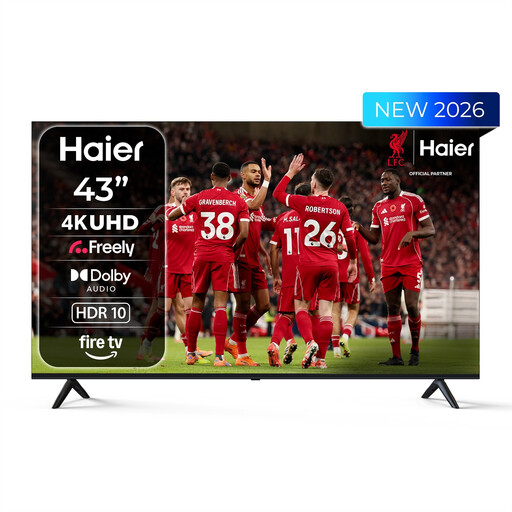
Haier H43K85GUF 43-inch 4K Ultra HD LED Smart TV with Freely and Fire TV
For an aerial-free setup where you want internet TV and apps on the screen itself; check support for the services you use.
43-inch 4K Ultra HD LED display; HDR10; Dolby Audio; Alexa Voice Remote; Energy Rating E.
Streaming requires an internet connection. Freeview through its broadcast TV Guide still requires an aerial.
View on Joybuy
 No image available
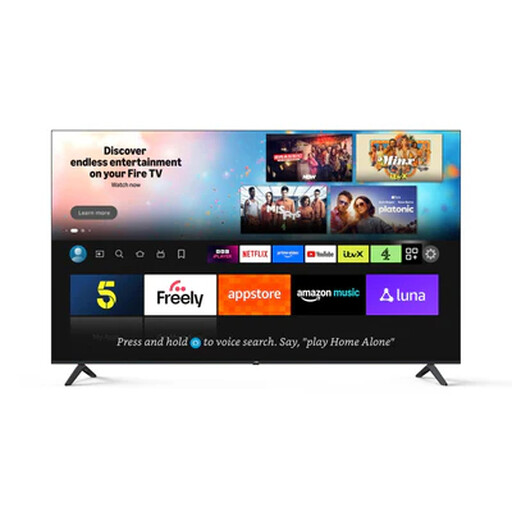
Haier H65S80GUF 65-inch 4K Ultra HD QLED Smart TV with Freely and Fire TV
For an aerial-free setup where you want internet TV and apps integrated into a larger screen; confirm support for your preferred services.
65-inch 4K Ultra HD QLED display; HDR10+; Dolby Audio; Alexa Voice Remote; Energy Rating E.
Streaming requires an internet connection. Freeview through its broadcast TV Guide still requires an aerial.
View on Joybuy
 No image available
Coocaa 40CTQH38ZUK 40-inch Full HD QLED Smart TV with Freely and TiVo OS
For internet TV viewing and apps built into the television; check that the services you want are available on this model.
40-inch Full HD QLED display; HDR10; Dolby Audio.
Freely viewing requires an internet connection. Freeview through its broadcast TV Guide still requires an aerial.
View on Joybuy
 No image available
Roku Streaming Stick 4K
For adding streaming apps to a compatible existing TV; check the exact device’s support for each service you need.
4K streaming stick. Roku specifies HDMI and Wi-Fi for this model.
It does not provide aerial reception for Freeview through the broadcast TV Guide.
View on Joybuy
Frequently asked questions
Will a Wi-Fi streaming stick show Freeview in my TV’s Freeview guide?
No. Freeview says live broadcast channels through its TV Guide require a working aerial. Some channels or programmes may be available through internet services instead, so check the service and device you plan to use.
Can Freely record programmes for me?
Do not assume that it can. Freely describes catch-up viewing, while recording depends on the particular device and may require an aerial. Confirm the recording function with the device manufacturer.
How can I check whether my broadband is suitable?
Test the connection at the TV during typical household use. Freely states a 10 Mbps minimum for its live internet channels or on-demand shows, while Netflix recommends at least 15 Mbps for a 4K stream. Neither figure guarantees performance for several simultaneous streams or every room.
Do I need a TV Licence if I only watch on-demand services?
The requirement depends on what you watch, not which device you use. GOV.UK says a TV Licence is required to watch or record live TV on any channel or service, and to use BBC iPlayer; check the current guidance for your viewing.


