
24/7 Customer Support

Free returns

Same-day & Next-day Delivery

Quality Guaranteed

Unlock Your Welcome Offers: FREE Delivery | Up to 80% OFF | Free 30-day JoyPlus trial
Download the APP
As a Joybuy Product Recommendation Officer, my role is to help you navigate the crowded market of gaming accessories. One of the most common frustrations for UK gamers, whether on console or PC, is the dreaded "Storage Full" notification. With blockbuster games now regularly exceeding 100GB, your internal drive fills up faster than ever.
Choosing an external drive seems simple, but several pitfalls can lead to a disappointing purchase. Before you spend your money, be aware of these common traps.
To make an informed choice and find a reliable way to expand your console storage, focus on these core specifications.
Storage capacity is the headline feature, but what does it mean in practice? A 4TB portable gaming HDD provides a substantial amount of space. Considering the average AAA game size is between 50GB and 150GB, a 4TB drive can hold approximately 25-80 large titles. This allows you to build a vast library of your favourite games without the constant need to delete and re-download, which is a significant advantage for anyone with slower home internet.
Understanding the difference between a Hard Disk Drive (HDD) and a Solid State Drive (SSD) is crucial for setting performance expectations.
For most gamers looking to simply expand their library without breaking the bank, a high-speed portable HDD offers the most practical balance of capacity and cost.
The connection standard determines how fast the drive can communicate with your console or PC. Look for drives that use USB 3.0 (also marketed as USB 3.2 Gen 1). This interface provides ample bandwidth for an HDD to operate at its maximum speed, ensuring smooth gameplay for compatible titles. Equally important is ensuring the drive is "bus-powered," meaning it draws power directly from the USB port without needing a separate wall plug. This is a non-negotiable feature for a truly portable PC game library drive.
Instead of a single "one-size-fits-all" suggestion, we match products to specific user needs. Here are our recommendations based on common UK gamer profiles.
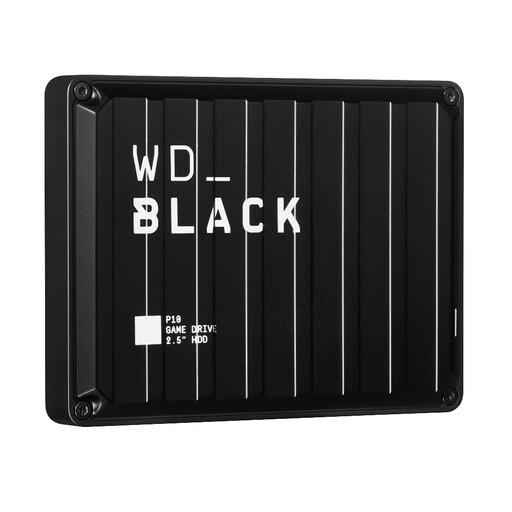
Why This Fits Their Persona: This user plays across multiple platforms (e.g., a PS5 and a gaming PC) and needs a reliable, high-capacity drive that just works. The P10 is purpose-built for this, offering a great balance of storage, dependable performance for older games and a rugged design for portability.
It directly addresses the compatibility myth by clearly stating its function: play and store PS4/Xbox One games and archive PS5/Series X|S games. It is also fully bus-powered, avoiding the hidden power cable issue.
Massive 4TB capacity in a portable form factor. Durable metal top cover and a 3-year limited warranty provide peace of mind.
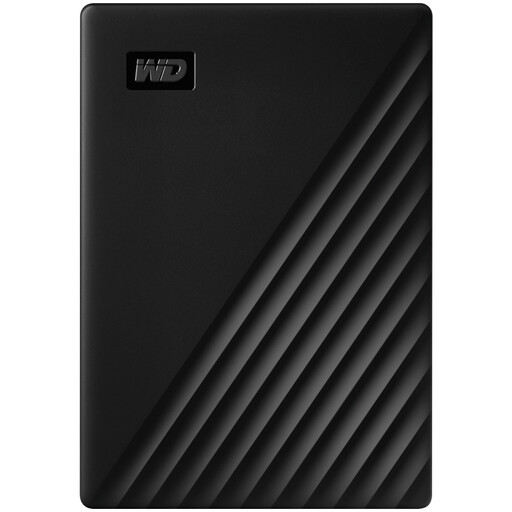
Why This Fits Their Persona: This user's primary goal is to get the most storage for their money. They have a large backlog of PS4 or Xbox One games and need a simple, cost-effective solution to keep them all installed. Gaming-specific branding is less important than raw capacity.
As a mainstream portable drive, it is bus-powered and avoids the power brick trap. While not marketed for gaming, its function as an external drive for PS4 games is well-established, avoiding compatibility issues for that use case.
Excellent value for money, offering 4TB of reliable storage in a slim, portable design. Includes optional password protection with 256-bit AES hardware encryption.
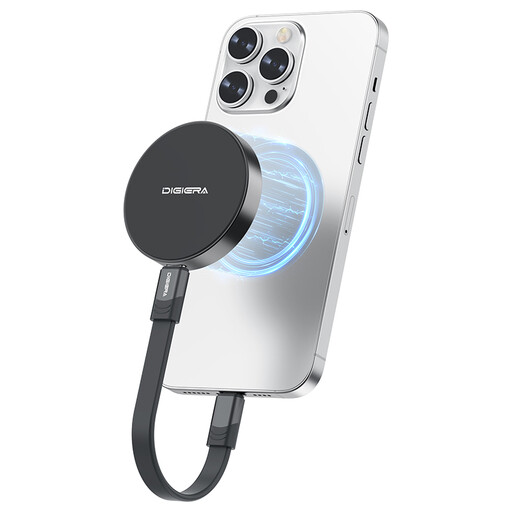
Why This Fits Their Persona: This user values speed above all else. They may be a PC gamer wanting to run games from an external drive with minimal load times, or a content creator using an iPhone 15/16 Pro to record high-bitrate video directly to storage. For them, the higher cost-per-gigabyte is a worthwhile trade-off for top-tier performance.
It completely sidesteps the speed trap by being a genuine high-performance SSD with transfer speeds up to 2000MB/s, far exceeding any HDD. Its ultra-compact, bus-powered design makes it exceptionally portable.
Extremely fast read/write speeds suitable for demanding tasks. The magnetic mounting feature is a unique convenience for users of compatible iPhones.
We have compiled a complete, real-time list of products that fully satisfy these strict selection criteria and UK safety regulations.
Setup is straightforward. Simply connect the drive to a free USB port on your console using the included cable.
Settings > Storage > Extended Storage and select the option to format the drive. This will prepare it for storing and playing PS4 games.No, this is a critical point. You can play PS4 and Xbox One games directly from the WD Black P10 on their respective next-gen consoles (PS5 and Xbox Series X|S). However, games designed specifically for the PS5 and Xbox Series X|S must be run from the console's internal SSD. You can, however, use the P10 as an external drive for PS4 games or to archive (store) your PS5 and Series X|S games to free up internal space, transferring them back when you want to play them.
With proper care, a portable HDD like the WD Black P10 (model WDBA3A0040BBK-WESN) should provide reliable service for many years. The key is to handle it carefully: avoid dropping it and always use your console or PC's "Eject" or "Safely Remove Hardware" function before unplugging it. The inclusion of a 3-year limited warranty from Western Digital is a strong indicator of the product's expected durability and the manufacturer's confidence in its build quality.