Before buying Wi-Fi equipment, compare a wired test at the router with results in the affected rooms: as Ofcom explains, in-home Wi-Fi cannot outperform the broadband service reaching your home. For several weak rooms, consider mesh if the units can connect from suitable positions; for one weak room, an extender may be enough if it receives a usable signal. For a fixed desk, consider Ethernet, and replace the router only when it appears to be the limitation, after checking the setup with your provider.
Who this advice is for
Multi-room coverage seekers
If Wi-Fi works near the router but calls, lessons or streaming struggle across several rooms or floors, consider where additional units could connect. Ofcom identifies router placement and walls as factors in home Wi-Fi coverage.
One-room signal fixers
If most rooms work but one bedroom or office has a weak signal, a targeted option may suit better than adding equipment throughout the home. Which? describes extenders as a targeted way to extend a router’s reach.
Fixed-desk connection seekers
If a stationary work or study device is the main concern, consider whether a cable can reach it before trying to extend Wi-Fi throughout the home. Ofcom recommends checking the connection and the conditions affecting Wi-Fi.
What to consider before buying
Mesh Wi-Fi
Consider when: Several rooms or floors need Wi-Fi and there are suitable places for units to connect.
Trade-off: It involves more units and setup than a one-room extender; walls may affect the connection between units.
Wi-Fi extender
Consider when: One area is weak and a suitable socket between it and the router still receives usable Wi-Fi.
Trade-off: A wireless extender relays the signal it receives, and mesh-style features can depend on router compatibility.
Replacement router
Consider when: Checks suggest the existing router, rather than only distant-room obstacles, is limiting the connection.
Trade-off: Replacing one router may not resolve signal loss through walls or floors; confirm connection and setup requirements with your provider.
Ethernet or a wired access point
Consider when: A cable can reach a fixed workstation, or a wired access point can serve a room that also needs Wi-Fi.
Trade-off: Cable routing takes work; an access point also needs a compatible wired connection and suitable operating mode.
Match the main issue to the route, then check the equipment and connection conditions that apply to your home.
| Concern |
What to check when buying |
Who this matters to |
| Coverage across rooms or floors |
Map the affected rooms and possible unit positions; check pack contents and whether Ethernet backhaul is supported. |
If Wi-Fi fades in several rooms, I want to know whether units can connect from sensible positions; around 40% of consumers put multi-room coverage first. |
| A fix for one weak room |
Check for a midpoint socket with usable incoming Wi-Fi and confirm the extender’s operating mode and compatibility. |
If the rest of the home works, I want to target just the weak room; around 30% of consumers prioritise coverage in one room. |
| Connection for a fixed device |
Check Ethernet ports and the cable route; if other devices need Wi-Fi in that room, check access-point mode. |
If my main issue is a stationary work or study device, I want to know whether a cable can reach it; around 20% of consumers prioritise a fixed-device connection. |
| Replacing the existing router |
Compare wired and near-router results with distant-room results, then ask your provider about connection and equipment requirements. |
If problems also appear near the router, I want to check whether that unit is the limitation; around 10% of consumers prioritise replacing their router. |
Buying pitfalls to avoid
-
Buying coverage equipment before checking the broadband service
Better in-home Wi-Fi cannot improve a poor broadband connection reaching the home.
Compare a wired test at the router with results in the affected rooms. If the wired connection is also poor, contact your provider about a possible service fault before buying coverage equipment.
-
Putting a wireless extender where the signal is already unusable
An extender relays the wireless signal it receives, so a dead zone may not be a useful position for it.
Look for a position that still receives usable Wi-Fi, or consider a wired access point if a cable can reach the room.
-
Assuming every mesh unit or mode has the same ports and features
Ports and available functions can vary between units and operating modes. For example, the eero 6+ router has Ethernet ports, while the separately named eero 6+ extender does not; some Deco features are unavailable in access-point mode.
Check the exact pack contents, ports and feature list for the mode you plan to use.
-
Treating advertised coverage as a guarantee through brick walls
Ofcom identifies internal walls as a factor affecting Wi-Fi, while product coverage descriptions do not establish how a particular room will perform.
Plan possible unit positions and check the affected rooms; where supported, consider wired backhaul if walls obstruct the wireless link between units.
Relevant brands to consider
TP-Link
Its Deco mesh and RE range-extender lines illustrate different choices for multi-room coverage, a targeted area and wired access-point setups.
- TP-Link specifies optional Ethernet backhaul and three Gigabit ports for Deco X50 V2; the RE705X has a Gigabit port and an access-point mode.
- RE705X EasyMesh requires a compatible router. In Deco access-point mode, DHCP remains with the existing router and some Deco features are unavailable.
eero
Its mesh equipment can be considered when retaining a UK provider hub or building a compatible multi-unit network.
- The eero 6+ router has two 1 GbE ports.
- The separately named eero 6+ extender has no Ethernet ports and cannot work alone. Provider arrangements vary, and bridge mode disables some advanced network features.
NETGEAR
The Orbi RBK762S router-and-satellite pack is a multi-unit option to compare when several rooms need coverage.
- NETGEAR specifies a dedicated router-to-satellite connection and five Gigabit ports for the RBK762S.
- Coverage descriptions do not guarantee results in brick-walled rooms. NETGEAR describes Armor for this pack as a subscription service with one year included after activation.
ASUS
Selected ASUS routers may be considered as replacements or as wired access points while retaining an existing provider router.
- ASUS documents an access-point mode using a wired connection to the primary router.
- Check that the chosen router supports the mode. In this mode, firewall, IP sharing and NAT functions are disabled by default.
Joybuy products for weak-room coverage
These options cover mesh systems, router-based setups and an extender for an existing Wi-Fi signal. Check the connection type, room layout and equipment requirements before choosing.
 No image available
NETGEAR Orbi 370 RBE373 WiFi 7 Mesh System, 3-Pack
For several rooms that need Wi-Fi, this pack forms one mesh network with one router and two satellites.
The description specifies 2.5 Gbps Ethernet ports on the router and each satellite. Actual wireless speed and coverage vary with building construction and other conditions.
Joybuy
 No image available
TP-Link Archer NX500 5G AX3000 Dual-Band Router
Consider this router-based option if you are comparing replacement equipment or a 5G/LTE connection.
The description specifies Wi-Fi 6 and a 2.5 Gbps WAN/LAN port, and describes traditional WAN use with cable, fibre or DSL modems as well as 5G/LTE use. EasyMesh-compatible devices can be added; a SIM card is required for mobile-network use.
Joybuy
 No image available
TP-Link Deco BE22 (3-Pack) BE3600 Whole Home Mesh Wi-Fi 7 System
A three-pack mesh system to consider when Wi-Fi is needed across several rooms.
The product description specifies combined wireless and wired backhaul.
Joybuy
 No image available
D-Link BE9500 Wi-Fi 7 Smart Mesh Router M95
This is a router-based option to compare for a home-network setup.
Check how the chosen setup fits your provider equipment and the way you plan to extend coverage.
Joybuy
 No image available
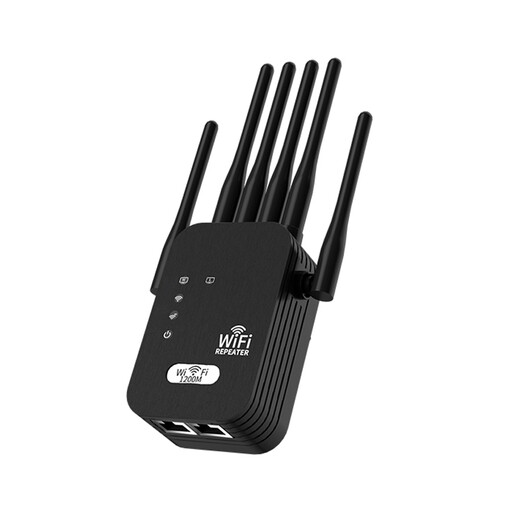
Signal Booster Wi-Fi, 1200M, 6-wire, Black, UK Standard
For one weak-signal area while other rooms work, the description presents this as an extender for an existing Wi-Fi network.
For wireless extension, place it within range of the existing Wi-Fi signal.
Joybuy
Frequently asked questions
How do I tell a broadband-service fault from poor Wi-Fi in one room?
Compare a wired test at the router with results near it and in the affected room, and check your provider’s outage information. If the wired connection or service is also poor, contact your provider before buying coverage equipment; if the wired result is good but distant rooms struggle, investigate in-home Wi-Fi. Which? recommends a wired connection for checking broadband speed.
Can I keep my provider’s router when adding mesh?
Often, but check the exact provider equipment and mesh instructions. TP-Link says Deco access-point mode leaves the existing router handling DHCP while some Deco features become unavailable. eero documents different arrangements for UK providers and notes that bridge mode removes some advanced features.
Does plugging a computer into a wireless mesh unit make the whole connection wired?
No. The computer-to-unit connection is wired, but the unit may still connect wirelessly to another unit. If you want to avoid wireless backhaul, check that the system supports Ethernet backhaul and whether a cable can reach along the full route.
What ongoing costs or support should I check?
Ask your broadband provider what support remains available with third-party equipment and whether it can supply updated or additional Wi-Fi equipment. Check whether any product feature depends on a subscription: NETGEAR describes Armor for the Orbi RBK762S as a subscription service with one year included after activation.


