Start by comparing the connection near the router, in the problem room and, where practical, over Ethernet: adding Wi-Fi equipment will not fix an outage or inadequate broadband service. For several weak rooms, consider mesh; for one room with a usable signal between it and the router, consider an extender. If walls or distance make that wireless link impractical, assess powerline or Ethernet instead, checking the sockets, cable route and router setup before choosing.
Who may need better room coverage
Households with weak Wi-Fi across several rooms
If the connection drops across floors or as you move around, consider where mesh nodes could sit and whether they can connect reliably to the router or one another. TP-Link’s Deco specifications describe optional Ethernet backhaul on the cited model.
Households with one unreliable room
If one bedroom or study is affected, check whether a position between that room and the router still has a usable signal before considering an extender. NETGEAR advises placing an extender within the router’s wireless range.
Remote-room workers and learners
For a fixed desk in a loft or garden office, consider whether Ethernet can reach the room and whether its sockets could support a powerline connection. A wired access point also needs suitable power and a practical installation route.
What to check before choosing
Check the service and router before buying coverage equipment. Ofcom advises checking for an outage and considering whether the issue is with Wi-Fi or the broadband service; different causes can call for different fixes.
| Concern |
What to check when buying |
Who this matters to |
| Diagnosing the problem |
Compare the connection near the router and in the affected room; where practical, test with Ethernet and check the provider’s outage information. |
If I have problems even near the router, I want to know whether a coverage device would help before spending. Around 25% of consumers put diagnosis before a purchase. |
| Several rooms or floors |
Map the weak areas and possible node positions; check how the nodes will connect, including whether Ethernet backhaul is practical. |
If several rooms need coverage, I want to consider their connections together rather than solve one socket at a time. Around 25% of consumers prioritise coverage across multiple rooms. |
| One reachable room |
Check for a position where the router’s signal is still usable; distinguish basic extension from any model-specific mesh feature. |
If one room is unreliable but an intermediate spot gets a signal, I want to know whether a single extender could suit that layout. Around 19% of consumers focus on one reachable room. |
| A difficult remote room |
For powerline, check the intended sockets and the kit’s requirements; if considering Ethernet, assess whether a cable route is feasible. |
If walls or distance make a wireless link difficult and running a cable is not practical, I want to check whether powerline could connect the rooms. Around 19% of consumers prioritise reaching an obstructed room. |
| A fixed wired desk |
Check the cable route, whether local Wi-Fi is also needed, and the access point’s power requirements and mounting arrangements. |
If my device stays at one desk, I want to consider a direct Ethernet connection or a wired access point. Around 12% of consumers prioritise a fixed wired workspace. |
Buying pitfalls to avoid
-
Buying a booster when the fault also occurs beside the router
A coverage device cannot correct an outage or an issue with the incoming broadband service. Ofcom recommends checking for a wider outage and distinguishing Wi-Fi problems from service problems.
Compare the connection in different rooms and, where practical, over Ethernet before choosing in-home coverage equipment.
-
Putting a wireless extender in the dead spot
An extender needs a usable signal where it is placed; at the dead spot, it may have little useful connection to repeat. NETGEAR advises keeping an extender within the router’s wireless range.
Check an intermediate position first. If none has a usable signal, assess another connection route rather than assuming the dead spot itself is suitable.
-
Assuming a powerline speed label guarantees a connection
For the TP-Link setup described in its guidance, the adapters need to connect through sockets on the same electrical circuit. A rated speed does not establish what connection a particular property or socket pair will provide.
Check the requirements for the exact kit and the intended sockets before buying, especially when the destination is a separate building.
-
Assuming a wired access point needs no installation planning
A wired access point needs an Ethernet connection and a suitable power arrangement. Ubiquiti specifies PoE power for its U6+; cable routing, mounting and any required permission also need consideration.
Plan the complete cable and power route, and check the relevant tenancy terms before making alterations.
Relevant brands to consider
TP-Link
Its cited products illustrate mesh, extender and powerline approaches to reaching rooms away from a router.
- TP-Link lists optional Ethernet backhaul for the Deco X50 V2, while its RE705X supports access-point mode and conditional EasyMesh operation.
- The RE705X’s EasyMesh feature needs a compatible router. For the cited powerline setup, the adapters need suitable sockets on the same electrical circuit.
devolo
Its Magic powerline range is one option to assess where a wireless path is poor and the home’s wiring may provide a route.
- devolo lists two Gigabit LAN ports on the Magic 2 WiFi next and says it can be combined with other Magic adapters.
- devolo says its Magic adapters do not support the older dLAN series. Suitability still depends on the connection through the property’s wiring.
NETGEAR
Its range extenders are a route to assess when one room has a weak connection but an intermediate position may still receive the router’s signal.
- NETGEAR’s guidance says an extender must be within the router’s wireless range.
- General compatibility guidance does not establish that every router and home layout will work with a particular model; check the model’s requirements and intended region.
Ubiquiti
The UniFi U6+ is a wired access-point example for a home where running Ethernet and providing power are practical.
- Ubiquiti lists a GbE uplink and PoE power for the U6+.
- This is not a plug-in wireless extender: plan the Ethernet and power arrangement, and check any conditions that apply to alterations in a rented home.
Joybuy product choices
These Joybuy choices cover mesh systems for several rooms and Wi-Fi extenders for a single room where an intermediate position can receive the router’s signal. Check each model’s connection requirements and the layout of your home before choosing.
 No image available
NETGEAR Orbi 370 RBE373 WiFi 7 Mesh System, 3-Pack
A three-pack mesh option to consider when several rooms need coverage; the product description says a high-speed internet connection and an existing modem or gateway are required.
Dual-Band BE3600; 2.5Gbps Ethernet.
View on Joybuy
 No image available
TP-Link RE220BE BE3600 Wi-Fi 7 Range Extender
Consider it for one weak room if a position between the router and that room still receives a usable signal.
Its description lists range-extender and access-point modes and a 1 Gbps Ethernet port. EasyMesh operation requires an EasyMesh-compatible router.
View on Joybuy
 No image available
TP-Link Deco BE22 (3-Pack) BE3600 Whole Home Mesh Wi-Fi 7 System
A three-pack mesh option for households considering coverage across several rooms; check whether the units can connect reliably in the planned positions.
The product description lists wireless and wired backhaul and Ethernet ports on each unit.
View on Joybuy
 No image available
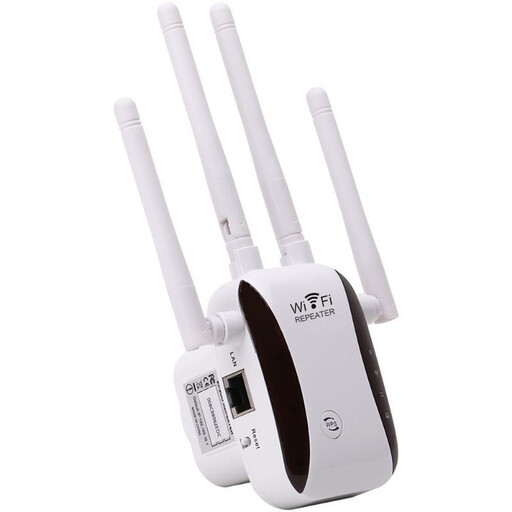
Wi-Fi Signal Extender
Consider a repeater for a weak-signal area only if the extender can be placed where it still receives a usable signal from the router.
The product description lists AP, relay, router and client operating modes; check which mode fits your setup.
View on Joybuy
 No image available
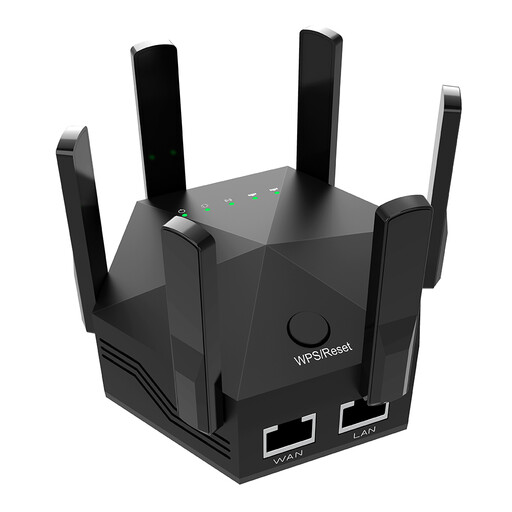
Dual-Band 1200Mbps Wi-Fi Signal Extender
Consider it for indoor use where an intermediate position can receive the router’s signal; its description advises placing it between the router and the weak-signal area.
The product description lists six adjustable antennas and two 10/100 Mbps Ethernet ports.
View on Joybuy
Wi-Fi coverage FAQs
How can I tell a weak-room Wi-Fi problem from an outage or slow broadband?
Check your provider’s service status, compare the connection in different rooms and, where practical, test near the router and over Ethernet. Ofcom notes that distance, walls and interference can affect Wi-Fi; a service fault or wider outage may need a different response from an in-home coverage problem.
Will an extender or mesh system work with my ISP router?
It depends on the model and how you want to use it. TP-Link says the RE705X can extend Wi-Fi from any Wi-Fi router, but its EasyMesh feature requires an EasyMesh-compatible router. Before buying, check the system’s setup mode and whether your ISP connection or services require you to keep the existing router.
What should I check before using powerline adapters in a garden office?
For the TP-Link setup described in its guidance, check that the router-side and office-side sockets are on the same electrical circuit and test whether the adapters connect. The setup requires at least two adapters; do not assume a detached building shares the required circuit.
Can I install a wired access point in a rented home?
A removable cable and work involving drilling or fixed mounting raise different considerations. Check your tenancy terms and the proposed route before work; permission requirements depend on the property and the alterations planned.
Should I check anything else before choosing a mesh system or access point?
Check what the package includes and whether the connection and power arrangements suit your home. For example, Ubiquiti specifies PoE power for the U6+ and lists a PoE adapter separately, so check what you need for the planned installation.


