Several-room dead-zone households
If you need Wi-Fi across distant rooms or floors, consider where each node can connect to the rest of the network. Ofcom notes that brick internal walls can make it harder to get Wi-Fi throughout a home.


If one room has weak Wi-Fi, an extender is worth considering when it can still receive a usable signal between the router and that room. For several weak rooms or floors, consider mesh if you can place the nodes where they connect reliably; powerline may be worth testing when walls obstruct a wireless link. Replace the router when the router itself appears to be the problem, not simply because distant rooms have poor coverage.
If you need Wi-Fi across distant rooms or floors, consider where each node can connect to the rest of the network. Ofcom notes that brick internal walls can make it harder to get Wi-Fi throughout a home.
If Wi-Fi works near the router but fails in one particular room, assess a targeted extender and whether there is an intermediate position where it can still receive a usable signal. NETGEAR describes extenders as a targeted option.
If walls or floors obstruct the wireless link, consider whether a powerline kit could use the home’s electrical wiring to reach the distant room. Check the intended sockets and what connection the far-end adaptor provides.
Start by identifying where the connection fails, then choose equipment for that problem: a single distant room, several rooms, an obstructed wireless link or a router that is unreliable close by.
| Concern | What to check when buying | Who this matters to |
|---|---|---|
| Coverage across several rooms or floors | Map weak areas and possible node positions; check pack size, the main-unit connection and support for Ethernet backhaul. | I need coverage in several rooms, not just at one socket, and want to know where nodes can connect reliably. Consumers who put multi-room coverage first make up around 36%. |
| A reliable fix for one distant room | Check for an intermediate socket where the extender still receives a usable signal, and confirm router-specific roaming compatibility if a unified network matters. | If the rest of my network works, I want to reach one weak room without adding a whole-home kit. Consumers prioritising a single-room fix make up around 29%. |
| Getting through obstructing walls or floors | Check the intended wall sockets, whether the far room needs Wi-Fi or Ethernet, and compatibility with any existing powerline adaptors. | When walls make a wireless link difficult, I need to know whether the electrical route can serve the far room and its devices. Consumers prioritising a wiring-based route make up around 21%. |
| Whether the router is the limitation | Compare the connection near and far from the router, check for provider faults or heavy simultaneous use, and confirm how a replacement connects to existing broadband equipment. | If problems also happen close to the router, I want to check the router and broadband setup before adding coverage equipment. Consumers prioritising a router replacement make up around 14%. |
Ofcom says in-home Wi-Fi cannot outperform the broadband service. If the connection is slow even beside the router, additional coverage equipment may not address the cause.
Compare the connection near the router with performance in distant rooms, and check for service faults or heavy simultaneous use before choosing equipment.
A wireless relay needs a workable connection back towards the router, and walls and layout can weaken that link.
Plan and test intermediate positions. If suitable cabling is available, check whether the selected models support Ethernet backhaul.
TP-Link says Deco, OneMesh, EasyMesh and Omada EAP Mesh are separate systems that cannot be combined into one unified mesh network.
Check the exact router, extender and mesh family for compatibility before buying an add-on.
TP-Link explains that a powerline adapter’s rated physical-layer speed is not the same as actual throughput, which depends on the electrical environment and interference.
Test the intended wall sockets and check whether the far-end adaptor provides the Wi-Fi or Ethernet connection your devices need. NETGEAR recommends plugging powerline adaptors directly into wall sockets rather than power strips or surge protectors.
Deco mesh kits, Archer routers and range extenders offer different approaches to home coverage.
Its home networking range includes extenders and mesh systems for targeted or wider coverage needs.
ZenWiFi and AiMesh are relevant to buyers considering whole-home coverage and a possible Ethernet backhaul.
Magic powerline kits are an option to assess when using electrical wiring to reach a distant room.
Halo is a mesh line for buyers considering wider home coverage.
These Joybuy options cover mesh systems for wider home coverage and extenders for a targeted weak-signal area.
 No image available
A router-and-two-satellite mesh arrangement for households planning coverage across several rooms.
Wi-Fi 7; dual-band BE3600; 3-pack; 2.5Gbps Ethernet. The listing specifies a LAN port on each satellite. Actual speed and coverage vary with building construction, network traffic, connected devices and environmental conditions.
 No image available
For a distant room where an intermediate position can still receive the existing router’s signal.
Wi-Fi 7; BE3600; range-extender and access-point modes; 1 Gbps Ethernet port. EasyMesh roaming requires an EasyMesh-compatible router, and the extender must be within range of the existing router.
 No image available
A three-unit mesh system to consider when planning coverage across several rooms.
Wi-Fi 7; BE3600; 3-pack. The listing describes combined wired and wireless backhaul.
 No image available
For a wider home network where expansion with compatible AQUILA PRO AI routers or extenders is being considered.
Tri-band Wi-Fi 7; MLO; 2.5-Gigabit WAN and LAN ports. The listing describes mesh expansion using AQUILA PRO AI routers or extenders.
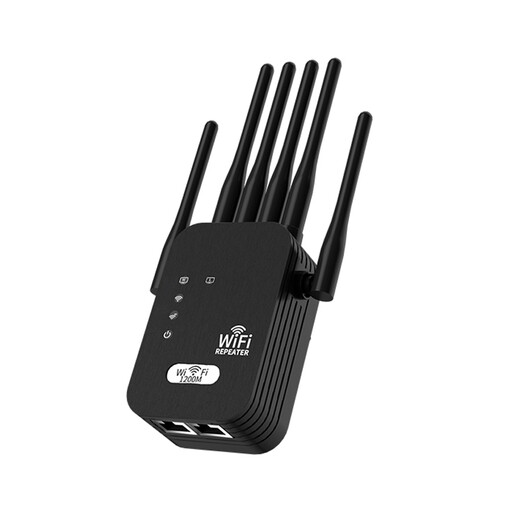 No image available
For extending an existing Wi-Fi network where a position within range of the current signal is available.
Dual-band support for 2.4 GHz and 5 GHz; six external antennas; UK-standard plug. Achievable speed depends on the incoming signal, wall thickness and interference.
Not automatically. Check for a service fault and heavy simultaneous use first. Ofcom says in-home Wi-Fi cannot outperform the broadband service, so extending coverage will not repair a slow incoming connection.
No: TP-Link says the main Deco unit must connect physically by Ethernet to the router, modem or internet feed. Deco supports router and access-point modes alongside an existing router, while its satellite units can connect wirelessly within the Deco network.
NETGEAR recommends plugging powerline adaptors directly into wall sockets rather than a power strip or surge protector, with one by the router and another in the destination room. Check the intended sockets and required connection before relying on this route.
No. devolo says its Magic adaptors can expand a Magic installation but cannot pair with dLAN or other HomePlug AV products.
Check the intended market and the particular product. UK Office for Product Safety and Standards guidance covers radio-equipment rules for products placed on the market in Great Britain, with distinct guidance for Northern Ireland. UK government guidance on consumer-connectable-product security applies to relevant products subject to stated exclusions, including an exclusion concerning certain products supplied in Northern Ireland. A retailer description alone does not establish that a particular product meets the applicable requirements.