What should you check before choosing?
Start by checking whether the broadband service is adequate, then identify where the Wi-Fi weakens and whether your provider offers equipment for your setup.
| Concern |
What to check when buying |
Who this matters to |
| Coverage across several rooms |
Check whether a provider coverage option is available and how a mesh system’s main unit connects to your existing router. |
If several rooms or floors have weak Wi-Fi, I want to know whether multiple access points can reach them without replacing the broadband service. Around 40% of consumers prioritise coverage in several rooms. |
| Service or router problem |
Compare performance near the router, or over a wired connection where practical, with the affected room. Check the replacement router’s WAN or modem requirements and provider settings. |
If the connection is slow even near the router, I want to identify the cause before buying more equipment. Around 30% of consumers put diagnosing the service or router first. |
| One weak room |
Check that an extender can be positioned where it receives a usable signal, and confirm the exact router and extender support the features you need. |
If just one room needs Wi-Fi, I want to try a targeted option before adding a multi-node system. Around 20% of consumers prioritise extending wireless coverage to one room. |
| Powerline connection |
Check that the kit has compatible units on the same electrical circuit, and whether the far room needs Ethernet, Wi-Fi or both. Confirm compatibility with any existing powerline adapters. |
If Wi-Fi struggles through walls or a fixed device needs a connection, I want to know whether the electrical route and adapter family will work for my setup. Around 10% of consumers prioritise a powerline-based connection. |
Joybuy product choices
These Joybuy choices cover mesh systems, a Wi-Fi range extender and a mesh-capable router for households addressing weak room coverage. Check each option’s connection requirements against your existing router or modem.
 Image unavailable
NETGEAR Orbi 370 RBE373 WiFi 7 Mesh System, 3-Pack
The listing describes a three-unit mesh system with one router and two satellites, with Ethernet ports on the router and satellites. It requires an existing modem or gateway.
The product name specifies Dual-Band BE3600 and 2.5Gbps Ethernet.
Shop on Joybuy
 Image unavailable
TP-Link RE220BE BE3600 Wi-Fi 7 Range Extender
For a targeted weak spot, the listing describes range-extender and access-point modes plus a Gigabit Ethernet port. Its instructions specify placing it within range of the existing router and plugging it directly into a wall outlet.
Shop on Joybuy
 Image unavailable
TP-Link Deco BE22 (3-Pack) BE3600 Whole Home Mesh Wi-Fi 7 System
The three-pack is described as a mesh system with a main unit and two satellites. The listing describes wired and wireless backhaul and compatibility with existing home networks and internet service providers.
Shop on Joybuy
 Image unavailable
D-Link BE9500 Wi-Fi 7 Smart Mesh Router M95
The listing describes a router that can expand into a mesh with compatible AQUILA PRO AI routers or extenders. It specifies a 2.5-Gigabit WAN port and three 2.5-Gigabit LAN ports.
Shop on Joybuy
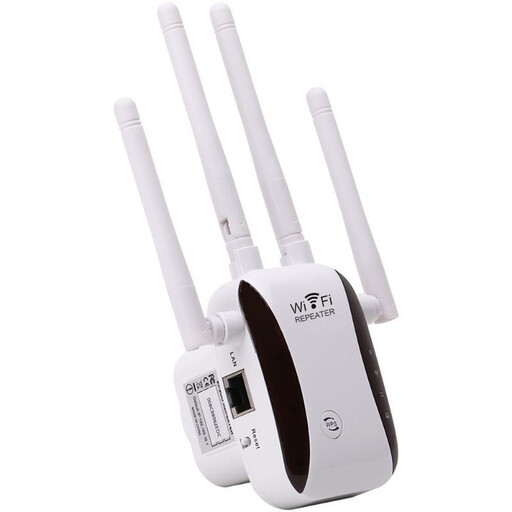 Image unavailable
Wi-Fi Signal Extender
The listing describes extending an existing Wi-Fi signal and offers access-point, relay, router and client modes. Setup is described as using WPS or a browser.
Shop on Joybuy
Wi-Fi coverage FAQs
How can I tell a broadband problem from weak Wi-Fi in one room?
Compare the connection near the router, and over a wired connection where practical, with performance in the affected room. Ofcom explains that extending Wi-Fi will not make an inadequate broadband service faster, so this comparison can help distinguish a service issue from a room-by-room coverage problem.
Can I replace my provider router on full fibre or DSL?
Check the connection type and the exact router’s modem and WAN requirements before replacing it. Openreach explains that the full-fibre ONT converts the fibre signal for a router; on DSL, do not assume an Ethernet-WAN-only router connects directly to the telephone line. Also check your provider’s settings and support.
Can a mesh system work with my existing provider router?
Some systems can run behind an existing router, but the setup depends on the model. TP-Link says Deco can operate in access-point mode with its main unit connected by Ethernet; the existing router remains the gateway, while some Deco gateway features are unavailable.
Where should I place a Wi-Fi extender?
Place it where it can still receive a usable signal from the router, rather than in the weakest part of the room with no usable connection. Check the specific extender’s instructions and compatibility with your router.
What should I check before installing a powerline kit?
Check that the setup has at least two compatible units on the same electrical circuit and that the far room has the connection type you need. TP-Link’s setup guidance specifies two units on the same circuit; devolo says Magic adapters do not join its dLAN or HomePlug AV equipment.


