Who needs a different setup?
The location of the weak signal matters as much as the number of devices using the network.
Homes with one persistent weak spot
If Wi‑Fi works near the router but struggles in one room, check router placement first. An extender may suit a spot it can reach from the router; a wired access point is another route if running Ethernet is practical.
Households using devices across several rooms
Phones, laptops and tablets may need connections in different parts of the home at the same time. If the broadband service is adequate but coverage varies by room, compare a multi-node mesh system with a better-positioned or replacement router.
Households changing provider-supplied equipment
Before replacing a provider router or adding mesh, identify whether the service reaches your home through a modem, an optical network terminal (ONT), a DSL connection or a provider hub. The equipment you retain and the available setup modes determine how a new router connects.
What should you check first?
Work from the incoming connection towards the rooms with weak coverage. That helps separate a broadband problem from a Wi‑Fi layout problem before choosing hardware.
| Priority |
What to check |
Your needs |
| Broadband or Wi‑Fi? |
Compare performance close to the router with performance in weak rooms. Test at different times; ask the provider to investigate if the service itself appears unreliable. |
I want to know whether a new Wi‑Fi device would address the problem. Ofcom notes that Wi‑Fi cannot outperform the broadband connection. |
| One weak spot |
Check whether an extender could sit between the router and the weak area while still receiving a usable signal. If Ethernet can reach the room, consider a wired access point. |
The connection works elsewhere, but one room needs coverage. I would rather target that room than change the entire network. |
| Several weak rooms |
Map the affected rooms, floors and obstacles. Compare a well-positioned single router with mesh units placed where they can maintain a connection to the network. |
People use devices around the home, and a fix for just one corner would leave other rooms with weak Wi‑Fi. |
| Multiple devices |
Note when disconnections happen and whether they affect all devices or particular rooms. Check the exact router or mesh model’s stated capabilities without assuming they will increase broadband speed. |
Work calls, learning and streaming can overlap at home. I need to distinguish a coverage problem from a connection that struggles when several people are online. |
| Existing equipment |
Identify the broadband handoff and the new device’s required WAN, Ethernet or DSL connection. Check provider instructions before relying on modem or bridge mode. |
I need the new setup to connect to my actual service and to preserve any provider-hub features I use. BT Business and Virgin Media describe different modem-mode arrangements for specified hubs. |
| Provider hub upgrade |
Ask what hub your provider can supply and whether its placement and features address the rooms affected. Compare that route with managing a third-party router yourself. |
I would prefer provider-supported equipment if the current hub is the limitation, but I still need to check whether one Wi‑Fi point can cover the home. |
Brands and their network options
These ranges illustrate different ways to extend home Wi‑Fi; check the particular model and your connection rather than treating a brand name as a compatibility guarantee.
TP-Link
TP-Link’s UK range includes Deco mesh systems, routers, extenders and powerline products.
- TP-Link describes Deco as a multi-node network, while its extenders repeat an existing router’s signal.
- Deco needs an external internet source. For a powerline setup, TP-Link says the adapters must be on the same electrical circuit; check the exact product’s requirements.
NETGEAR
NETGEAR offers Orbi mesh systems, Nighthawk routers and Wi‑Fi extenders in its UK home-network range.
- Its range allows a comparison between extending an existing router’s signal and using a router-and-satellite mesh design.
- NETGEAR notes that an extender may create a separate network. Check the selected model’s network behaviour and the placement available in your home.
eero
eero offers app-led mesh systems that can be expanded with compatible eero hardware.
- The UK eero 6+ listing describes connecting the system to a modem in place of a Wi‑Fi router.
- That listing does not establish how every provider hub, connection type or voice service should be configured. Check your provider and the exact eero setup before purchase.
Joybuy options by setup
These options cover multi-room mesh systems, an extender for a reachable weak spot and a single replacement router. Choose a setup after checking whether the broadband service, Wi‑Fi coverage or current router is causing the problem.
 No image available
NETGEAR Orbi 370 RBE373 WiFi 7 mesh system, 3-pack
Consider this three-unit mesh system when weak Wi‑Fi affects several rooms. Its listed configuration is dual-band BE3600 with 2.5Gbps Ethernet. Check how it will connect to your broadband equipment and where the units can be placed; the title’s specifications do not establish coverage in a particular home.
View on Joybuy
 No image available
TP-Link Deco BE22 BE3600 Wi‑Fi 7 mesh system, 3-pack
This three-unit Deco system is an option for Wi‑Fi coverage across several rooms. Check the available positions for its units and how one will connect to your modem or retained router. The listed BE3600 and Wi‑Fi 7 designations do not guarantee a particular speed in each room.
View on Joybuy
 No image available
TP-Link Deco BE25 WiFi 7 mesh system, 3-pack
A three-unit mesh layout is relevant when a single router leaves several rooms with weak Wi‑Fi. Confirm the BE25 model and three-pack variant supplied, then check the connection required for your provider equipment and the positions available for the units.
View on Joybuy
 No image available
TP-Link RE220BE BE3600 Wi‑Fi 7 range extender
Consider an extender for an isolated weak area that is still reachable from the existing router. Find a position with a usable incoming signal, and check the mode and compatibility needed for your router rather than assuming the extender will resolve weak coverage throughout the home.
View on Joybuy
 No image available
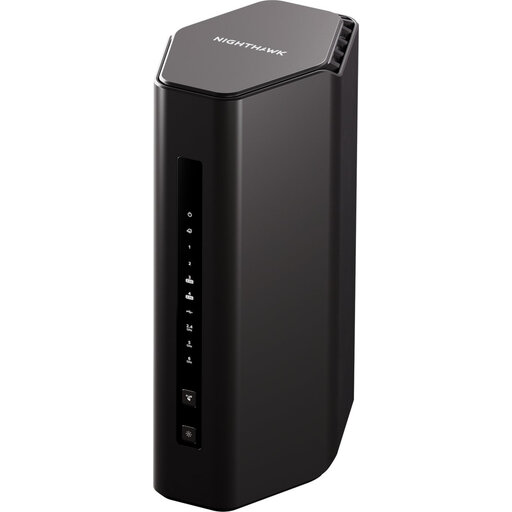
5PT Nighthawk RS300 BE9300 Wi‑Fi 7 router
A replacement router is worth considering if the current router is the limitation and one well-positioned Wi‑Fi point can serve the rooms you use. This listing identifies an RS300 BE9300 Wi‑Fi 7 router; check its required broadband connection and any provider-hub arrangement before replacing your existing equipment.
View on Joybuy
Questions about home Wi‑Fi
Do I need better broadband or better Wi‑Fi?
Check the broadband service first if performance is poor throughout the home, including close to the router. Test at different times and speak to the provider if the service appears to be the problem. Ofcom notes that Wi‑Fi cannot outperform the broadband connection.
Will mesh make my broadband package faster?
No. Mesh can improve Wi‑Fi signal strength and coverage within the home, as Ofcom explains, but it does not increase the speed supplied by your broadband service. Consider it when the incoming connection is adequate and weak coverage affects several rooms.
When should I choose an extender instead of mesh?
Consider an extender for one reachable weak area if it can receive a usable signal between that area and the router. An extender repeats the existing signal; for several weak rooms, compare mesh or a wired access point instead.
Can I keep my broadband router when adding mesh?
A mesh system can connect by Ethernet to an existing router; TP-Link describes this arrangement for Deco. Check the mesh model and your provider’s instructions to decide whether the existing hub should remain in router mode or whether a supported modem or bridge mode is appropriate.
Can I connect my own router to a Virgin Media Hub?
Virgin Media says modem mode lets you connect your own Wi‑Fi equipment to supported Hubs, but says the mode is not currently available for Hub 5x. Check your exact Hub model and the features you would lose in modem mode before buying a replacement router or mesh system.


