For one weak room with usable Wi-Fi nearby, a suitably placed extender may fit; mesh is worth considering when several rooms or floors need network points, while a router change suits a layout that one better-positioned Wi-Fi point could cover. Ethernet or powerline may suit a fixed connection when the route and, for powerline, the household wiring allow it; first check whether the problem is Wi-Fi coverage rather than the broadband service, and confirm who controls the shared equipment and whether installation changes are permitted.
Who this guide is for
Renters in rooms far from the router
A shared connection may work near the router but fail in a basement or distant bedroom. A MoneySavingExpert Forum post describes this kind of student-rental problem; it does not establish how common it is. Check who can change the shared network and whether any installation would alter the property.
Households spread across several floors
When more than one room or floor needs coverage, consider where each unit can be placed and how it will connect to the rest of the network. Ofcom explains that walls and other materials can weaken Wi-Fi signals.
People working at a fixed desk
If a dependable connection at one desk matters most, check whether Ethernet already reaches the room or could be routed with permission before choosing another wireless link. TP-Link’s guidance describes wired connections between mesh units and the requirements for its powerline equipment.
What to prioritise when choosing Wi-Fi equipment
Wi-Fi extender
Consider it: One room needs coverage and an intermediate position still receives the router’s Wi-Fi.
Trade-off: It depends on a usable signal from the existing router; placing it in the dead zone will not solve that connection problem.
Mesh system
Consider it: Several rooms or floors need network points that can connect to the main unit by Wi-Fi or Ethernet.
Trade-off: Plan the position and connection for each unit; a mesh main unit may need a wired connection to the existing broadband equipment.
Replacement or additional router
Consider it: One well-positioned Wi-Fi point could cover the rooms that need service, or an additional router can be used as an access point.
Trade-off: Check compatibility with the actual modem, ONT or provider hub, and confirm which device should manage the network.
Ethernet or powerline
Consider it: Ethernet already reaches the room, or a permitted cable route can connect a wired access point; powerline is another option to investigate when cabling is impractical.
Trade-off: Cable installation may need permission in a rental, while powerline depends on a suitable electrical circuit.
Check the broadband service as well as the in-home signal: Ofcom distinguishes Wi-Fi coverage problems from limitations or faults with the broadband service.
| Concern |
What to check when buying |
Who this matters to |
| Coverage in the weak room |
Map the weak room and nearby sockets; check that an extender or mesh unit can connect to the rest of the network from its planned position. |
If Wi-Fi drops in a basement bedroom, I need the connection to reach that room before I worry about extra features. Around 33% of consumers put reaching a distant room first. |
| A setup the household can control |
Find out who administers the router and whether the equipment can use the existing network; check permission before making property alterations. |
If I rent a room and cannot change the shared router or make permanent alterations, I need a setup that fits those limits. Around 27% of consumers put a reversible, manageable setup first. |
| A connection at a fixed desk |
Check whether Ethernet already reaches the desk; for powerline, check that the adapters can use a suitable circuit. |
If I work at one fixed desk, I want to know whether a wired connection can reach it before choosing a route that extends Wi-Fi throughout the home. Around 20% of consumers put a wired workspace first. |
| Use while housemates are online |
Compare the connection near the router and in the weak room; check how the proposed units connect to each other and whether the incoming service is also a limit. |
If housemates are online at the same time as me, I care about the connection during that shared use, not just the signal in an empty room. Around 20% of consumers put shared capacity first. |
Buying pitfalls to avoid
-
Putting an extender in the dead zone
A wireless extender needs to receive the router’s signal before it can relay it. A position with no usable upstream signal will not create a reliable connection to the network.
Check reception at a powered intermediate position before buying. If no suitable position exists, investigate a wired access point or another feasible route.
-
Assuming any mesh unit joins a provider’s Wi-Fi
Requirements vary by model: the eero 6 extender requires an existing eero network, while TP-Link says a Deco main unit needs a physical Ethernet connection to the broadband equipment.
Check the exact model’s compatibility and required connection before relying on it with a shared provider router.
A model that requires its own compatible mesh network may mean adding that network equipment as well.
-
Replacing a provider hub without checking its role
A provider hub may have service-specific settings or functions, and the steps for using another router can vary by hub model. Virgin Media’s guidance, for example, describes modem mode for its own equipment.
Identify the exact hub and service before changing modes or removing the provider equipment; check any phone-service requirements too.
A change of setup can add configuration and support work, so check what will need to be managed before making the switch.
-
Treating a powerline link rate as a room-speed promise
Powerline performance depends on the electrical installation, and the manufacturer’s rated link speed is not a measurement of throughput in a particular home.
Check whether the adapters can use a suitable circuit and treat the advertised link rate separately from the speed achieved after setup.
Relevant brands to consider
TP-Link
Its Deco mesh, RE range extenders and TL-WPA powerline kits represent different ways to extend a home network. Check the exact model and connection method.
- TP-Link’s documentation says a Deco main unit connects to a modem, router or internet connection by Ethernet. Its TL-WPA8631P KIT combines powerline with Wi-Fi and wired ports.
- Powerline depends on suitable household wiring, and Deco setup requires access to a wired connection for the main unit.
NETGEAR
Its range extenders and Orbi mesh systems cover different installation routes, from adding coverage to using multiple network points.
- NETGEAR’s setup guidance places a wireless extender between the router and the area where better reception is needed.
- The guidance notes that an extender does not improve the inherent capabilities of an older router; it still needs a usable connection from the router.
eero
Its mesh routers provide a multi-point option, while the eero 6 extender is intended for an existing eero network.
- An eero mesh system is a route to consider when several network points are needed around the home.
- The eero 6 extender requires an existing eero network, so check compatibility rather than assuming it can extend any provider router.
Joybuy products for extending home Wi-Fi
These products cover mesh systems for homes needing several network points and Wi-Fi extenders for a weak area that remains within reach of the existing router. Check the planned unit positions and connection requirements against your home.
 No image available
NETGEAR Orbi 370 RBE373, 3-Pack
A mesh option to consider when several rooms need network points.
The product name specifies a dual-band BE3600 Wi-Fi 7 system with 2.5Gbps Ethernet. An existing modem or gateway is required.
View on Joybuy
 No image available
TP-Link RE220BE BE3600 Wi-Fi 7 Range Extender
For one weak room where the extender can still receive the existing router’s signal.
TP-Link identifies this model as a dual-band BE3600 Wi-Fi 7 extender with a 1Gbps Ethernet port and range-extender and access-point modes. Wireless extender use depends on placement within usable range of the router.
View on Joybuy
 No image available
TP-Link Deco BE22 (3-Pack) BE3600 Wi-Fi 7 Mesh System
A three-unit mesh option for a home where several rooms need network points.
TP-Link identifies the Deco main unit as needing a physical Ethernet connection to a modem, router or internet connection, so check that you can make this connection at home.
View on Joybuy
 No image available
D-Link BE9500 Wi-Fi 7 Smart Mesh Router M95
A mesh-router option to consider when planning to extend a home network with compatible equipment.
The product name identifies a BE9500 Wi-Fi 7 smart mesh router. The described expansion route uses compatible AQUILA PRO AI routers or extenders, so check compatibility before planning a multi-point setup.
View on Joybuy
 No image available
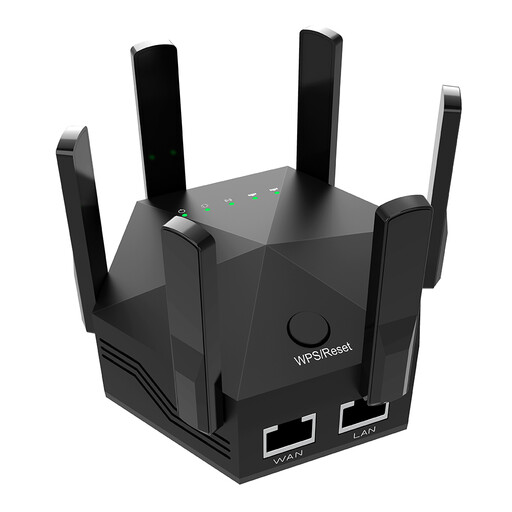
Dual-Band Wi-Fi Signal Extender, 1200Mbps, 6 Antennas, UK Plug
For a weak area where the extender can be placed between the router and the room while still receiving the existing signal.
The product name specifies dual-band Wi-Fi, 1200Mbps, six adjustable antennas and a UK plug. Its stated placement depends on reception from the existing router.
View on Joybuy
Frequently asked questions
How can I tell whether I need Wi-Fi equipment or broadband help?
Check whether the connection is also poor near the router and whether there is a provider outage or service issue. Ofcom distinguishes faults or limitations with broadband service from Wi-Fi coverage problems inside the home; an extender or mesh system cannot improve the incoming service itself.
Where should I place an extender or mesh unit?
Place a wireless extender where it can still receive the router’s Wi-Fi, typically between the router and the weak area. Plan mesh units around a usable connection to the main unit; TP-Link says a wired connection between supported Deco units can avoid using wireless bandwidth for that link.
Can mesh work with a provider-supplied router?
It depends on the system and the provider equipment. TP-Link says the main Deco unit needs a physical Ethernet connection, and access-point mode can retain an existing router; before replacing a hub, confirm the service’s connection requirements and any phone-service needs.
Will a powerline Wi-Fi kit work between the router and a bedroom?
Not automatically: TP-Link says its powerline network needs at least two adapters connected through a suitable shared electrical circuit or meter, with the router-side adapter connected by Ethernet. Check the socket and wiring arrangement before choosing this route.
Can I run Ethernet cable in a rented home?
Check your tenancy terms and ask the landlord or property manager before making permanent changes. Leeds City Council requires written permission for alterations by its secure council tenants; that specific rule should not be treated as applying to every UK renter.


