Remote workers with unreliable video calls
If you work at a fixed desk, compare the connection there with one close to the router. A practical Ethernet cable may address a desk-specific Wi-Fi problem without changing wireless coverage elsewhere.


Check whether the difficulty comes from the broadband service, your home’s Wi-Fi or one computer before buying equipment: Ofcom notes that Wi-Fi cannot outperform the underlying broadband connection. Ethernet is worth considering for a fixed desk with a practical cable route; an extender addresses one weak area, while mesh is a route to consider for several weak rooms. If the issue is limited to one computer, check that device and its network adapter; before adding a router or mesh system, confirm how it connects to your provider’s equipment.
The location of the problem matters more than the type of equipment you first had in mind.
If you work at a fixed desk, compare the connection there with one close to the router. A practical Ethernet cable may address a desk-specific Wi-Fi problem without changing wireless coverage elsewhere.
If coursework regularly happens in a bedroom, loft or another weak-signal area, establish whether the problem is confined to that room or extends across several rooms before choosing an extender or mesh system.
When work calls, study and other demanding activities coincide, check both the broadband connection and where Wi-Fi is weak. Ofcom advises checking whether others are using the connection for data-hungry tasks.
Locate the problem first, then choose equipment for the affected room or device. A wider-coverage product will not fix a limitation in the broadband service itself.
| Priority | What to check | Your needs |
|---|---|---|
| Find the bottleneck | Check provider service status and compare the connection near the router with the affected room. Test at different times, including when other devices are busy; Ofcom says Wi-Fi cannot outperform the broadband service. | Calls falter even close to the router, so I want to identify the cause before buying something for coverage. |
| Match the layout | Map every weak room and consider router placement. An extender is a route for one limited weak area; a mesh system uses multiple nodes for coverage across several areas, as Which? describes. | I need access in a distant study room—or across more than one floor—and want the equipment to match where the signal drops. |
| Connect a fixed desk | See whether a cable can run safely from the router to the computer. Check for an Ethernet port or a compatible adapter; Ofcom recommends a direct Ethernet connection for a computer where practical. | My desk stays put, and I would rather address the connection at that computer than change Wi-Fi throughout the house. |
| Check network compatibility | Identify your provider box and any services it supplies. Check the proposed router or mesh model’s wired connection and supported operating mode; TP-Link says the main Deco unit needs an Ethernet connection. | I want to add coverage without disrupting the provider equipment or services I still use. |
| Isolate device problems | Compare the affected computer with another device in the same place. For a computer adapter, check its port, operating-system and network compatibility; if several devices struggle, investigate coverage or shared connection use instead. | Only my computer seems to have trouble, so I want to rule out a device-specific issue before changing the whole network. |
An extender or mesh system cannot make Wi-Fi outperform the broadband service, as Ofcom points out. An outage or heavy simultaneous use may therefore remain a problem.
Check provider service status, compare the connection close to the router and test at different times before choosing equipment for a weak room.
That assumption can leave a new system with no supported way to connect. TP-Link says the main Deco unit must connect by Ethernet to the modem, router or internet connection.
Identify the provider equipment and check the exact mesh model’s connection and operating-mode instructions. If two routers will remain in use, eero recommends putting either the existing router or the eero network into bridge mode for its systems.
Walls, floors and the position of equipment affect the signal; Virgin Media O2 notes that home layout and materials can interfere with Wi-Fi. A stated coverage area does not describe every home.
Map the weak rooms and plan where the router and any additional units could go before selecting a system.
A larger home may call for additional mesh units, so consider how many positions the proposed kit can serve.
A USB Wi-Fi adapter addresses the connection on a compatible computer; it does not extend household coverage or increase broadband capacity.
Compare another device in the same room. If it also has a weak connection, assess placement, a wired connection or coverage equipment instead.
These brand references help distinguish setup approaches; compatibility still depends on the particular model and provider equipment.
Deco is relevant when considering mesh alongside existing provider equipment.
eero is relevant when weighing a mesh network that will operate alongside an existing router or upstream device.
NETGEAR is relevant to both whole-home mesh and computer-adapter choices, which address different locations of a connection problem.
These options address several-room coverage, a limited weak area or connectivity on one computer. The powerline kit offers another way to bring network access to a room, provided its outlet and wiring requirements suit the home.
 No image available
Consider this three-unit mesh system if several rooms need Wi-Fi coverage. Plan where the units can go, and check the BE25’s wired connection and operating mode against your provider equipment and any services you need to retain; the pack size does not guarantee coverage in every room.
 No image available
Consider an extender when one area has weak Wi-Fi rather than several rooms. It needs a position that still receives the router’s signal; Ofcom notes that extenders can affect speed and responsiveness, which matters for the work or study device in that area.
 No image available
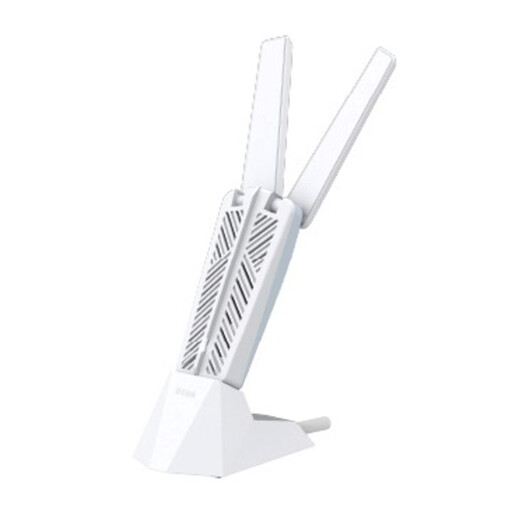
This computer adapter is worth considering when the connection problem is isolated to one desktop or laptop. Check the computer’s USB port, operating system and network compatibility before buying; it will not address weak Wi-Fi across several devices or rooms.
 No image available
This three-unit mesh option is relevant when several rooms need coverage. Its name specifies dual-band Wi-Fi 7 and 2.5Gbps Ethernet; neither figure predicts the connection in a particular room. Check how the RBE373 connects to your modem or gateway and whether the setup retains required provider services.
 No image available
Consider a powerline kit for network access in a remote room when its use of the home’s electrical wiring suits the layout. Check that direct wall outlets are available for the adapters and that the wiring arrangement is suitable; any OneMesh roaming function depends on a compatible OneMesh router.
Check for a provider outage, then compare the connection near the router with the room where it struggles, including at different times of day. Ofcom says Wi-Fi cannot outperform the broadband service; if the problem persists close to the router, contact the provider before assuming an extender or mesh system will fix it.
Use Ethernet as an option for a fixed computer when you can route a cable safely and the computer has an Ethernet port or compatible adapter. Ofcom recommends connecting a computer directly to the router by Ethernet; doing so addresses that device’s connection, not wireless coverage in other rooms.
Consider an extender for one limited weak area and mesh for several weak rooms or floors. Ofcom cautions that extenders can affect speed and responsiveness; with mesh, plan node positions and check how the main unit connects to your existing equipment.
Do not assume it can. TP-Link says the main Deco unit requires a physical Ethernet connection to a modem, router or internet connection, rather than acting as a wireless repeater for the old router. Check the connection instructions for the exact system you are considering.
That depends on which device will handle routing and what your existing equipment supports. When eero operates alongside another router, eero recommends bridging either the existing router or the eero network. Check the exact model’s instructions and which network features or provider services the chosen arrangement retains before changing modes.