People working in rooms with weak Wi-Fi
If wireless access is unreliable away from the router, consider where additional mesh units could go and whether a wired link between them is practical.


Ofcom advises comparing a wired speed test at the router with the connection in your work room before choosing Wi-Fi equipment. If the wired result does not meet your household’s needs, assess the broadband service; if the problem is specific to a room, consider mesh for wireless access in several areas or Ethernet for a fixed desk. A replacement router also needs to suit your provider’s connection and any services that rely on the existing hub.
If wireless access is unreliable away from the router, consider where additional mesh units could go and whether a wired link between them is practical.
If you mainly work in one place, Ofcom recommends connecting a computer to the router with Ethernet when checking broadband speed; a cable may also be a route to consider for that workstation.
When several people are online, compare the incoming broadband service with the local Wi-Fi connection to help identify which part of the setup needs attention.
Choose when: You need wireless access in several separated rooms and can position multiple units appropriately.
Trade-off: Mesh units need power and a suitable connection between them; some systems can use Ethernet backhaul.
Choose when: Your current router may be limiting local connectivity after you have checked placement and the incoming service.
Trade-off: Check whether your provider uses a separate modem or combined hub, and whether phone or other services depend on its equipment.
Choose when: You mainly need a connection at a fixed workstation and can run a cable to it.
Trade-off: A cable serves the connected device, not wireless coverage throughout the home; check cable routing, adapters and available ports.
Choose when: Wired tests suggest the incoming service may not meet your household’s needs.
Trade-off: A service change does not itself improve room-to-room Wi-Fi; check availability and contract terms for your address.
Ofcom recommends using an Ethernet connection for a broadband speed check. The checks below help connect the problem you experience with the equipment or service to investigate.
| Concern | What to check when buying | Who this matters to |
|---|---|---|
| Coverage where you work | Map the rooms and possible mesh-unit positions; check whether the exact system supports Ethernet backhaul if you can cable the units. | If I work in rooms where the signal is unreliable, I need usable wireless access where I sit and a practical way to connect mesh units. Around 29% of consumers put work-room coverage first. |
| Reliability at a fixed desk | Check the computer’s Ethernet connection or adapter, the cable route and the ports available on the router. Ofcom recommends Ethernet for speed checks. | At a fixed desk, I would rather check whether a cable can connect my work device directly than buy coverage for rooms I do not use. Around 22% of consumers prioritise fixed-desk reliability. |
| Several people online at once | Compare a wired test with your contracted service, then check the router and connected devices for compatibility with the features you need. | When several people share the connection, I need to know whether the incoming service or the home Wi-Fi needs attention before choosing a router. Around 21% of consumers prioritise capacity during simultaneous use. |
| Provider compatibility and setup | Identify your modem and router arrangement, provider connection requirements, and any phone service that relies on the existing hub. | If my broadband or phone service depends on provider equipment, I need a setup that keeps those services working. Around 14% of consumers prioritise compatibility and manageable setup. |
| Ownership, updates and support | Check the exact hardware version, required cables or adapters, installation needs and the manufacturer’s stated security-update period. | I want to understand what installation and ongoing support the exact model requires before choosing it. Around 14% of consumers put ownership and support first. |
If the wired connection at the router is already inadequate for your needs, adding wireless equipment may leave the underlying service issue unresolved.
Compare an Ethernet speed test with your contracted service before deciding whether the purchase should address broadband or in-home Wi-Fi.
Mesh units still need a suitable link between them. Expert Reviews’ 3 January 2023 review of the Mercusys Halo H80X noted that its dual-band design shares bandwidth between client connections and mesh traffic; that finding applies to the reviewed configuration.
Check the exact system’s backhaul design and whether Ethernet backhaul is supported if you can run cables between units.
Additional powered units need suitable placement and a workable connection between them.
Some phone services rely on a supported hub or adapter arrangement, and adding mesh in router or access-point mode changes how the home network is managed.
Check your provider’s instructions and identify which device will manage routing before changing the setup.
Changing the setup may mean reconfiguring the network or restoring the provider-supported arrangement.
Hardware revisions can differ, and a product lifecycle notice can change how relevant an older recommendation is.
Check the exact model, hardware revision, bundle and stated support period on the product you are considering.
These examples relate to specific product lines and their documented conditions; a brand’s inclusion does not establish product availability or suitability for every home.
Deco X50 is a mesh option, while the TL-SG105 is a wired-network switch for a different need.
The RT-AX58U is a standalone Ethernet-WAN router with access-point and AiMesh-node operating modes.
The eero 6+ line is a mesh option for buyers considering an app-managed system alongside an existing router.
The Halo H80X is a dual-band Wi-Fi 6 mesh system reviewed by Expert Reviews.
The products below are mesh systems and Wi-Fi routers for households weighing distributed wireless coverage against replacing a router. Check each model’s connection requirements against your existing broadband equipment.
 Image unavailable
A three-unit mesh system for wireless access across separated rooms; the description says a high-speed internet connection and existing modem or gateway are required.
Dual-band Wi-Fi 7; the router has 2.5Gbps WAN/LAN ports and each satellite has a 2.5Gbps LAN port.
 Image unavailable
A three-unit mesh system for wireless access in multiple parts of the home; the setup instructions connect a unit to a modem before adding satellite units.
Dual-band Wi-Fi 7 with wired and wireless backhaul; each unit has two 1.0Gbps ports.
 Image unavailable
A router option for replacing existing equipment, with mesh expansion available only by adding compatible units.
Tri-band operation, MLO, one 2.5-Gigabit WAN port and three 2.5-Gigabit LAN ports. The described mesh expansion requires compatible AQUILA PRO AI routers or extenders.
 Image unavailable
A three-unit mesh system for wireless access around the home.
Tri-band Wi-Fi 7 with a dedicated backhaul band.
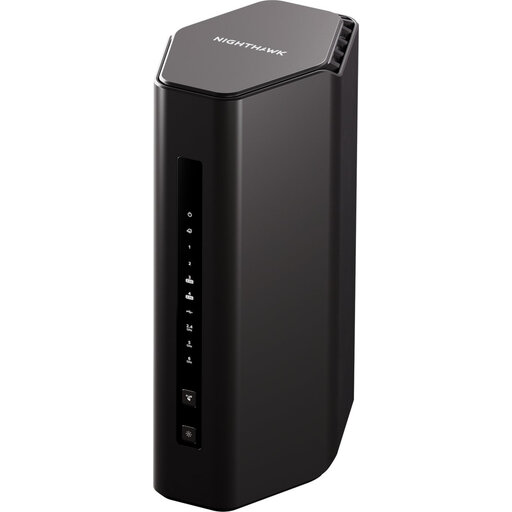 Image unavailable
A Wi-Fi 7 router option for a home network where wired connections are also part of the setup.
The description lists 320MHz channels, 4K QAM, and 10G and 2.5G Ethernet ports.
Compare an Ethernet speed test at the router with your contracted service, then compare the connection in your work room. Ofcom’s guidance makes this a useful way to distinguish a room-specific Wi-Fi concern from an incoming-service concern, though the comparison does not identify every possible fault.
Yes, in a supported setup using Deco access-point mode. TP-Link documents this mode for keeping the existing router in charge, with the main Deco connected by Ethernet; follow the setup instructions for firmware, app and DHCP settings.
No. TP-Link states that Deco does not support repeater mode to connect wirelessly to an existing router, so the main unit needs a physical Ethernet connection. Links between Deco units may be wired or wireless in supported configurations.
Keep a BT-supported phone arrangement in place before removing the hub; BT’s corded-handset instructions use the hub’s green phone port. If you use a healthcare alarm or medical pendant, BT advises contacting its service provider and notifying BT; never plug the alarm or pendant into a Digital Voice Adapter.
The UK Product Security and Telecommunications Infrastructure regime took effect on 29 April 2024. For products within its scope, the National Cyber Security Centre explains that manufacturers must avoid easily guessable shared default passwords, provide a security-reporting contact and state the minimum security-update period. Check the stated period for the exact model and hardware version; it is distinct from a hardware warranty.