What matters when choosing
For shared-office weather-record work, check how you enter readings and how much noise the desk can tolerate before paying attention to connection features you may not use.
| Concern |
What to check |
Who this matters to |
| Noise near colleagues |
Check the exact key mechanism and whether you can try or return the chosen model; descriptions of quiet keys are not comparable noise measurements. |
I need to enter observations without repeatedly disturbing the people beside me. Around 36% of consumers put low disturbance first. |
| Repeated numeric entry |
Confirm a dedicated number pad, UK layout and enough desk space for the keyboard. |
When I enter readings, dates and spreadsheet figures throughout the day, I want the number keys in a familiar place; roughly 29% of consumers prioritise numeric entry. |
| Long-session workstation fit |
Check keyboard height and placement alongside the chair, screen and mouse; consider a split layout only if it suits the workstation. |
If plotting and checking records takes long sessions, I need a desk arrangement I can use comfortably. About 21% of consumers put workstation fit first. |
| Connections and device switching |
Check which devices you use, operating-system compatibility and whether workplace IT permits the intended wireless connection. |
I move between an office computer and another device, so changing connections without disrupting work matters most; around 14% of consumers prioritise connection flexibility. |
Brands to consider
These brands offer relevant examples of office-keyboard designs; the features and cautions below concern the named models, not every keyboard from each brand.
Logitech
Examples range from a conventional wired keyboard to multi-device and split-layout designs.
- Logitech lists a UK QWERTY layout, USB connection and integrated number pad for the K120. Its MX Keys S supports switching among up to three devices.
- The ERGO K860’s split design addresses a different need from the K120’s straightforward desk setup. Check the selected model’s layout and connection rather than assuming the range shares one set of features.
Keychron
The K5 Max is relevant if configurable shortcuts and a UK-ISO mechanical layout matter to your workflow.
- Keychron lists a 100% layout option, wired, Bluetooth and 2.4 GHz connections, and QMK/VIA configuration for the K5 Max.
- Switch variants differ. Confirm the exact UK-ISO version and its sound before choosing it for a noise-sensitive office.
Cherry
A conventional wired option is worth examining if you prefer a full-size office layout.
- An RS listing describes a UK QWERTY Cherry JK-45/STREAM model with USB connectivity and quiet scissor keystrokes.
- Check the current model number, dimensions and exact listing before relying on product-family descriptions.
Joybuy product choices
These wireless keyboards include full-size, split and compact-with-number-pad layouts that may suit different weather-record desks. Check the exact keypad arrangement, connection and office noise suitability for the model you choose.
 No image available
Targus EcoSmart Full Size Wireless Keyboard (UK)
Consider this full-size UK keyboard if you enter readings regularly and want a wireless desk setup. Confirm the keypad arrangement you need, whether the intended wireless connection is permitted at work and whether key noise is acceptable to nearby colleagues.
View on Joybuy
 No image available
HP 960 Ergonomic Split Layout Wireless Keyboard with Padded Wrist Rest
The split layout is worth considering when workstation fit is a priority during long plotting sessions. Check the keyboard’s UK key layout and the space needed for numeric entry; assess the chair, screen and mouse positions too. Confirm that its key noise suits the shared desk.
View on Joybuy
 No image available
ASUS ROG Strix Scope II 96 Wireless Keyboard, White, UK Layout
Consider the 96-layout design if desk space and repeated numeric entry both matter. Confirm the delivered key and switch variants before ordering: the switch choice affects whether this keyboard’s sound will suit a shared office.
View on Joybuy
 No image available
Hyper HyperSpace Next Bluetooth Wireless Keyboard (UK), White
This UK-version Bluetooth keyboard is worth considering if you move between compatible devices while working on records. Check that workplace IT permits Bluetooth, that the keypad arrangement fits your entry routine and that the key sound is acceptable at your desk.
View on Joybuy
 No image available
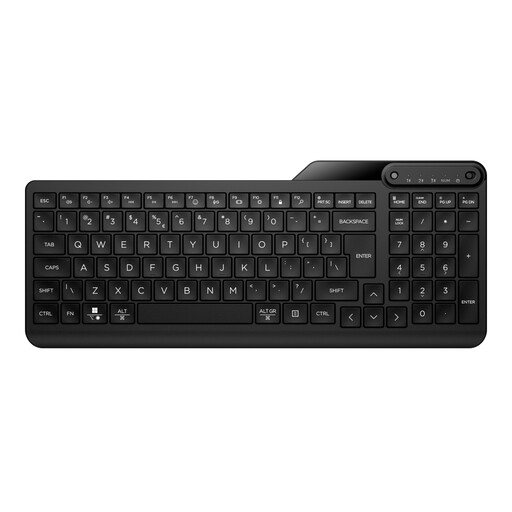
HP 460 Multi-Device BT Keyboard
Consider this multi-device keyboard if switching devices matters more than keeping to a simple fixed-desk connection. Before using it for frequent weather-record entry, confirm the UK layout and dedicated number pad, as well as whether its key sound suits the office.
View on Joybuy
Frequently asked questions
Do I need a number pad to plot weather records?
A dedicated number pad is useful if you repeatedly type measurements, dates or calculations into a spreadsheet. RS identifies it as useful for frequent numeric entry; if you rarely enter numbers manually and need more mouse room, a compact keyboard may suit you instead.
Is wireless better for a shared-office desk?
Not necessarily: wired USB is a straightforward choice for one fixed computer. Consider wireless when switching devices or repositioning the keyboard solves a real problem, and check that workplace IT permits the intended Bluetooth or receiver connection.
Can a split keyboard replace a workstation assessment?
No. The Health and Safety Executive says employers must assess workstations used for display screen equipment work daily as part of normal work for continuous periods of an hour or more. That assessment considers the workstation, the job and individual needs rather than keyboard shape alone.
Where should the keyboard sit during long spreadsheet sessions?
Place it centrally in front of you and just below elbow height, as advised by the Health and Safety Executive. Check the mouse, chair and screen positions at the same time; a different keyboard will not correct an awkward overall setup.
What should I check about returns and support?
Check the seller’s terms for the exact keyboard variant and purchase channel, including how to report a fault and any separate warranty offered. If you need to try the layout or sound at your desk, check the conditions for a change-of-mind return before ordering; that is a different question from remedies for faulty goods.


