What matters when choosing?
For one laptop used for coursework and web-page testing in a student room, establish the required software first, then compare the complete configuration and the space it needs.
| Concern |
What to check |
Who this matters to |
| Browser-testing workflow |
Confirm course software and processor-architecture compatibility; compare configured memory and SSD capacity for local tools and test files. |
If browser automation is central to my coursework, I need my required tools and browser checks to run on the laptop I choose. Around 33% of consumers put that testing workflow first. |
| Everyday multitasking |
Compare the exact memory and SSD configuration, and check the stated warranty and repair route. |
I need to move between study tasks, development work and browser windows without choosing a configuration solely by its processor name. For around 25% of consumers, everyday multitasking is the primary concern. |
| Screen and desk space |
Assess screen size, resolution and aspect ratio against your desk; check documented display support if you plan to add a monitor. |
Working mainly at a small desk, I need enough visible room for code, developer tools and a page preview without crowding the workspace. That viewing balance comes first for around 25% of consumers. |
| Portability and later expansion |
Check the exact model's weight and ports, plus the laptop-and-dock specifications for any planned display arrangement. |
I carry my laptop between study locations but may want a monitor at my desk later, so both carrying and connections affect my choice. Around 17% of consumers make that combination their first priority. |
Joybuy laptop choices
These laptops offer different built-in screen sizes and configurations for coursework and web-page testing. Choose between them by the software you must run, your available desk space and whether you plan to connect a display.
 No image available
Lenovo LOQ Essential 15ARP11, Ryzen 7 170, RTX 5050
Consider its larger built-in screen if most work will happen at a desk. The named configuration has 16 GB RAM, a 1 TB SSD and a 15.6-inch 144 Hz FHD display. Check required course software and the exact display connections if you plan to add a monitor.
Shop on Joybuy
 No image available
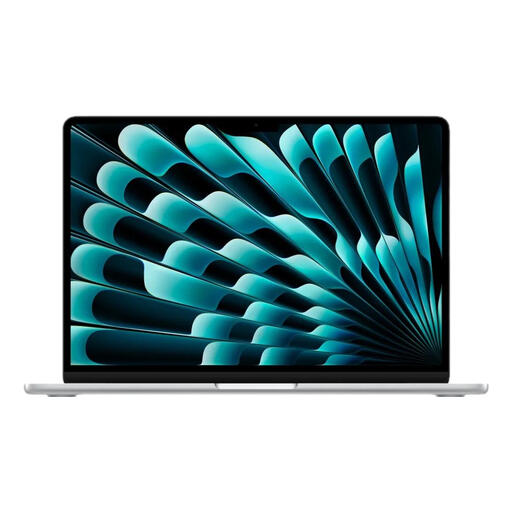
Apple 13-inch MacBook Air (2026), M5, 16 GB, 1 TB, Silver
Consider this compact macOS option if your course tools work on that platform. The product name specifies an M5 chip, 16 GB memory and a 1 TB SSD. Confirm compatibility with your required extensions and dependencies, and check the exact display arrangement before buying accessories.
Shop on Joybuy
 No image available
ASUS Vivobook 14 X1407QA-LY003W, Snapdragon X, Quiet Blue
Its 14-inch format is worth considering when the laptop needs to fit a small desk. The named configuration has 16 GB RAM and a 512 GB SSD. Check that course applications and local development dependencies work as required with its Snapdragon X processor before choosing it.
Shop on Joybuy
 No image available
Lenovo IdeaPad Slim 3 83K7009MUK, Ryzen 5 7535HS
Consider this configuration if you want a larger built-in screen for study and browser work. Its product name specifies a 15.3-inch WUXGA display, 24 GB DDR5 RAM, a 512 GB PCIe SSD and Windows 11 Home. Check the exact ports and external-display support before planning a docked setup.
Shop on Joybuy
 No image available
MSI Modern Laptop C2RMG-282UK, 9S7-15H431-282
Consider it for study and development tasks if its installed software suits your course. The product name specifies an Intel Core 5 processor, 16 GB DDR4 RAM, a 512 GB SSD and an FHD display. Confirm the installed operating system and exact screen size before purchase.
Shop on Joybuy
Frequently asked questions
Do I need a particular operating system to test web pages?
Not for Playwright's documented Chromium, WebKit and Firefox workflows alone: Playwright supports them on Windows, Linux and macOS. Choose the operating system required by your course and check every necessary local tool, extension and processor-architecture requirement.
Can browser emulation replace testing on real devices?
Emulation helps with repeatable viewport checks, but it should not replace a real-device or required-browser check when an assignment or feature calls for one. MDN Web Docs describes responsive design across different screen sizes and resolutions; check the specific devices and interactions your project must support.
Should I buy a monitor with the laptop?
A monitor makes sense if you have desk space and regularly need code, developer tools and a browser visible together. Check the exact laptop's display support alongside the monitor and any dock: Apple documents up to two external displays for the current MacBook Air range, while Microsoft specifies dual 4K-monitor support for its Surface USB4 Dock.
Will a stated battery-life figure cover a day of coding and browser tests?
A manufacturer's battery-life figure is not a runtime promise for your particular editor, local server, browser tests or external display. Compare figures under their stated test conditions and consider whether you can charge the laptop during longer sessions.
What should I do with an old laptop in the UK?
Use an appropriate electronics-recycling or take-back route rather than putting an old laptop in general waste. GOV.UK identifies the Waste Electrical and Electronic Equipment Regulations 2013, as amended, as the underpinning UK legislation; check the retailer's take-back arrangements for your purchase.


