What matters when choosing?
Decide whether the workshop call is mainly for one person or a group at the table. Then check framing for pages, face visibility and microphone coverage against the way you will actually sit and work.
| Concern |
What to check |
Who this matters to |
| Framing faces and pages |
Check whether the field of view can be adjusted and whether the camera can be positioned to show work on the table. AnkerWork lists software-controlled 65°, 78° and 95° settings for PowerConf C200; Logitech describes MX Brio Show Mode for sharing notes and sketches. |
I want workshop members to see me during discussion and my writing when I need feedback, without showing the whole kitchen. Around 45% of consumers could put control over that framing first. |
| Picture and speech clarity |
Check stated exposure features for your lighting and test speech from your usual seat. Logitech specifies Brio 4K’s microphone pickup at up to 3 feet; Zoom says HD video depends on the plan, device and bandwidth. |
When the kitchen is dim or backlit, I need others to see my face and hear my comments clearly. Around 33% of consumers could make that close-range clarity their primary concern. |
| Shared-table coverage |
Check the angle and stated microphone range against every seat. Yealink specifies a 120° view and a 5 m voice-pickup range for UVC34; test the intended arrangement rather than treating those specifications as a guarantee. |
If several of us join through one computer, everyone needs to fit in the frame and take part in the discussion. That shared-table need could come first for around 22% of consumers. |
Joybuy product choices
These choices include personal webcams for joining alone and an integrated camera to consider for a shared table. Match each one to your seating, document-framing and audio needs rather than treating camera resolution as the deciding factor.
 No image available
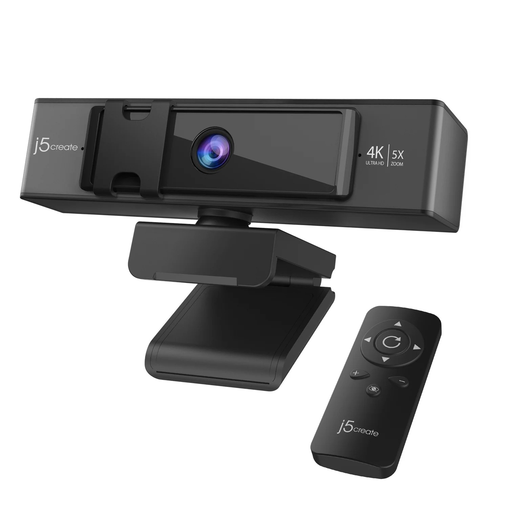
j5create JVCU435 USB 4K Webcam with 5x Digital Zoom Remote, Black and Silver
For a solo call where you want to adjust the view, this model includes a remote for its 5x digital zoom. Check whether your intended camera position will let you show handwritten pages; zoom control alone does not establish a desk-sharing setup.
View on Joybuy
 No image available
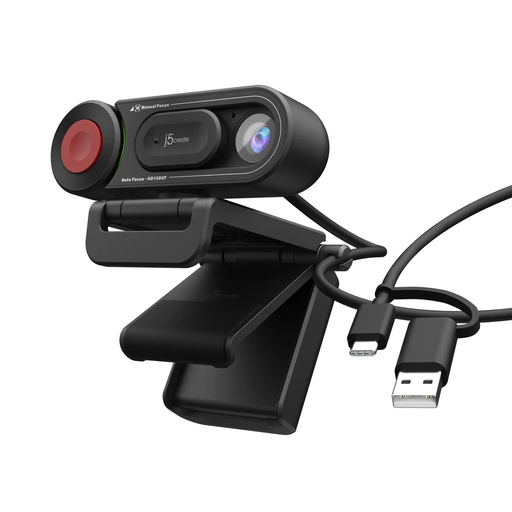
j5create JVU250 HD Webcam with Auto and Manual Focus Switch, Black
For an individual workshop call, this webcam offers a switch between auto and manual focus. If showing writing is important, check that its viewing angle and your planned placement can frame the page.
View on Joybuy
 No image available
EMEET All-in-One 4K Webcam, 98° Adjustable View, 4-Mic Array and Dual Speakers
For people sharing a table, its 98° adjustable view and integrated microphones and speakers are relevant features to assess. It has a fixed-focus lens; test whether your seating and any pages you want to show fit the intended camera position. Check operating-system compatibility before choosing it.
View on Joybuy
Frequently asked questions
Do I need a conference camera if I join the writing workshop alone?
Usually, a personal webcam is enough for one person joining a discussion. Consider a room-oriented, all-in-one camera when several people regularly share the table and need one device to cover their seating and audio.
Will a 4K webcam send 4K video to the workshop?
Not necessarily: the meeting platform, device settings and connection also determine the transmitted video. Zoom says HD video depends on the plan, device and bandwidth, and indicates that HD can use approximately 2 Mbps in each direction. Check the platform used by your workshop and test a call from your usual seat.
How can I show handwritten notes during a call?
Choose a camera position and framing control that let you move between face-to-face discussion and a readable view of the page. Logitech describes MX Brio Show Mode as a way to tilt the camera down towards notes and sketches; test the page framing in your meeting app before the workshop.
What should I do with an old webcam in the UK?
Look for an appropriate electrical-equipment collection route rather than assuming the webcam belongs in general household waste. The UK Waste Electrical and Electronic Equipment Regulations 2013 include provisions on equipment marking and collection arrangements; check your local electrical recycling options or an available retailer collection service.


