Who needs which camera?
Decide whether viewers chiefly need to see the dictionary, the presenter or both. That choice determines how important a downward-facing position is.
Page-first demonstrators
If participants need to follow entries and pointing gestures, start with a camera that can be positioned over the open book. IPEVO describes adjustable heights and angles for its DO-CAM visualiser, a more direct document setup than holding pages in front of a monitor-mounted webcam.
Presenter-led community hosts
If you mainly address the group and show an entry only occasionally, consider a webcam with autofocus or a document-view mode. Logitech lists Show Mode for Brio 500; whichever format you choose, check the book view in your own layout.
Shared-space organisers
When several volunteers use the same room, straightforward setup, understandable host audio and a visible way to cover the lens can matter alongside the picture. Logitech lists a shutter for C920s, while AnkerWork lists a sliding cover for PowerConf C200; test audio from the presenter’s usual position.
What matters when choosing?
For a dictionary demonstration, settle the camera position before comparing headline video specifications. Then decide how often you need to switch back to the presenter.
Document camera or USB visualiser
Choose when: Page turns, printed entries and pointing at the book are the session’s main content. IPEVO describes an adjustable arm and camera head for its DO-CAM.
Trade-off: This desk-based format takes a different position from a monitor-mounted webcam, so plan the space for both the book and camera.
Webcam with a document-view mode
Choose when: You mostly address the group but want to show a page or desktop object without setting up a separate visualiser. Logitech lists Show Mode for Brio 500.
Trade-off: A document-view feature does not establish that the print in your dictionary will be readable at your chosen distance.
Conventional webcam
Choose when: The presenter is usually in frame and book close-ups are occasional. Autofocus models offer an option when the subject moves; a fixed-focus model calls for a more controlled distance.
Trade-off: A monitor clip does not establish a stable downward-facing book view. Check the intended stand or support separately.
| Concern |
What to check |
Who this matters to |
| Readable pages and camera angle |
Position the camera over the intended page area; check focus and the smallest entry in the actual calling software. |
If viewers need to follow where I point, I need the open dictionary to stay clearly in frame as I turn pages. Around 50% of consumers would put a stable, readable page view first. |
| Switching between host and book |
Try the change between face and desk views; check framing controls and any software needed to use them. |
When I move from explaining a word to showing its entry, I want the change of view to be manageable during the call. For around 30% of consumers, that flexibility would be the primary concern. |
| Shared-room setup, audio and privacy |
Confirm the computer connection and calling-app recognition; check the lens cover and test speech from the host’s position. |
If different volunteers run the session, I need them to set up the call and tell when the lens is covered, while remote listeners can understand the host. That would come first for around 20% of consumers. |
Brands and product lines to consider
These examples illustrate different camera formats and controls. Their stated features do not establish dictionary-print readability in your room.
IPEVO
Consider the DO-CAM Creator’s Edition when showing physical dictionary pages is the main task.
- IPEVO describes an adjustable arm and camera head for different heights and angles, with an image-flip function for changing between document and face-to-face use.
- It is a desk-based visualiser rather than a conventional monitor-clip webcam; plan where it and the open dictionary will sit.
Logitech
Brio 500 and C920s illustrate two conventional-webcam approaches to presenter-led sessions.
- Logitech lists Show Mode for Brio 500. For C920s, it lists 1080p at 30 fps, autofocus, a 78° view, dual microphones and a privacy shutter.
- Check the actual book view: those features do not establish readable dictionary print at a particular distance.
AnkerWork
PowerConf C200 is an autofocus webcam to consider when the host wants selectable framing and a physical lens cover.
- AnkerWork lists 65°, 78° and 95° viewing options through its software, alongside autofocus and a sliding privacy cover.
- Confirm a suitable support separately if the camera must point down at a dictionary.
Elgato
Facecam MK.2 is relevant to a prepared layout in which the camera-to-subject distance stays consistent.
- Elgato specifies a fixed-focus range of 30–120 cm and a 1/4-inch mounting point.
- Moving the book in and out during a live demonstration calls for care with that fixed-focus range; its listed uncompressed modes require USB 3.0.
Joybuy webcams for presenter-led sessions
These conventional webcams suit a setup where the host is usually on screen and shows dictionary pages occasionally. Before choosing either one for close-ups, check how you will aim it at the book and whether the entries are readable in your calling app.
 No image available
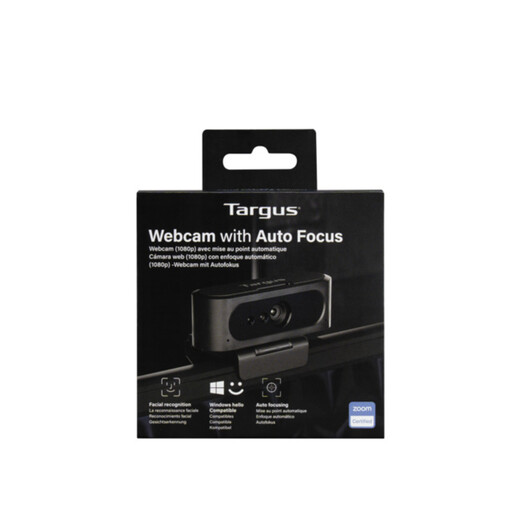
Targus 2K Webcam with Auto Focus
Consider this autofocus webcam if you mainly speak to the group and need occasional book close-ups. Check that your planned support gives it a secure view of the page and that it focuses at the intended distance.
If resolution affects your choice, confirm the video specification before buying: the 2K wording in the name differs from the stated Full HD 1080p specification.
Joybuy
 No image available
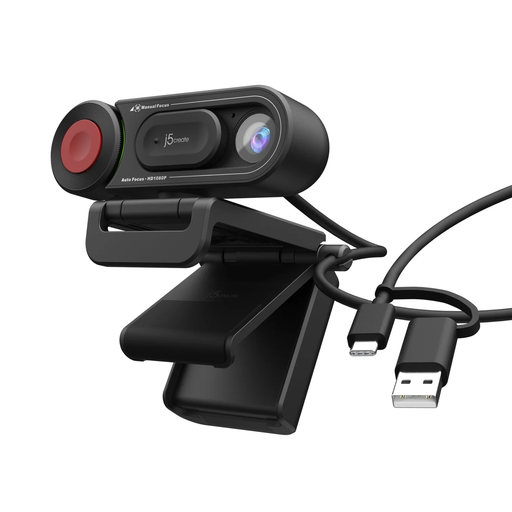
j5create JVU250 HD Webcam with Auto & Manual Focus Switch, Black
Consider this webcam for a presenter-led session if the choice of automatic or manual focus is useful when preparing a book close-up. Check that its support can hold the intended downward-facing position and that the dictionary is readable at your chosen distance.
Joybuy
Common questions
Do I need a 4K webcam to show dictionary entries?
No particular resolution guarantees readable entries. Prioritise a workable camera angle, focus and lighting, then check the exact dictionary at the distance and picture size participants will see in the calling app. A document camera is a more direct format for showing a book lying on a desk.
How should I prepare the camera before the session?
Put the dictionary where you will use it and inspect the remote preview while pointing to entries and turning pages. Check that the relevant area stays in frame; adjust available focus, exposure or framing controls where your camera and software allow it.
What if participants cannot clearly see the page?
Describe the word and relevant page information aloud rather than relying on the camera view alone. Ask participants what would help them follow the demonstration, and share materials in advance where appropriate. AbilityNet highlights the range of needs to consider in online meetings.
Which privacy feature helps in a shared community room?
A physical shutter or sliding cover provides a visible way to block the lens when the camera is not in use. Logitech lists a shutter for C920s, and AnkerWork lists a sliding cover for PowerConf C200; check the feature on the particular model you intend to buy.


