Frequent client-facing callers
If interviews, presentations or client meetings are a regular part of your day, identify whether the laptop image, your voice or both are making those calls harder to follow.


For frequent home video calls, choose a headset if clear speech or private listening is the main problem; choose an external webcam if the image needs improving. If the laptop camera is simply too low, try changing its position first. A webcam microphone may be enough in a quiet room, but check ports, meeting-app permissions and any employer restrictions before buying.
If interviews, presentations or client meetings are a regular part of your day, identify whether the laptop image, your voice or both are making those calls harder to follow.
When household sound reaches your calls or you need to listen privately, microphone placement and headset design matter more than camera resolution. Noise-control performance still depends on the model and room.
A work computer, Teams configuration or browser permission can affect which camera and microphone you can use. Check the available ports and workplace rules before choosing a device.
Start with the problem other people notice on your calls: speech, image or interruptions. For an image problem, check camera height and lighting before replacing the camera; a webcam with an integrated microphone can keep a quiet-room setup simple.
| Concern | What to check | Who this matters to |
|---|---|---|
| Clear speech and private listening | Consider a headset with a microphone positioned near your mouth; match its wired connection or wireless adapter to your computer. | If household sounds reach my calls or I need to listen without others hearing, audio is the upgrade I would make first. Around 29% of consumers might likewise put speech and listening first. |
| Image, lighting and framing | Check whether moving the camera nearer eye level helps; if replacing it, compare its mounting method, field of view and stated video resolution. | When I appear poorly framed or the laptop image is unclear, I want to fix what callers see. Roughly 29% of consumers might make image and framing their primary concern. |
| Ports and meeting-app access | Match the exact USB connection and device variant to your computer; check browser permissions and employer-managed Teams settings. | I need a device that works with my work account and computer, including the call controls I actually use. For about 24% of consumers, compatibility might come first. |
| Connection reliability | Check call stability and your meeting platform’s bandwidth guidance before choosing higher-resolution video equipment. | If calls freeze or drop, a different camera will not address the connection causing the interruption. Around 18% of consumers might prioritise call stability. |
More pixels do not move a laptop camera closer to eye level or improve the room lighting. PCMag UK describes 1080p as a starting point for a webcam and points to cropping flexibility as a reason to consider 4K.
Try the camera at your normal screen height and assess the lighting first. Consider higher resolution if reframing the picture is the problem you need to solve.
Connections and Teams or UC variants can differ within a headset range. Microsoft Support says certified devices can provide physical call controls, but those functions should not be assumed for every variant.
Check the exact model against your computer’s port, the meeting app you use and any employer-approved device requirements.
An integrated microphone can simplify calls in a quiet, private room, but it does not provide private listening. Jabra and Poly describe noise-reducing microphone features on particular headsets; results depend on the model and surroundings.
If shared-room noise or confidential listening is your main concern, assess a headset rather than treating the webcam microphone as a substitute.
A connected device still needs access in the meeting app or browser. Microsoft Learn also describes Teams audio and video settings that an organisation can manage.
Test the camera and microphone in your usual app, browser and work account, and ask your IT team about restrictions on a managed computer.
Logitech offers standalone webcams for home and hybrid meetings. Its Brio 500 is a 1080p example.
Jabra’s Evolve2 55 range covers business headsets with connection and platform variants.
Poly’s Voyager Focus 2 range is relevant to callers considering a Bluetooth headset with a boom microphone.
These choices cover a wired headset for audio-first calls and two external webcams for callers assessing their image or a simpler camera-and-microphone arrangement. Choose according to the problem you need to fix, then check the exact variant against your computer and meeting app.
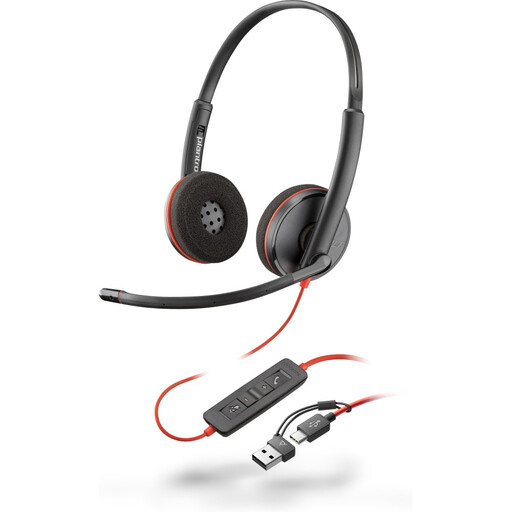 No image available
Consider this wired headset when speech and private listening matter more than changing your image. Its named variant has a USB-C connection and USB-C/A adapter; confirm the available port, any required Teams call controls and employer device rules before buying.
 No image available
Consider this external webcam if camera focus or positioning is your main concern. Confirm the capture resolution before buying: the 2K product title and 1080p description differ. Check camera permissions on a managed work computer too.
 No image available
For calls in a quiet room, consider this external camera if an integrated microphone suits your setup. Its HD designation alone does not establish that it meets a 1080p requirement; check the resolution and use a headset if private listening or voice isolation is your priority.
No. A separate webcam is a targeted choice when your laptop image, framing or camera position is the problem; if people struggle to hear you, assess the audio setup first. Zoom Support says you can join Zoom without a webcam.
Usually not if you do not need extra room to crop or reframe. PCMag UK identifies 1080p as a starting point for a webcam; lighting, placement and connection stability still need separate attention.
No, do not assume the controls will work on every model or variant. Microsoft Support says certified devices can support physical controls such as answer, mute and volume in installed Teams for Windows and Mac; check the exact headset and your workplace setup.
A browser may need camera or microphone permission, and employer-managed Teams settings can restrict audio or video, as Microsoft Learn explains. Check the connection and test the device in your usual work account and meeting app.
Not if the connection is causing the freezes. Zoom Support’s bandwidth guidance varies with video resolution and call type, so check call stability and household network use before choosing higher-resolution camera hardware.