Solo practical tutors
People teaching alone from a shallow kitchen table who need to show both their face and physical materials without leaving a permanent camera setup in place.


For a solo kitchen-table tutorial, a personal webcam with controllable framing and a workable mounting position is a sensible starting point. Consider a presentation-focused camera if picture-in-picture or lighting controls suit your lesson, and an all-in-one conference camera when several people need to be seen and heard; a room-wide view can make one tutor and small teaching materials less prominent. Check your meeting app, microphone selection and camera preview from the position you intend to use.
People teaching alone from a shallow kitchen table who need to show both their face and physical materials without leaving a permanent camera setup in place.
Tutors who move between speaking to the camera, showing a close demonstration and sharing visual material. Framing control, a flexible mount or picture-in-picture may matter more to them than a room-wide view.
Hosts teaching with several people at the table who need to consider a wider view and audio that can capture more than one local speaker.
Start with the view your lesson needs: controllable framing for one tutor, presentation features for a mixed-format lesson, or wider coverage and integrated audio for a group. Then check the camera position, lighting and sound in the kitchen where you will teach.
| Concern | What to check | Who this matters to |
|---|---|---|
| Framing the lesson | Check the field of view, any adjustable settings and whether the mount can place the camera at the angle you need. | I need viewers to see my hands and materials without losing sight of me; around 31% of consumers put framing first. |
| Changing kitchen light | Check the stated focus and lighting controls, then preview the image at your usual teaching time. | Window light and overhead lighting change how my demonstration looks, so I want an image I can assess before class; for around 25% of consumers, this is the primary concern. |
| Clear speech | Check which microphone your meeting app selects and whether a headset or separate microphone would suit the room. | Instructions need to remain understandable when there is kitchen noise or echo; speech clarity comes first for around 25% of consumers. |
| Setup and privacy | Check the connection, mounting method and whether the model includes a cover for its lens. | I need to clear the shared table after teaching and put the camera away or cover it between lessons; around 19% of consumers prioritise this need. |
Logitech describes MeetUp’s 120° view as a way to show people around a small room. At kitchen-table distance, that room-oriented view can make one tutor and small teaching objects less prominent.
For solo teaching, check how tightly you can frame yourself and the materials. A wide room view is more relevant when several local participants must remain visible.
The view learners receive also depends on camera placement, focus, lighting and the settings used by the meeting app.
Preview your intended app and table layout. Check that the camera’s mounting and framing controls work for the demonstration you plan to give.
A monitor-mounted camera may show your face but miss work taking place beside or below it on the table.
Work out the camera height and angle first, then check whether the model and your intended mount support that position.
A separate tripod, clamp or mounting arm may be needed when the monitor position cannot show the teaching area.
GOV.UK guidance dated 31 March 2026 describes different marking routes for electrical equipment placed on the Great Britain and Northern Ireland markets.
Confirm the delivery destination and check the seller’s or manufacturer’s documentation for the exact camera and any supplied power accessories, rather than applying a Great Britain marking conclusion to Northern Ireland.
Its personal webcams and room cameras address different kitchen-table setups: one presenter or several people teaching together.
Its PanaCast 20 personal camera is relevant when the lesson calls for presentation features as well as a view of the tutor.
Its Meet 2 personal webcam is relevant to tutors who regularly move the camera between a monitor and a tripod position.
These choices include personal webcams for a solo tutor and an all-in-one camera to consider when several people teach at the table. Choose by the view and camera position your lesson needs, rather than treating the different formats as interchangeable.
 No image available
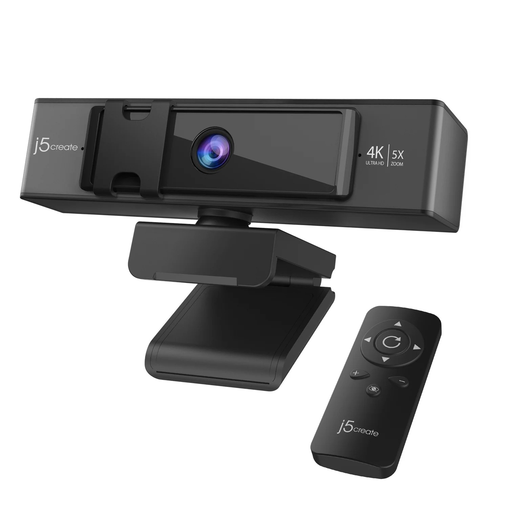
For a solo lesson where you want to change the camera view remotely, this model offers a remote control and 5x digital zoom. Check that your planned mounting position can show both you and your teaching materials; digital zoom does not establish how wide the starting view is.
 No image available
For a tutorial with several people at the table, this model combines a 98° adjustable field of view with four microphones and dual speakers. It has fixed focus, so check the intended distance to the people and materials, as well as where the camera can sit.
 No image available
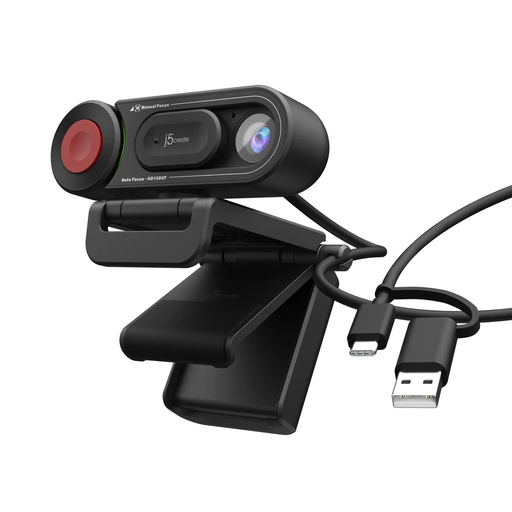
For a solo lesson where you want a choice between automatic and manual focus, this HD webcam has a focus switch. Check that its view includes the tabletop area from the position where you plan to teach.
For one tutor, choose a view that includes the necessary materials without making them too small to see. Logitech lists 65°, 78° and 90° diagonal settings for Brio 4K, while its 120° MeetUp room camera is more relevant when several people need to stay in view; check the stated measurement direction when comparing camera angles.
Yes, if the camera and mount support the position you plan to use. Logitech specifies a 1/4-inch tripod thread for Brio 4K, and OBSBOT specifies a 1/4-20 thread for Meet 2; check that your tripod, arm or clamp can hold the camera steadily without obstructing the lesson.
Select the intended camera and microphone in your meeting app, then preview them or place a test call from your kitchen-table position. Microsoft Support says a Teams test call checks the microphone, speaker and camera, but that feature is not available in Teams on the web.
It may suit a quiet solo lesson, but check a recording or test call in the actual room before relying on it. Logitech lists built-in microphones for Brio 4K and a room-oriented microphone array for MeetUp; if appliance noise or echo makes speech difficult to understand, consider a separate microphone or headset.
Yes. GOV.UK guidance dated 31 March 2026 lists UKCA or CE routes for electrical equipment placed on the Great Britain market, and CE or, where applicable, CE alongside UKNI for Northern Ireland. Confirm the delivery destination and check the documentation for the exact camera and any supplied power accessories.