Solo presenters in noisy shared rooms
If you present from a bedroom or desk, consider what the camera shows behind you, how your voice sounds around household activity and whether you want a physical way to cover the lens between calls.


If you are presenting alone from a desk in a shared flat, start with a personal webcam whose framing and privacy controls suit your room. A small-room conference camera makes more sense when several people need to be seen and heard together. If you will show physical research materials or move while speaking, check the exact model’s focus, presentation modes and software requirements before choosing.
If you present from a bedroom or desk, consider what the camera shows behind you, how your voice sounds around household activity and whether you want a physical way to cover the lens between calls.
If you need to show a whiteboard, papers or objects on a desk, or move while explaining your findings, check how the camera focuses and frames those materials rather than choosing on resolution alone.
When several people will speak from the same room, check whether everyone fits in the frame and can be heard. A room-oriented camera addresses a different setup from a compact personal webcam.
Choose when: One person presents from a desk and needs to control what is visible in a shared room.
Trade-off: A built-in microphone is convenient, but noise-reduction features do not guarantee that flatmate conversations will disappear from the call.
Choose when: Several people must present or answer questions from the same room.
Trade-off: Room-oriented camera, microphone and speaker hardware needs a suitable position and takes more space than a desk webcam.
| Concern | What to check | Who this matters to |
|---|---|---|
| Privacy and household noise | Check the exact model’s physical lens control and frame your shot away from private spaces. Rehearse microphone audio in the room. | If other people or belongings might appear behind me, I want control over the view and need my voice to remain understandable. Around 27% of consumers put privacy and household sound first. |
| Visible research materials | Decide whether you will screen-share or point the camera at physical material; then check focus, framing and any desk or whiteboard mode. | When I explain a diagram on paper or move to a whiteboard, viewers need to follow what I am showing. Around 33% of consumers make material visibility their primary concern. |
| Simple solo setup | Check the USB connection, computer and meeting-platform compatibility, mounting position and whether framing controls need software. | I may present from a temporary desk under changing indoor light, so I need a camera I can position and set up without disrupting the talk. For around 27% of consumers, ease of solo setup comes first. |
| Several people in one room | Count the local presenters and check group framing, microphone placement, speaker use and cable routing. | If flatmates present with me, everyone needs to be visible and able to contribute without crowding a laptop. Group coverage is the main concern for around 13% of consumers. |
Insta360 describes physical gimbal tracking on Link 2, while Link 2C adjusts its framing automatically. The distinction matters if you plan to walk away from your desk.
Check which movement the exact model follows, then try the intended camera position before the presentation.
A wider shot can fit more of the presentation space, but it can also show flatmates or private belongings.
Use only the width you need. If a physical privacy control matters when the camera is idle, confirm its type on the exact model.
Logitech, AnkerWork and Insta360 describe noise-reduction features on particular models; those features do not establish how a household conversation will sound through your meeting app.
Make a rehearsal call from the room and, where possible, arrange a quieter time or use a suitable separate microphone.
A working camera may still be awkward to use if its mount, framing controls or required software do not fit your computer and presentation space.
After delivery, check the USB connection, meeting-platform recognition, mounting and any software-dependent features. Keep change-of-mind returns separate from remedies for faulty or misdescribed goods.
Logitech offers personal webcams as well as the small-room MeetUp conference camera; the appropriate format depends on how many people will present.
PowerConf C200 is a personal webcam to consider when you need to adjust how much of a shared room appears on screen.
Link 2 and Link 2C are presentation-oriented webcams for situations involving movement or physical materials.
These Joybuy choices include personal webcams for desk presentations and an all-in-one webcam for a shared-room setup. Compare each model’s stated controls with what you need to show and hear.
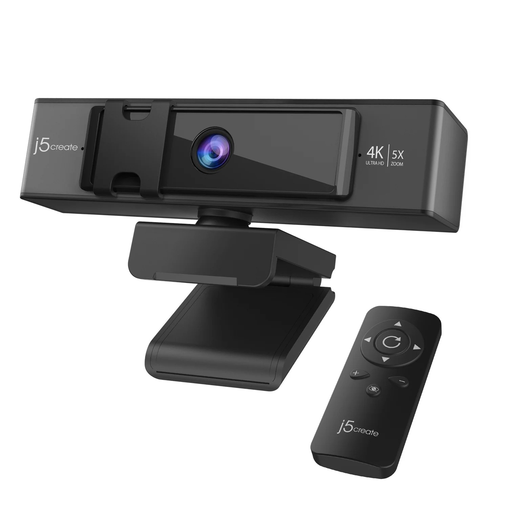 No image available
Consider this desk webcam if you need to adjust the shot while presenting physical materials.
Its product name specifies 4K video, 5x digital zoom and remote control. Check how the framing works in your meeting app and whether its privacy controls meet your needs.
 No image available
Consider this all-in-one design when several people need to join a presentation from the same room.
The product name specifies an adjustable 98° field of view, a four-microphone array, dual speakers, fixed focus and USB plug-and-play operation. Check whether speaker use suits your flat and whether the privacy control is the type you want.
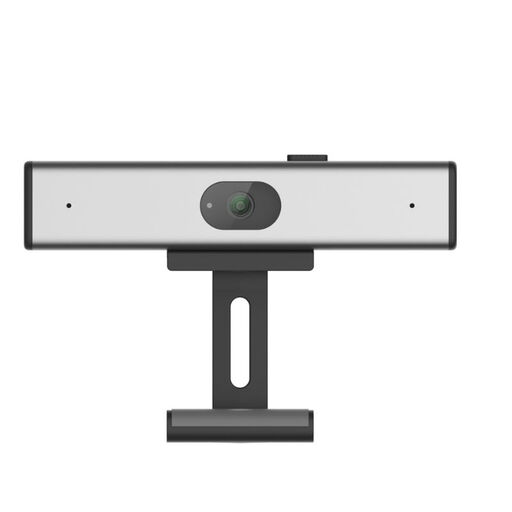 No image available
This clip-on webcam is a desk-based option if you plan to present from a laptop or monitor.
Its product name specifies 2K QHD video and a noise-reduction microphone. Check the field of view, privacy controls and compatibility with your meeting setup before ordering.
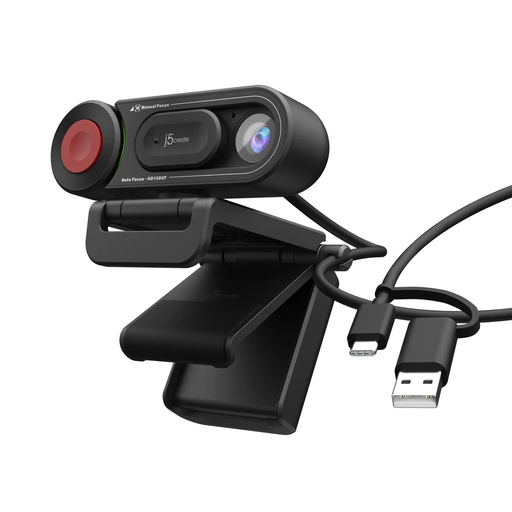 No image available
Consider this personal webcam if switching between automatic and manual focus would help with a desk presentation.
The product name specifies HD video and an auto/manual focus switch. If you must show fine detail or need a physical privacy control, check those requirements against the exact model.
Usually not for a solo presentation from a laptop desk: a personal webcam is the more proportionate setup. Consider a room-oriented camera when several local presenters need to fit in the shot and be heard on the same call.
Consider 4K when the camera must show physical details such as handwriting, a whiteboard or objects on a desk. For screen-shared slides and a seated presenter, check framing, lighting, focus and audio as well; a 4K camera does not ensure the meeting service will transmit at 4K.
Position the camera away from private spaces and use the narrowest view that still fits your presentation. For control between calls, choose an exact model with a suitable physical shutter, cover or switch, and check whether changing its field of view requires software.
For an eligible UK online purchase, the cancellation period ends 14 days after the day you receive the goods under regulation 30 of the Consumer Contracts Regulations 2013. Check the applicable exceptions and the seller’s cancellation procedure; remedies for faulty or misdescribed goods are a separate matter.