For learning a wet racing line, put motion handling ahead of an HDR label: look for response-time evidence, a refresh rate your system can use and variable refresh rate (VRR) support over your intended connection. A 27-inch QHD monitor is worth considering if it fits the shared desk and your system can drive it; a compact 24.5-inch Full HD display makes a different trade-off when space and high-refresh play matter more than QHD detail.
Who this is for
Wet-condition sim racers
If spray and rapid camera movement make the racing line harder to follow, assess motion handling at the frame rates you actually play. RTINGS explains that slow pixel transitions can leave blur or inverse ghosting around moving objects; an HDR label does not answer that motion question.
Shared-bedroom desk racers
If the desk also holds a wheel, keyboard or other everyday equipment, measure the space available for the screen and stand. Screen size alone will not tell you whether the monitor can sit at a comfortable height without obstructing the rest of the setup.
Mixed-use evening gamers
If you race and also use the display for games or desktop work later in the day, consider QHD resolution, brightness adjustment and the exact model’s evening picture settings alongside its racing specifications.
What matters when choosing
Decide whether a 27-inch QHD screen or a smaller Full HD screen fits your desk and priorities, then check motion behaviour and the modes available from your PC or console.
27-inch QHD
Consider it when: you want 2560 × 1440 track detail and have room for the screen and its stand.
Trade-off: QHD places more demand on the source system than Full HD; the stated refresh ceiling does not mean your game will reach it.
24.5-inch Full HD
Consider it when: desk clearance and a compact, high-refresh setup take priority over QHD resolution.
Trade-off: you give up QHD pixel detail; judge any blur-reduction mode at the brightness and frame rates you expect to use.
| Concern | What to check | Who this matters to |
|---|
| Motion clarity |
Look for independent response-time results at relevant refresh rates, then confirm VRR on your intended input. Do not equate a manufacturer’s response-time figure with tested motion performance. |
When spray and fast camera movement make the line difficult to follow, I want moving detail to remain readable without distracting blur or tearing. Around 40% of consumers put motion clarity first. |
| Desk fit |
Measure the space left around your wheel or keyboard; compare the exact stand footprint and adjustment range. |
If racing shares a desk with other activities, I need the screen to fit without crowding my controls. Roughly 30% of consumers make desk fit their primary concern. |
| Source compatibility |
Match the PC or console, cable and HDMI or DisplayPort input to the resolution, refresh-rate and VRR combination you intend to use. |
Before changing monitors, I need to know whether my existing system can deliver the mode I am choosing it for. About 20% of consumers prioritise that compatibility question. |
| Evening picture settings |
Check low-brightness controls and any restrictions on using HDR with blur reduction. Check certification for the exact model if HDR matters to you. |
For racing later in a shared room, I want picture settings I can live with without assuming that every display mode works together. Around 10% of consumers put evening picture settings first. |
Buying pitfalls
-
Choosing by refresh rate alone
A high refresh-rate specification does not establish how clearly pixels follow fast-moving track detail. RTINGS notes that slow response behaviour can produce blur or inverse ghosting.
Compare independent motion tests where available, including behaviour at the frame rates you expect to use, and check the supported VRR mode for your connection.
-
Assuming HDR and blur reduction work together
Display modes can have restrictions. ASUS says ELMB Sync reduces overall brightness and cannot run simultaneously with HDR on supported models.
Read the exact model’s mode guidance and decide which setting you would use for racing rather than counting both features as simultaneous benefits.
-
Judging a 27-inch screen without its stand
The screen diagonal does not show how much room its base leaves for a wheel, keyboard or other desk equipment.
Measure usable desk depth and width, then check the stand dimensions and adjustments for the model you plan to order.
If you intend to use a monitor arm instead, confirm the exact model’s mounting compatibility and allow room to position the arm.
-
Assuming a listing settles model and power details
Variants and supplied accessories can differ, so a familiar model family name is not enough to identify the equipment you will receive.
Confirm the full model number, supplied power equipment, ports and documentation with the seller. Check that the equipment is suitable for the electrical supply where it will be used, as the Health and Safety Executive advises.
Relevant monitor brands for reference
ASUS / ROG
The TUF VG27AQL5A illustrates a 27-inch QHD Fast IPS route with a high stated refresh rate and ELMB Sync.
- ASUS lists the VG27AQL5A at 2560 × 1440 and up to 210Hz when overclocked.
- ASUS recommends ELMB Sync above 120Hz and says it reduces brightness and cannot run with HDR.
AOC / AGON
The Q27G4XF illustrates a 27-inch QHD Fast IPS option with a height-adjustable stand.
- AOC lists 2560 × 1440 resolution, 180Hz and Adaptive Sync for this model.
- Its stated response-time specification does not replace motion testing at the settings you plan to use.
MSI
The MAG 27CQ6F represents a curved QHD monitor for consumers who prefer that screen shape.
- MSI lists a 180Hz refresh rate and Adaptive-Sync for the MAG 27CQ6F.
- Its 0.5ms GtG minimum is a manufacturer specification, not a measured result for every racing frame rate.
ZOWIE by BenQ
The XL2546K represents the compact 24.5-inch Full HD esports route rather than a QHD-detail-first choice.
- ZOWIE lists a TN panel, 240Hz, DyAc+ and height and tilt adjustment.
- Its smaller Full HD format is a different resolution and desk-space trade-off from a 27-inch QHD screen.
Joybuy monitors for this setup
These monitors offer QHD options for the wet-racing and shared-desk decision, including curved and high-refresh variants. Check each model’s motion behaviour, connection modes and physical fit rather than treating its refresh-rate headline as a complete answer.
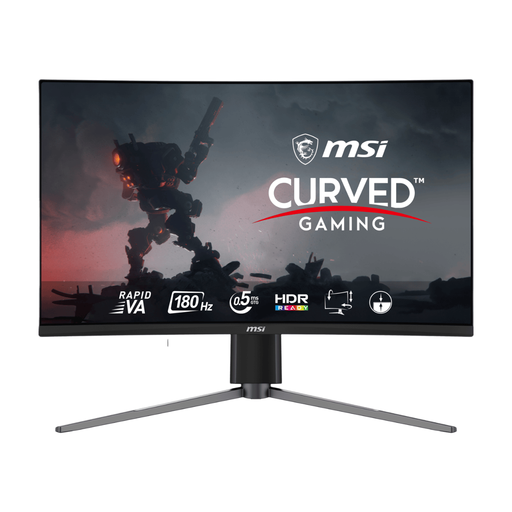 No image available
MSI MAG 27CQ6F 27-inch WQHD curved monitor
Consider this model if you prefer a curved screen for your racing setup and have room for a 27-inch display.
Its title specifies a Rapid VA panel and 180Hz. Check motion testing where available, and confirm the refresh and Adaptive-Sync modes for your source and chosen input.
View on Joybuy
 No image available
MSI MAG 274QF 27-inch WQHD Rapid IPS monitor
This is an IPS-format QHD option to assess if you want a 27-inch racing display on a shared desk.
The title lists 180Hz and Adaptive Sync. Confirm the available refresh and VRR modes for your connection, and measure the stand’s footprint before ordering.
View on Joybuy
 No image available
MAG 274QP QD-OLED X24 WQHD 240Hz monitor
Consider this QD-OLED option if you want QHD resolution with a 240Hz specification and can accommodate its screen on the desk.
Check the refresh and Adaptive-Sync combination your device can use, as well as the panel’s settings at your preferred evening brightness. The stated 0.03ms response time is not independent motion testing.
View on Joybuy
 No image available
MAG 275QF X32 27-inch WQHD Rapid IPS monitor
Its 320Hz specification is worth assessing if your racing system can make use of a higher QHD refresh ceiling.
The title also lists Adaptive-Sync. Confirm the mode available on your intended input and look beyond the stated 0.5ms response time when judging motion clarity; check that the stand position suits the shared desk.
View on Joybuy
 No image available
HKC G27H2DPro 27-inch QHD Fast IPS monitor
This is another 27-inch QHD option if you want to assess a higher refresh-rate specification for racing.
The title states 220Hz. Before choosing it, confirm which connection supports your desired refresh and FreeSync mode, and check the stand’s dimensions and adjustment options.
View on Joybuy
Frequently asked questions
Is 180Hz enough for learning a wet racing line?
A 180Hz monitor can be a sensible choice if your system can use that mode and the screen handles motion well at your usual frame rates. RTINGS notes that response behaviour affects blur, so check motion results and VRR support rather than relying on refresh rate alone.
Should I prioritise HDR for wet-track reflections?
Prioritise motion behaviour for following the racing line, then assess the exact monitor’s HDR capability as a separate picture choice. VESA DisplayHDR certification has defined tiers; ASUS also says ELMB Sync cannot run with HDR on its supported monitors.
What should I check before connecting a PC or console?
Match your device and cable to the exact monitor input and the resolution, refresh-rate and VRR combination you want. Read the model’s port specifications because available modes can differ between HDMI and DisplayPort.
What should I check when buying a monitor for use in Great Britain?
Confirm the exact model, supplied power equipment and product documentation before ordering. The UK Office for Product Safety and Standards identifies the Electrical Equipment (Safety) Regulations 2016 as requirements for electrical equipment placed on the Great Britain market; a marketplace listing alone does not establish that a particular item meets them.


