
24/7 Customer Support

Free returns

Same-day & Next-day Delivery

Quality Guaranteed

Unlock Your Welcome Offers: FREE Delivery | Up to 80% OFF | Free 30-day JoyPlus trial
Download the APP
Building a new PC is an exciting process, and selecting the right case is about more than just housing your components. For many, a white airflow PC case represents the perfect blend of clean, modern aesthetics and high-performance cooling. However, the market is filled with options that look the part but fail to deliver, leading to buyer's remorse. As the Joybuy Product Recommendation Officer, my role is to help you navigate these choices and identify what truly matters.
Before you commit, be aware of a few common pitfalls that can turn your dream build into a thermal nightmare.
To ensure your white gaming PC case performs as well as it looks, focus on these non-negotiable features. Analysing these details will help you make a much more informed decision.
The single most important factor for a high-airflow case is its front panel design.
Never assume your parts will fit. Always verify the following specifications, which are usually listed on the product page:
A good case is an investment that should last through several upgrades.
Instead of a single "best" option, the right case depends on your specific needs and priorities. Here are a few recommendations matched to different builder profiles.
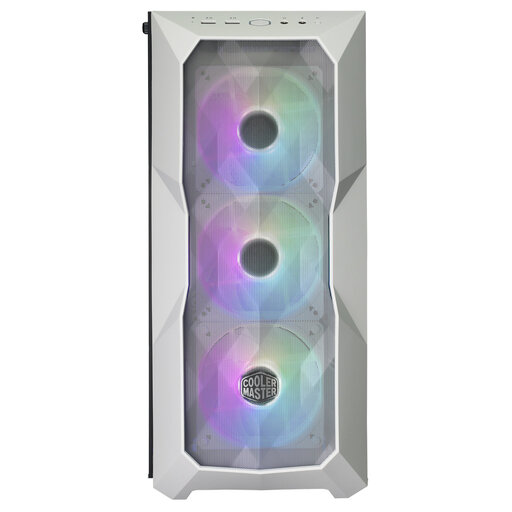
Why This Fits Their Persona: This user wants a PC that is both a high-performance machine and a centrepiece for their desk. The clean white finish, combined with a mesh front and tempered glass side panel, delivers on both cooling and visual appeal for a stunning build.
Its full mesh front panel directly counters the "Glass Box" trap by prioritising airflow, ensuring components stay cool. It also offers generous clearance for large GPUs (up to 410mm) and supports E-ATX motherboards, avoiding compatibility issues.
Includes three pre-installed PWM fans for immediate cooling performance straight out of the box. Detachable dust filters on the front, top and bottom make maintenance simple.
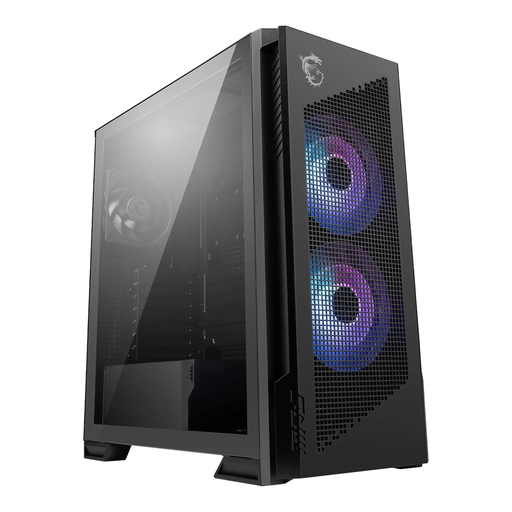
Why This Fits Their Persona: This user prioritises framerates and low temperatures above all else. While not a white case, its airflow-centric design makes it a strong contender for anyone whose primary goal is maximum cooling performance for demanding games and applications.
The design is entirely focused on function. A full mesh front panel and strategically placed vents ensure there are no thermal bottlenecks, directly addressing the primary pitfall of style-over-substance cases.
Extensive cooling support for multiple fans and radiators up to 360mm allows for highly capable cooling setups. A dedicated cable management system helps keep the interior tidy to further improve airflow.
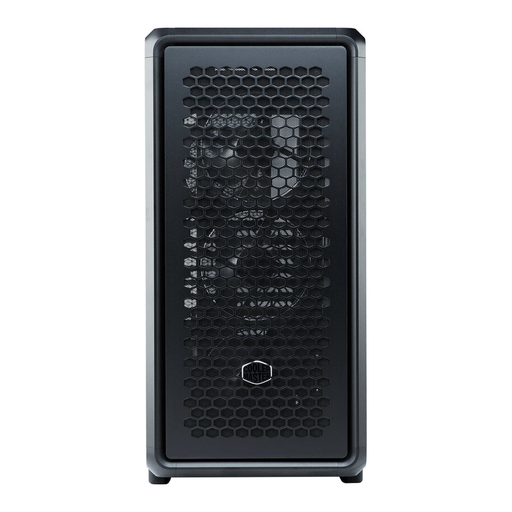
Why This Fits Their Persona: This builder sees their PC as a work of art and wants ultimate flexibility for custom water cooling loops and showpiece hardware. The open-frame design offers unparalleled airflow and a unique platform for a truly custom build that stands out.
An open-frame case is the antithesis of the "Glass Box" trap; there are no panels to restrict airflow. Its massive interior and E-ATX support eliminate virtually all component compatibility concerns.
Offers extreme hardware support, including space for up to triple 360mm radiators and 485mm graphics cards. The integrated GPU holder prevents sagging of heavy, high-end cards.
While the models above represent different approaches to high-performance builds, from clean white aesthetics to function-first black designs, the options don't stop there. For those who appreciate a classic, stealthy look, our selection of black frame cases offers another avenue for a powerful and stylish PC.
We have compiled a complete, real-time list of products that fully satisfy these strict selection criteria and UK safety regulations.
For a typical UK home environment, it's a good practice to check and clean the dust filters every two to three months. If you live in a dustier area, have pets or keep the PC on the floor, you may need to clean them monthly. Simply remove the filters, wipe or rinse them, ensure they are completely dry and reinstall. This 5-minute task can significantly maintain thermal performance.
This was a common issue with older, lower-quality plastics. Modern high-quality PC cases use more durable materials and coatings, such as powder-coated steel and high-grade ABS plastic, which are highly resistant to yellowing from UV light exposure. By choosing a case from a reputable manufacturer, you can expect the white finish to remain crisp for many years.
Yes, in most situations. A well-designed mid tower ATX case is the most popular size for a reason. It offers a great balance of a manageable footprint and sufficient space for the majority of high-end components, including large graphics cards and AIO liquid coolers. However, if you plan on building a complex custom water-cooling loop or using an oversized E-ATX motherboard, you may want to consider a full-tower case for the extra room.