
24/7 Customer Support

Free returns

Same-day & Next-day Delivery

Quality Guaranteed

Unlock Your Welcome Offers: FREE Delivery | Up to 80% OFF | Free 30-day JoyPlus trial
Download the APP
A white wireless gaming mouse can bring a clean look to a UK gaming desk, home office or Apple setup. However, appearance is only one part of the buying decision. The right model also needs dependable wireless performance, suitable comfort, sensible battery management and software that works with your computer.
Marketing specifications can make comparison difficult. An 8K wireless gaming mouse may offer a high polling rate, but your monitor, game and computer hardware may not benefit equally. A very high DPI figure can sound impressive, yet most users will not play at the maximum setting. Battery-life figures may also depend on the selected polling rate and power mode.
This guide focuses on the practical details that help you avoid paying for features you may not use.
DPI describes sensitivity, not necessarily accuracy. A high DPI gaming mouse can be useful for large or high-resolution displays, but sensor consistency, lift-off behaviour and software adjustment are also important. Independent X/Y adjustment can be particularly useful when horizontal and vertical movement need different sensitivity levels.
For everyday work, moderate settings are often easier to control. For FPS games, many players prefer lower sensitivity with a larger mousepad, while MOBA players may value quick movement and programmable buttons.
Polling rate refers to how frequently the mouse reports its position to the computer. A 1,000Hz mouse reports around 1,000 times per second; an 8,000Hz model reports more frequently. This can support smoother cursor updates, but it may increase data processing and battery consumption.
Before selecting an 8K wireless gaming mouse, check whether your computer’s USB controller and CPU can handle the increased data throughput. A lower setting may be more practical for office work or longer battery life.
“Wireless” can mean 2.4GHz receiver connection, Bluetooth or both. Some models use replaceable AA batteries, while a rechargeable wireless mouse needs periodic charging. A tri-mode wireless mouse generally offers wired, 2.4GHz and Bluetooth connections, but the exact switching process varies.
Also check whether the receiver, charging cable and any optional charging dock are included. Wireless charging modules may be sold separately.
A lightweight gaming mouse can reduce the effort needed for repeated movements, particularly in FPS games. Models around 49g–68g may feel agile, but low weight does not suit every grip. Palm, claw and fingertip users may prefer different shell shapes and side-button positions.
Ambidextrous designs can be useful for left- and right-handed users, while shaped ergonomic shells may provide more support for a particular hand. If possible, compare dimensions with your current mouse rather than relying on weight alone.
Look for the complete specification rather than one headline number. Useful details include:
A sensor with adjustable settings can work for gaming, design tasks and general computing without requiring a separate white computer mouse.
Mechanical switches provide a familiar click feel and audible feedback. Optical switches register clicks using light rather than traditional mechanical contact. Product specifications may state a rated click lifespan, but this is a manufacturer rating rather than a guarantee of personal service life.
For a programmable gaming mouse, consider the number and position of buttons, onboard memory and macro support. These can help with MOBA shortcuts, creative applications and productivity, but only if the software is compatible with your operating system.
Battery figures should be read alongside their conditions. For example, a stated runtime at 1,000Hz may be shorter at 4KHz or 8KHz. USB-C charging is convenient, while a charging dock can reduce cable interruptions but may add to the purchase cost.
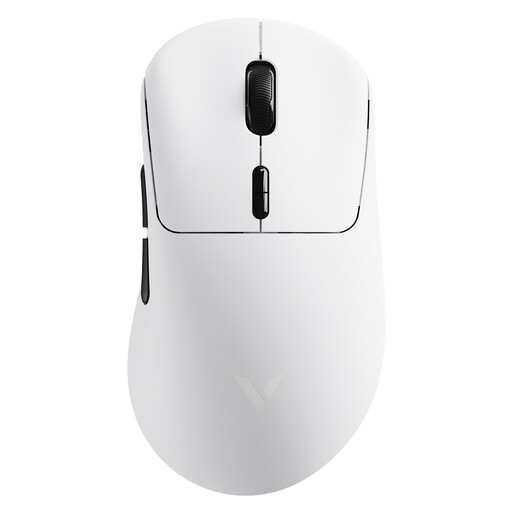
Why This Fits Their Persona: A practical choice for PC gamers who want a light white wireless gaming mouse with substantial stated battery capacity without moving immediately to the highest specification.
Its stated 8K wireless mode is clearly specified, while users can lower the polling rate when battery conservation matters. A HUB software supports Windows and Mac OS.
53g weight, 26K independent X/Y DPI and a stated battery life of up to 750 hours at 1,000Hz.

Why This Fits Their Persona: Suited to players who prioritise optical switching, extensive controls and a low-weight design for frequent competitive gaming.
The 120-million-click optical switch rating is stated separately from the 8K polling specification, making the core features easier to compare rather than treating them as one performance claim.
53g weight, 30K independent X/Y DPI, 10 programmable buttons and onboard memory.

Why This Fits Their Persona: A flexible option for users moving between competitive play, office work and multiple operating systems.
It specifies all three connection methods—wired, 2.4G and Bluetooth—so buyers can select a suitable mode for gaming, laptops or travel.
49g hole-free design, dual 8K polling through wired and 2.4G modes and a 700mAh battery rated for over 100 hours.

Why This Fits Their Persona: Designed for Mac and iPad users who value Bluetooth simplicity, a slim appearance and gesture-based navigation more than esports controls.
The product specification clearly identifies Bluetooth connectivity, rechargeable operation and supported Apple operating systems, helping avoid incompatible purchases.
Multi-Touch gesture surface, Bluetooth wireless connection and stated runtime of up to one month.
We have compiled a complete, real-time list of products that fully satisfy these strict selection criteria and UK safety regulations.
It can be worthwhile for users with a compatible gaming PC, a high-refresh-rate monitor and a preference for frequent cursor updates. For general browsing, office work or older computers, 1K or 2K polling may be sufficient and can reduce battery consumption.
No. Many gaming models use a dedicated 2.4GHz receiver for low-latency play. Bluetooth is useful for laptops, tablets and multi-device setups, but it is not essential for gaming. Check the connection modes before buying.
Runtime varies according to polling rate, lighting, software settings and battery capacity. Some listed models provide more than 100 hours, while others state up to 750 hours at a specified 1,000Hz setting. Treat these as product-condition figures and expect shorter intervals when using higher polling rates.