
24/7 Customer Support

Free returns

Same-day & Next-day Delivery

Quality Guaranteed

Unlock Your Welcome Offers: FREE Delivery | Up to 80% OFF | Free 30-day JoyPlus trial
Download the APP
A white wireless gaming mouse can improve desk aesthetics and remove cable drag, but appearance is only one part of a sensible buying decision. UK gamers comparing an 8K wireless gaming mouse, lightweight gaming mouse or high DPI gaming mouse should look beyond headline figures.
Several common marketing traps can lead to an unsuitable purchase:
A lightweight gaming mouse can be easier to move during long FPS sessions, particularly when using a low in-game sensitivity. However, a lower weight is not automatically suitable for every hand or grip. Consider the mouse’s length, side-button position and whether you use a palm, claw or fingertip grip.
A 53g gaming mouse, such as selected Rapoo models, is designed for users who prioritise quick movement and reduced mass. If you prefer a more substantial feel or use a larger hand, a 59g or 68g option may offer a more familiar balance. Ambidextrous designs can also be useful for left-handed users, although button placement should still be checked carefully.
Polling rate describes how often the mouse reports its position to the computer. A 1,000Hz mouse reports approximately 1,000 times per second, while an 8,000Hz model reports more frequently. This can make cursor updates feel smoother on a suitable high-refresh-rate display, but it may increase USB data activity, CPU demand and battery consumption.
Before choosing an esports gaming mouse with 8K wireless, check:
For most general desktop work, browsing and casual gaming, 1,000Hz may be sufficient. Competitive players with compatible hardware may prefer 4K or 8K settings.
A high DPI gaming mouse may offer 26,000 or 30,000 DPI, but most players use a much lower setting. More useful features include adjustable sensitivity, independent X/Y DPI control and reliable tracking at your preferred speed.
Switch type also affects the experience. An optical switch gaming mouse uses light-based registration rather than the same mechanical contact arrangement found in traditional switches. The Rapoo VT7 MAX, VT2 MAX and VT3 MAX list a 120-million-click optical switch lifespan and no debounce delay in their supplied specifications. The mechanical Rapoo VT3 lists a 100-million-click rated lifespan and may suit users who prefer a more traditional click feel.
Software is another practical consideration. Rapoo’s A HUB supports Windows and Mac OS, with programmable buttons, macros and onboard memory on selected models. Onboard storage can reduce the need to configure settings again when moving between a home PC and another compatible computer.
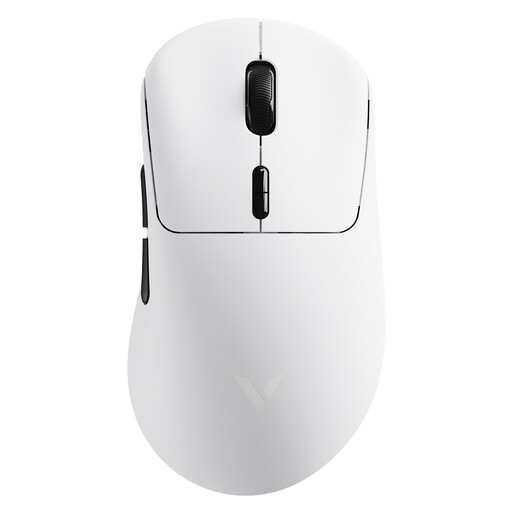
Why This Fits Their Persona: A practical entry point for UK gamers wanting a 53g wireless mouse, native 8K connection and adjustable sensitivity without moving straight to an optical-switch model.
The supplied specification clearly identifies a 100-million-click mechanical switch and 26K independent X/Y DPI, rather than relying only on a generic high-DPI label.
53g weight, native 8K wireless polling and A HUB support for custom settings and onboard memory.

Why This Fits Their Persona: Suited to performance-focused FPS players and streamers who want a white wireless gaming mouse with low weight, extensive controls and long intervals between charging.
Its supplied details specify native 8K wireless, while the stated up-to-750-hour figure is linked to 1,000Hz and requires the latest driver for low-power mode.
53g body, 30K independent X/Y DPI, 10 programmable buttons and a listed 120-million-click optical switch.

Why This Fits Their Persona: A flexible choice for users moving between a gaming PC, laptop and office setup who need wired, 2.4G and Bluetooth connectivity.
The tri-mode connection makes the intended use clear, while its 49g weight and 700mAh battery specification provide more useful context than appearance alone.
49g hole-free design, PAW3395 sensor, dual 8K wired/2.4G polling and Bluetooth connectivity.
Before using a new wireless mouse, charge it with the supplied or a certified USB cable and pair the receiver with a suitable USB port. Install the manufacturer’s driver only when you need macros, DPI profiles or firmware features. For extended battery life, reduce the polling rate when 8K performance is unnecessary.
Keep the receiver, cable and mouse away from liquids and excessive heat. Rechargeable lithium batteries should not be punctured, crushed or exposed to fire. At the end of the product’s life, use an appropriate UK electronic-waste recycling route rather than household rubbish.
A Bluetooth wireless mouse can reduce receiver clutter for laptops and office devices, but Bluetooth is not always the preferred connection for competitive gaming. For FPS play, compare the available 2.4GHz wireless mode, polling rate and receiver design before prioritising multi-device convenience.
We have compiled a complete, real-time list of products that fully satisfy these strict selection criteria and UK safety regulations.
It can be useful for competitive play with a high-refresh-rate monitor and a computer capable of handling the increased reporting rate. For general gaming and office work, a lower setting may offer a similar practical experience while using less battery and system bandwidth.
Runtime depends on polling rate, lighting, sleep settings and driver configuration. Some models list up to 750 hours at 1,000Hz, but this is a maximum supplied figure rather than a guarantee for every setup. Check the conditions and update requirements before comparing battery claims.
Optical switches may appeal to users who want infrared click registration, no debounce delay and a specified long click lifespan. Mechanical switches provide a more familiar tactile and audible feel. The sensible choice depends on your preferred feedback, button use and the manufacturer’s stated specifications.