If your university-study connection is unreliable, identify whether the problem lies with your device, an available wired connection or the network itself before buying an accessory. An Ethernet adapter is a direct route where an active socket is permitted; a travel router needs accommodation permission, while a mobile hotspot depends on suitable coverage and a data plan that fits your use.
Who these accessories may suit
Students with an approved wired room connection
If your room has an active Ethernet outlet but your laptop lacks an RJ45 port, an adapter can provide a direct connection without creating another wireless network. Check your accommodation’s connection and registration rules first.
Students troubleshooting one device
If the difficulty appears confined to your laptop, test its Wi-Fi settings and connection before buying another adapter. Microsoft Support recommends using the operating system’s network diagnostics to help identify connection problems.
Students needing an independent connection
A mobile-data device may suit study across campus, shared housing and other locations when the chosen network works where you need it. Ofcom advises checking local coverage and likely performance, as well as your data use.
What to check before choosing
Choose the connection route before comparing device features: an accessory for one laptop fault serves a different need from a permitted room connection or independent mobile data.
USB Ethernet adapter
Consider it when: An active, permitted Ethernet socket is available and your study device needs a compatible adapter.
Trade-off: It connects the device directly but cannot replace a missing or inactive wired service.
USB Wi-Fi adapter
Consider it when: Diagnosis points to your device’s existing Wi-Fi hardware or configuration.
Trade-off: New client hardware cannot repair a network outage or resolve accommodation login requirements.
Travel router
Consider it when: You need a personal multi-device setup on a connection whose provider allows that use.
Trade-off: Residential-network rules may prohibit extending the connection, even when the router supports the required mode.
Mobile-data device
Consider it when: You need a separate connection and your chosen mobile network performs adequately at your study locations.
Trade-off: Your connection remains subject to local mobile performance and the plan’s allowance and usage conditions.
| Concern |
What to check |
Who this matters to |
| Permitted wired access |
Confirm that the room socket is active, direct connection is allowed and your device has a suitable port or adapter. |
If I have a wired socket in halls, I want to use it without breaching the connection rules. Roughly 36% of consumers put permitted direct access first. |
| A device-specific Wi-Fi fault |
Compare another device on the same network and run your device’s network diagnostic before checking USB and operating-system compatibility. |
When only my laptop struggles to connect, I want to establish whether its own Wi-Fi setup is the cause. Around 19% of consumers prioritise that diagnosis. |
| A permitted private setup |
Check the accommodation’s rules for router or repeater use and whether the device supports your permitted upstream connection. |
If I need several personal devices on one connection, I want a setup that the network provider allows. Roughly 18% of consumers make permitted device sharing their primary concern. |
| Independent mobile connectivity |
Check coverage and likely performance where you study, plus provider compatibility, data allowance and usage terms. |
When the available Wi-Fi does not meet my needs across study locations, I want a separate connection I can use there. Around 27% of consumers put mobile connectivity first. |
Mistakes to avoid
-
Assuming a travel router is allowed in halls
The University of Edinburgh and University of Warwick prohibit extending their residential networks with hubs, switches or wireless access devices. UCL instead describes a managed service for additional devices.
Read the rules for your particular accommodation and ask its IT team for written permission before using router, repeater or access-point modes.
-
Treating a Gigabit port as a speed promise
A Gigabit-rated adapter describes its port capability, not the speed delivered by the building’s connection under your conditions.
Check the room service and choose an adapter that fits your device’s host port and operating system.
-
Buying a USB Wi-Fi adapter before diagnosing the fault
Another adapter cannot fix an upstream outage or a network authentication requirement. Microsoft Support recommends device-level diagnostics for Windows connection problems.
Test another device in the same place and run your operating system’s network diagnostic before deciding whether new Wi-Fi hardware addresses the problem.
-
Choosing a hotspot on coverage alone
Ofcom distinguishes mobile coverage from likely connection performance. Video calls and uploads also need an allowance and plan conditions that suit how you study.
Check each intended study location, review your current data use and read the plan’s allowance, fair-use and speed terms.
Relevant brands to consider
TP-Link
USB Ethernet adapters for a permitted direct connection from a compatible study device to an active RJ45 socket.
- TP-Link specifies Type-C and Type-A host connectivity and a 1 Gigabit RJ45 port for its UE310C model.
- Those specifications do not establish permission to use a hall socket or the speed of its internet service.
GL.iNet
Travel routers for personal-network arrangements where the upstream connection and chosen mode are permitted.
- GL.iNet describes LAN, repeater and tethering modes across its travel-router range.
- A router’s connection modes do not override residential-network rules; GL.iNet also documents that repeater mode creates a separate subnet.
NETGEAR
Dedicated mobile hotspots for an independent connection where a suitable mobile network and data plan are available.
- NETGEAR lists 5G connectivity and Wi-Fi sharing for its Nighthawk M6 MR6150.
- The model’s listed capabilities do not establish coverage, performance or plan suitability at your study locations.
Joybuy products for these connection routes
These products cover direct wired access, device-side Wi-Fi and mobile-data connections for study spaces. Match the connection route to your diagnosed problem, device and local network rules before choosing a model.
 No image available
HOCO HB42 4-in-1 USB Ethernet hub, 0.2 m, black
Consider this for a direct wired connection if your study space has an active, permitted Ethernet socket and your computer has a suitable USB port.
The product name lists three USB 3.0 ports and an RJ45 LAN connection. Check the host connector against your computer before buying; the port rating does not promise the speed of the building’s connection.
Joybuy
 No image available
D-Link DWR-932W 4G LTE Wi-Fi 6 mobile hotspot
Consider a separate mobile connection when the chosen network works at your study locations and its plan accommodates your coursework use.
Check SIM and provider compatibility before buying. Confirm the exact Wi-Fi specification with the seller if it matters to your choice.
Joybuy
 No image available
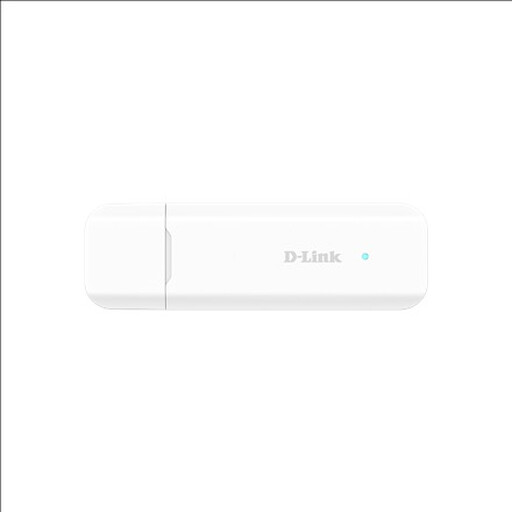
D-Link DWM-222W/R 4G LTE Wi-Fi 6 USB adapter
This is a mobile-data route for study away from unsuitable Wi-Fi, provided a compatible network and data plan serve your locations.
Its product name identifies a USB adapter rather than a standalone battery-powered hotspot. Check its power requirements and SIM compatibility if you need to use it away from your computer.
Joybuy
 No image available
D-Link F530 5G NR AX3000 Wi-Fi 6 mobile hotspot
Consider this independent connection route only if a compatible 5G service performs adequately where you study and the plan suits your data use.
Check the intended provider’s SIM and band compatibility. Its Wi-Fi rating does not indicate the mobile speed you will receive.
Joybuy
 No image available
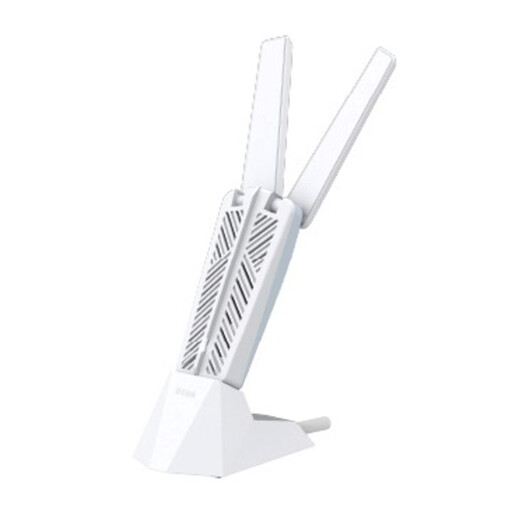
D-Link AE65U BE6500 Wi-Fi 7 USB adapter
Consider a USB Wi-Fi adapter after checking whether the connection problem is specific to your computer rather than the shared network.
Check your operating system and available USB port for compatibility. A newer Wi-Fi standard cannot resolve an upstream outage or accommodation login rule.
Joybuy
Common questions
Can I use a USB Ethernet adapter in university halls?
You can consider one if your room has an active wired socket and your accommodation permits direct device connection. The University of Kent describes wired sockets in its Canterbury campus bedrooms, but check your own hall’s socket, device-registration rules and your laptop’s port before buying.
Are travel routers and Wi-Fi extenders allowed in halls?
Permission depends on your accommodation’s current network rules. The University of Edinburgh and University of Warwick prohibit extending their residential networks with hubs, switches or wireless access devices; check the rules for your hall and obtain written permission before using router, repeater or access-point modes.
When does a mobile hotspot make sense for studying?
A mobile hotspot is worth considering when you need a connection independent of the available fixed or campus Wi-Fi and the chosen mobile network works where you study. Ofcom advises checking local coverage and likely performance; also compare your data use with the plan’s allowance and conditions.
Will a Gigabit Ethernet adapter give me Gigabit internet?
No: the Gigabit rating describes the adapter port, not the speed delivered by your hall or household connection. Check that the socket is active and permitted, then choose an adapter compatible with your computer rather than relying on its port rating as a speed forecast.


