For streaming in a converted loft, a single router is worth considering if careful placement gives the viewing device a stable connection; a mesh system is more suitable when floors or walls leave the loft with a persistent weak spot. Check the connection at the viewing device before buying, and consider Ethernet between floors if a wireless link between mesh nodes is unreliable. As Ofcom explains, Wi-Fi cannot outperform the underlying broadband service.
Who is this for?
Loft viewers with a persistent Wi-Fi dead spot
If the streaming screen is in a converted loft and the broadband router is elsewhere, dependable signal through the floors and internal barriers matters more than the router’s advertised maximum speed. Ofcom’s Wi-Fi guidance identifies placement and obstructing materials as practical considerations.
4K nature-film streamers
If buffering or a drop in picture quality interrupts a film, check the connection at the viewing device rather than relying on the broadband package headline. Netflix recommends a connection of at least 15 Mbps for its UHD/4K streams; other services may set different requirements.
Households planning a wired loft connection
If Ethernet can be routed between the main router and a loft node or access point, you can assess a wired connection between them instead of relying entirely on wireless backhaul. Check that the equipment supports the arrangement you intend to install.
What matters when choosing?
Check the broadband connection and Wi-Fi at the viewing device before deciding whether to reposition one router, add mesh nodes or run Ethernet to the loft.
Single router
Consider it: When a centrally placed router gives the loft a stable signal.
Trade-off: One unit needs fewer socket locations, but a high advertised Wi-Fi speed cannot guarantee a signal through floors or dense materials.
Wireless mesh
Consider it: When the loft remains a weak spot and an intermediate node can receive a usable signal from the main router.
Trade-off: Extra nodes need suitable positions and power sockets; a node placed inside the dead spot may also have a weak connection.
Wired loft connection
Consider it: When Ethernet can connect the main router to a compatible loft access point or mesh node.
Trade-off: This avoids relying on a wireless link between those points, but routing the cable takes planning and installation work.
| Concern |
What to check |
Who this matters to |
| Signal reaching the loft |
Check the floors and walls between router and screen, and test whether an intermediate mesh-node position receives a usable signal. |
If my screen is beyond a floor and several barriers, I need coverage where I actually watch. Around 50% of consumers would put that signal need first. |
| Stable streaming connection |
Test at the loft device when you normally watch, including when other devices are active. Netflix recommends at least 15 Mbps for its UHD/4K streams. |
I want the film to keep playing at my chosen picture quality, even when the household is online; roughly 30% of consumers would make connection stability their primary concern. |
| Setup and future expansion |
Confirm whether the existing ISP router must stay, whether Ethernet can reach the loft and whether the proposed equipment supports the required mode. |
If I may add loft coverage later, I need an installation plan that fits the existing network. About 20% of consumers would prioritise setup and expandability. |
Buying pitfalls
-
Buying for headline Wi-Fi speed alone
A faster router will not fix an insufficient broadband connection. Ofcom notes that Wi-Fi cannot outperform the broadband service.
Check the connection at the loft streaming device at your usual viewing time. If possible, also test by Ethernet near the main router to help distinguish a broadband problem from a Wi-Fi problem.
-
Putting a mesh node in the dead spot
A wireless mesh node needs a usable connection to another node; placing it where the signal has already failed may leave the loft connection weak.
Try positions between the main router and the loft. If none gives the node a usable connection, assess whether Ethernet backhaul is practical.
An additional node or an Ethernet run may be needed if the planned position cannot maintain that connection.
-
Treating quoted coverage as a loft guarantee
A product’s stated coverage area cannot account for this loft’s particular floors, insulation, walls and node positions.
Use coverage figures to narrow your choices, then check the retailer’s return terms and test the connection at the viewing position.
-
Overlooking optional security services
Some additional security functions involve a separate subscription. NETGEAR says its Armor service becomes subscription-based after an included first year, while the eero Pro 6E listing describes its all-in-one digital security subscription as sold separately.
Before choosing either product line, check which functions you would use and whether they require an ongoing subscription.
Brands to consider for these Wi-Fi routes
TP-Link
Its Deco BE65 is relevant when comparing multi-node mesh equipment and a possible wired connection between nodes.
- TP-Link’s UK Deco BE65 specification lists tri-band Wi-Fi 7, four 2.5 Gbps ports and combined wired and wireless backhaul.
- Those specifications do not establish the speed or coverage achievable in a particular loft; placement, construction and connected devices still matter.
ASUS
Its RT-BE86U is relevant if you want to assess a standalone router with the option of AiMesh expansion.
- ASUS’s UK specification lists dual-band Wi-Fi 7, a 10G WAN/LAN port, 2.5G Ethernet ports and AiMesh support.
- The RT-BE86U uses 2.4 GHz and 5 GHz bands, not 6 GHz; check another model if a 6 GHz band is part of your requirements.
NETGEAR
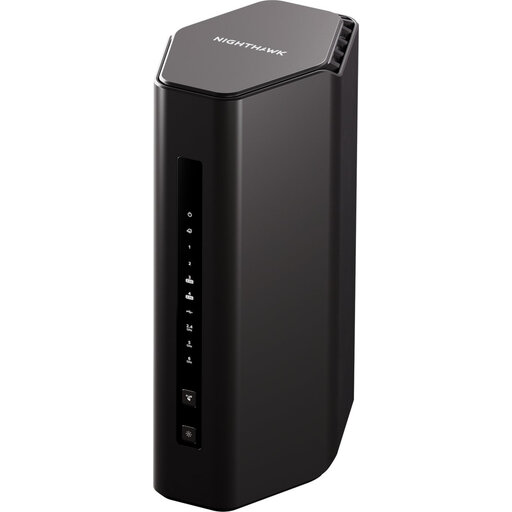
Its Nighthawk RS300 is a standalone Wi-Fi 7 router to assess where one well-positioned unit may suffice.
- NETGEAR lists a 2.5 Gig internet port for the RS300.
- NETGEAR’s quoted speed and coverage are product claims, not a promise of loft performance. Its Armor service is subscription-based after the included first year.
eero
The eero Pro 6E is relevant if app-guided mesh setup and network management matter to your choice.
- The Amazon UK eero Pro 6E listing states that it supports a 6 GHz band for compatible Wi-Fi 6E devices and has 2.5 Gbps Ethernet.
- The listing sells its all-in-one digital security subscription separately. Quoted coverage remains dependent on the property and device placement.
Joybuy product choices
These choices include three-unit mesh kits for a persistent loft weak spot, a mesh-capable router that may need additional units, and a standalone router for a loft that already receives a stable signal. Check the kit contents and connection options against your planned layout.
 No image available
TP-Link Deco BE65 BE9300 tri-band Wi-Fi 7 mesh system, 3-pack
Consider this three-unit kit if the loft needs coverage beyond one router and you can place nodes with a usable connection between them.
TP-Link’s BE65 specification lists four 2.5 Gbps ports per unit and combined wired and wireless backhaul. Check whether an Ethernet run and suitable node positions are practical in your home.
View on Joybuy
 No image available
TP-Link Deco BE22 BE3600 Wi-Fi 7 mesh system, 3-pack
This three-unit mesh kit is an option when the loft is a recurring weak spot and you have positions for nodes between it and the main connection.
Confirm the port and backhaul arrangements against any planned wired loft connection. Test node positions rather than relying on a quoted coverage area.
View on Joybuy
 No image available
NETGEAR Orbi 370 RBE373 dual-band Wi-Fi 7 mesh system, 3-pack
The router-and-two-satellite kit is relevant when a single router leaves the loft with a weak signal.
Its listed variant includes 2.5 Gbps Ethernet. If you intend to wire a satellite to the loft, confirm Ethernet-backhaul support for this kit before buying.
View on Joybuy
 No image available
D-Link AQUILA PRO AI M95 BE9500 Wi-Fi 7 Smart Mesh router
Consider this mesh-capable router if one unit may cover the loft now but you want to assess expansion later.
Confirm how many units this offer includes before treating it as a multi-node setup. If Ethernet to a future loft node is important, check support for that arrangement too.
View on Joybuy
 No image available
5PT Nighthawk RS300 BE9300 Wi-Fi 7 router
A standalone router is worth considering if repositioning the main router gives the loft a stable connection without extra nodes.
NETGEAR lists a 2.5 Gig internet port for the RS300. Confirm the exact variant and its frequency bands before buying, and test the signal at the loft viewing position.
View on Joybuy
Common questions
Will a new router fix buffering in the loft?
A new router can help if Wi-Fi is the limiting part of the connection, but it cannot fix an insufficient broadband service. Ofcom advises that Wi-Fi cannot outperform broadband; test at the loft screen and compare the result with your streaming service’s requirement. Netflix recommends at least 15 Mbps for its UHD/4K streams.
Should I choose one router or a mesh system?
Choose a single router if a suitable position gives the converted loft a stable signal; consider mesh if the loft remains a weak spot across floors or walls. A wireless mesh node should sit where it can still connect to the main router or another node, rather than inside the dead spot.
Do I need Wi-Fi 7 to stream a film in the loft?
No particular Wi-Fi generation alone guarantees a stable loft stream. Check broadband speed and the connection at the viewing device first; then compare Wi-Fi generations, compatible devices and any wider network needs without treating an advertised maximum speed as the speed your screen will receive.
Could a router or mesh system involve ongoing subscriptions?
Optional services can involve a continuing subscription, so check which functions you want before buying. NETGEAR says Armor is subscription-based after its included first year, while the Amazon UK eero Pro 6E listing says its all-in-one digital security subscription is sold separately.


