Start by checking whether the connection is weak only in the distant room or throughout the home: Ofcom notes that improving Wi-Fi cannot make the underlying broadband service faster. If Ethernet can reach the room, a wired access point avoids relying on a wireless link to get there; otherwise, consider mesh for several rooms, an extender for one room with a usable signal partway along the route, or powerline Wi-Fi if the electrical path works for the chosen kit.
Who this guide is for
Multi-room coverage seekers
If your bedroom or upper floor is one of several weak areas, consider where mesh nodes can maintain a usable connection and how easily you can move between rooms. A January 2026 UK question on the MoneySavingExpert Forum described an upstairs-bedroom coverage problem; it is an individual account, not evidence of how common the issue is.
Single-room fixers
If one distant room is the main problem, check whether a socket partway between the router and that room still receives a usable signal. That can help you decide whether an extender is worth trying.
Detached-room and wired-link planners
If you need a connection in a garden room or beyond difficult walls, consider whether Ethernet can reach it or whether a powerline kit works along the electrical path. A 2024 garden-room question on the MoneySavingExpert Forum illustrates this kind of layout, rather than establishing how often it occurs.
What to consider before buying
Mesh Wi-Fi
Consider it when: Several rooms or floors need coverage and you can place nodes where they still connect to one another.
Trade-off: Node placement matters; adding too many nodes can make Wi-Fi problems worse, according to Ofcom.
Wi-Fi extender
Consider it when: One room needs help and a midway position still has a usable signal from the router.
Trade-off: An extender cannot relay a signal it cannot receive, and Ofcom cautions that extenders can affect speed and responsiveness.
Wired access point
Consider it when: Existing or feasible Ethernet can reach the room, particularly where floors or a separate building obstruct Wi-Fi.
Trade-off: You need to plan the cable route, installation permission and the access point’s power arrangement.
Powerline Wi-Fi
Consider it when: Running Ethernet is impractical and the electrical path between the two locations works with the chosen kit.
Trade-off: Actual results depend on the wiring and other network conditions, so test the sockets you plan to use.
| Concern |
What to check when buying |
Who this matters to |
| Several weak rooms or floors |
Check where mesh nodes can keep a usable link, whether Ethernet backhaul is possible and which features remain in access-point mode. |
If I need coverage in several rooms, I would focus on node placement rather than a headline coverage figure. Around 28% of consumers in this situation prioritise reaching multiple rooms. |
| One poorly served room |
Test whether a midway socket gets a usable signal; compare the extender’s wireless and access-point modes if Ethernet is available. |
If one bedroom or study is the only problem, I would check whether a signal reaches a sensible midway position before choosing a repeater. Around 22% of consumers prioritise a fix for one room. |
| A distant or detached work area |
Check whether Ethernet can reach the room, whether installation is permitted and how the exact access point is powered. |
If I need a dependable route to a distant room, I would investigate cabling and installation before relying on a wireless link. Around 22% of consumers put that wired connection first. |
| Coverage where cables are impractical |
Check the kit’s electrical-path requirements and test the intended sockets; confirm whether the receiving unit provides Wi-Fi. |
If installing cable is impractical and walls obstruct Wi-Fi, I would want to test the electrical route rather than assume a rated speed will reach the room. Around 17% of consumers prioritise this kind of alternative. |
| Control of a shared connection |
Ask who administers the router and where equipment can be placed before choosing a setup that needs router access. |
If I share the connection, I would first establish what changes and equipment placement the router administrator allows. Around 11% of consumers prioritise control over changes to the shared network. |
Buying pitfalls
-
Putting a repeater where the router signal is already unusable
An extender receives the router’s Wi-Fi before relaying it. Ofcom also cautions that extenders can affect speed and responsiveness.
Try an intermediate position first. If there is no suitable one, compare a mesh or wired route instead.
-
Assuming a powerline rating is the speed the far room will receive
TP-Link’s guidance says actual powerline throughput varies with network conditions and environmental factors.
Check the kit’s electrical-path requirements and test the sockets you intend to use.
-
Assuming every mesh unit supports Ethernet or keeps every router feature
Port availability and access-point-mode features differ by model. For example, eero’s support documentation excludes eero Beacon and eero 6 Extender from Ethernet backhaul because they have no Ethernet ports; TP-Link lists some features unavailable in Deco access-point mode.
Check the exact units, ports, operating mode and feature list before choosing a system.
Brands to consider for these Wi-Fi routes
TP-Link
Its product range includes Deco mesh systems, RE-series extenders and TL-WPA powerline Wi-Fi kits.
- TP-Link’s specifications identify mesh nodes in the Deco X1500 range, extender and access-point modes for the RE700X, and a Wi-Fi-equipped powerline receiver in the TL-WPA7517 KIT.
- These model specifications do not establish coverage in a particular home. Check the electrical path for powerline and compatibility with the existing router for mesh.
eero
A mesh option for households considering Ethernet backhaul now or later.
- eero’s support documentation describes Ethernet backhaul for compatible units.
- The documentation excludes eero Beacon and eero 6 Extender from wired backhaul because they have no Ethernet ports. Check the exact units in a bundle.
NETGEAR
Its EAX12 is a wall-plug Wi-Fi 6 extender with an Ethernet port, for a targeted extension setup.
- The NETGEAR UK product page describes the EAX12 as having a Gigabit Ethernet port.
- Quoted throughput and seamless-coverage wording are manufacturer claims, not measurements of performance in a distant room.
Ubiquiti
Its U6+ access point is relevant when Ethernet can reach the room.
- Ubiquiti describes the U6+ as a ceiling-mounted Wi-Fi 6 access point.
- Check mounting and power for the exact model; the UK store lists a PoE adapter as an accessory, rather than describing the unit as a plug-in extender.
devolo
Its Magic powerline Wi-Fi systems carry a network connection over electrical wiring.
- The Magic 2 WiFi 6 next starter kit is presented as a powerline Wi-Fi option.
- A manufacturer’s headline Wi-Fi speed does not establish the throughput available over the electrical path in a particular home.
Joybuy product choices
These Joybuy listings cover mesh systems for multiple rooms, a Wi-Fi extender for a targeted area and a powerline Wi-Fi kit for a room where the electrical path may offer an alternative to running cable.
 No image available
NETGEAR Orbi 370 RBE373 WiFi 7 Mesh System, 3-Pack
A three-unit mesh system for extending Wi-Fi across several rooms; the listing says coverage depends on building construction and other conditions.
Dual-band Wi-Fi 7, BE3600, with 2.5Gbps LAN ports on the satellites.
Joybuy
 No image available
TP-Link RE220BE BE3600 Wi-Fi 7 Range Extender
For one poorly served room, check that the extender can receive a usable signal at its intended position; its listing recommends placing it partway towards the weak-signal area.
Range-extender and access-point modes, EasyMesh compatibility and a Gigabit Ethernet port.
Joybuy
 No image available
TP-Link Deco BE22, 3-Pack, BE3600 Whole Home Mesh Wi-Fi 7 System
A three-unit mesh system for several rooms; place the nodes where they can maintain usable links with one another.
Dual-band Wi-Fi 7, Ethernet ports and combined wired and wireless backhaul.
Joybuy
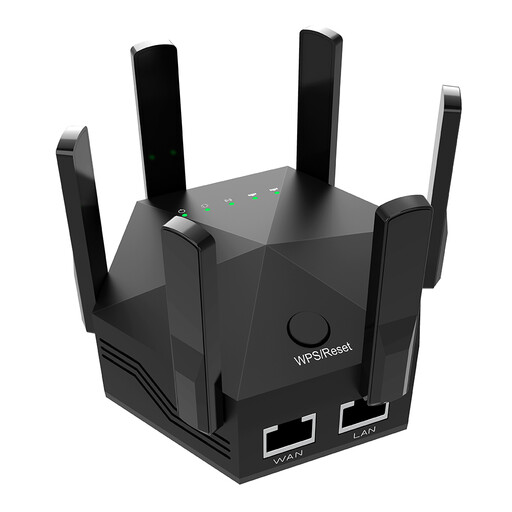 No image available
Dual-Band Wi-Fi Signal Extender, 1200Mbps
For a targeted indoor area, place it where it can still receive the router’s signal; the listing notes that walls and interference affect the result.
Dual-band Wi-Fi, six adjustable antennas and two Ethernet ports.
Joybuy
 No image available
TP-Link TL-WPA8631P KIT AV1300 Gigabit Powerline Wi-Fi Extender Kit
A powerline Wi-Fi kit for a room where cable installation is impractical; performance depends on the electrical path and network conditions.
Dual-band Wi-Fi, three Gigabit Ethernet ports and OneMesh compatibility.
Joybuy
Frequently asked questions
How should I check the problem before buying?
Compare the connection near the router with the one in the affected room, and check whether the problem affects the whole household. Ofcom notes that improving Wi-Fi cannot make the underlying broadband service faster; this guide is about in-home coverage.
Can a mesh system work with my existing router?
Some systems can operate with an existing router, but check the setup requirements and features for the exact model. TP-Link documents Deco access-point mode and notes that some features, including parental controls and port forwarding, are unavailable in that mode.
How should I test a powerline Wi-Fi kit?
For the cited TP-Link setup, use at least two units on the specified electrical circuit and test them in the sockets you intend to use. TP-Link advises connecting directly to wall sockets because some power strips or surge protectors can reduce the powerline rate.
When is a Wi-Fi extender worth considering?
Consider one when a single room needs help and you can place the extender where the router’s signal is still usable. If there is no suitable intermediate position, compare a mesh system or a wired connection instead.


